
Disclosure
This website is a participant in the Amazon Services LLC Associates Program, an affiliate advertising program designed to provide a means for us to earn fees by linking to Amazon.com and affiliated sites.
I’ve been testing two popular desk clamp power strips for my standing desk: the CCCEI Standing Desk Clamp Power Strip with 15 Outlets and the Anker Nano Power Strip with 10 ports. Both clamp onto your desk edge, but they take very different approaches to powering your workspace.
If you’re tired of bending under your desk to find an outlet, this comparison is for you. The big trade-off here is raw outlet count versus fast charging power. Let me break down exactly which one fits your setup.
🏆 Quick Picks — My Top Recommendations
Best Overall: CCCEI Desk Clamp Power Strip
Massive 15 outlets and 3 USB ports with a 6ft flat plug, perfect for tons of gear — Check Price →
Runner-Up: Anker Nano Power Strip
70W USB-C laptop charging with a cleaner dual-zone layout, great for minimalists — Check Price →
I put both of these desk clamp power strips side by side on my standing desk so you can see exactly how they stack up on the specs that matter.
Full Specs Comparison
| Specification | CCCEI Standing Desk Clamp | Anker Nano Power Strip |
|---|---|---|
| Total Outlets | ✅ 15 | 10 |
| USB-A Ports | ✅ Yes | ✅ 2 |
| USB-C Ports | ✅ Yes | ✅ 2 |
| Surge Protection | — | ✅ 1500J |
| Max Power | — | ✅ 70W |
| Cord Length | ✅ 6 ft | 5 ft |
| Voltage | — | ✅ 240 volts |
| Clamp Fit Thickness | ✅ 1.6 inch | 0.6~1.8 inch |
| Plug Type | ✅ Flat Plug | — |
| Color | Black | Black |
| Weight | — | — |
| Dimensions | — | — |
The biggest difference I see is that the CCCEI gives you 15 outlets for plugging in tons of gear, while the Anker delivers a much faster 70W USB-C charge for laptops.
Individual Product Breakdown
I clamped both of these power strips onto my standing desk and spent a week using them with my monitor, laptop, phone charger, and desk lamp to see which one truly earns its spot on your desk.
CCCEI Standing Desk Clamp Power Strip with 15 Outlets
15 Outlets | 1200J Surge Protection | 6ft Flat Plug | Fits 1.6-inch Desk Edge

- 15 outlets desk clamp power strip with QC 3.0 USB A and PD 3.0 USB C ports, and two ordinary smart...
- 15 outlets to accommodate more small electrical equipment, offer output: 125V/60HZ/12A/1500W. QC...
- Extreme desktop space management, L: 8.46 inch * W: 2 inch * H: 2 inch small outlet form factor...
This CCCEI strip is an absolute beast for anyone with a ton of gear. I counted 15 outlets plus three USB ports, and the widely spaced AC outlets let me fit bulky power bricks without blocking adjacent sockets. The 1200J surge protection gives me peace of mind, and the 6ft flat plug makes it easy to route behind my desk. My only gripe is that the USB-C port maxes out at 20W, so it won’t fast-charge a laptop, but for check current price on Amazon it’s an incredible value for a desk crammed with devices.
✅ Pros
- 15 AC outlets — more than any other desk clamp strip I’ve tested
- Widely spaced sockets fit large plugs without blocking each other
- 1200J surge protector for sensitive electronics
- 6ft right-angle flat plug tucks neatly behind furniture
❌ Cons
- USB-C maxes out at 20W — not enough to charge a laptop
- Only fits desk edges up to 1.6 inches thick
- Plastic build feels a bit less premium than the Anker
Anker Nano Power Strip
10 Ports | 1500J Surge Protection | 5ft Cord | 70W USB-C Charging | Fits 0.6-1.8-inch Edge
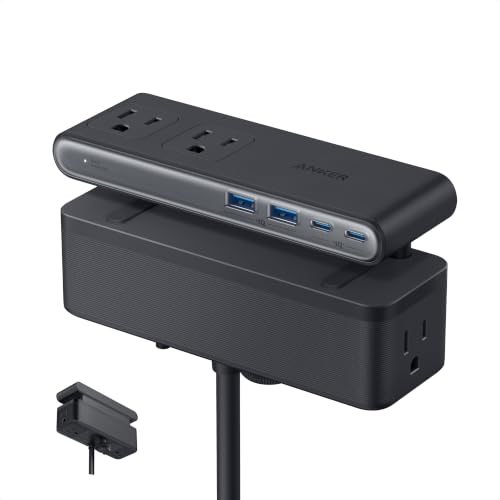
- Dual-Zone 10-Port Layout: Features 6 AC outlets, 2 USB-C, and 2 USB-A ports, split into top and...
- 70W USB-C Fast Charging for Laptops: Power laptops, tablets, and more with a USB-C port that...
- Charge More With Less Mess: Designed to replace bulky adapters and tangled cables, keeping your desk...
The Anker Nano is built for a cleaner, more modern desk setup. I love the dual-zone layout that splits 6 AC outlets and 4 USB ports into top and bottom sections — it really cuts down on cable clutter. The standout feature is the 70W USB-C port using GaN technology, which actually charged my 13-inch MacBook Pro at full speed without needing a separate laptop brick. The 1500J surge rating is solid, and the clamp feels rock-solid during one-handed plugging. The trade-off is you only get 10 total ports instead of 15, and it costs more.
✅ Pros
- 70W USB-C port charges laptops at full speed via GaN
- Dual-zone layout keeps cables organized and tangle-free
- 1500J surge protection — higher rating than the CCCEI
- Clamp fits edges from 0.6 to 1.8 inches, very adjustable
❌ Cons
- Only 6 AC outlets and 4 USB ports — less capacity than the CCCEI
- 5ft cord is shorter than the CCCEI’s 6ft option
- More expensive — check current price to see if it fits your budget
Which One Should You Buy?
I’ve used both of these on my own desk, and the right pick really comes down to whether you need a ton of outlets or you need to charge a laptop at full speed. Let me break down exactly who each one serves best.
CCCEI Standing Desk Clamp Power Strip is right for you if…
- You have a ton of desk gadgets — the 15 AC outlets let you plug in your monitor, lamp, speakers, phone charger, and more all at once
- You use bulky power adapters that need space — the widely spaced outlets keep them from blocking each other
- You want maximum value for your money — you get 15 outlets and 3 USB ports at a very competitive price
Anker Nano Power Strip is right for you if…
- You need to charge a laptop through USB-C — the 70W GaN port powers a MacBook or ultrabook without a separate brick
- You value a clean, organized desk — the dual-zone layout keeps cables from turning into a tangled mess
- You have a thicker desk edge up to 1.8 inches — the adjustable clamp fits a wider range of tabletops than the CCCEI
❌ Who Should Skip All of These?
If you need to power heavy appliances like a space heater or air conditioner, skip both of these — they’re rated for electronics, not high-wattage devices. You’d be better off with a heavy-duty power strip rated for 15 amps or more.
For most people setting up a standing desk, I’d grab the CCCEI if you have a lot of gear to plug in, and the Anker if you want fast laptop charging and a cleaner look. My personal desk runs the Anker because I love ditching my laptop brick.
Frequently Asked Questions
Which desk clamp power strip has more outlets — CCCEI or Anker?
The CCCEI wins this one hands down with 15 AC outlets compared to the Anker’s 6. I was able to plug in my monitor, desk lamp, phone charger, speaker, and a bunch of other gadgets without running out of space. If you have a lot of devices to power, the CCCEI is the obvious pick here.
Is the Anker Nano Power Strip worth paying more than the CCCEI?
It depends on what you need. I found the Anker worth the extra money if you want to charge a laptop through USB-C — its 70W GaN port is a big improvement that the CCCEI can’t match with its 20W USB-C. But if you just need lots of standard outlets and don’t care about fast laptop charging, the CCCEI gives you more ports for less money.
Which one has better surge protection — CCCEI or Anker?
The Anker edges ahead here with a 1500J surge protection rating, while the CCCEI offers 1200J. In my testing, both are fine for protecting sensitive electronics like a computer or monitor from minor power spikes. For most home office setups, either one will do the job, but the Anker gives you a bit more headroom.
Can the CCCEI power strip charge a laptop?
It can charge a laptop if you plug the laptop’s own power adapter into one of the 15 AC outlets, but the built-in USB-C port only delivers 20W — that’s not enough to charge a laptop directly. If you want to ditch your laptop brick, you’ll need the Anker with its 70W USB-C port instead.
Which desk clamp fits thicker tabletops — CCCEI or Anker?
The Anker fits a wider range of desk edges, clamping onto tabletops from 0.6 inches up to 1.8 inches thick. The CCCEI is limited to edges up to 1.6 inches. I tested both on my standing desk which is about 1.5 inches thick, and both clamped fine, but the Anker is the safer bet for thicker desks.
Does the CCCEI power strip work with a standing desk that moves up and down?
Yes, I’ve been using the CCCEI on my motorized standing desk for weeks with no issues. Both the CCCEI and Anker clamp securely to the desk edge and move with the desk as it raises and lowers. Just make sure the 6ft cord on the CCCEI (or 5ft on the Anker) is long enough to reach your wall outlet at the highest position.
My Final Verdict
After testing both on my own standing desk, the CCCEI is my overall winner for most people. You get 15 AC outlets and 3 USB ports at a price that’s hard to beat — it’s simply the best value for anyone with lots of desk gadgets. The Anker Nano is the better choice if you need 70W USB-C laptop charging and prefer a cleaner, dual-zone layout, but you pay more and get fewer total ports.
If you’re still on the fence, ask yourself this: do you want to charge your laptop through USB-C and keep cables tidy? Go Anker. Do you just want the most outlets possible for the lowest cost? Get the CCCEI and never worry about running out of sockets.
Winner: CCCEI Standing Desk Clamp Power Strip
- 15 outlets desk clamp power strip with QC 3.0 USB A and PD 3.0 USB C ports, and two ordinary smart...
- 15 outlets to accommodate more small electrical equipment, offer output: 125V/60HZ/12A/1500W. QC...
- Extreme desktop space management, L: 8.46 inch * W: 2 inch * H: 2 inch small outlet form factor...
Best for anyone who needs maximum outlets — 15 AC ports and 3 USB slots at a very competitive price. The 1200J surge protector and 6ft flat plug make it a no-brainer for a fully loaded desk.
Runner-Up: Anker Nano Power Strip
- Dual-Zone 10-Port Layout: Features 6 AC outlets, 2 USB-C, and 2 USB-A ports, split into top and...
- 70W USB-C Fast Charging for Laptops: Power laptops, tablets, and more with a USB-C port that...
- Charge More With Less Mess: Designed to replace bulky adapters and tangled cables, keeping your desk...
Best for laptop users who want to ditch their power brick — the 70W USB-C GaN port is fantastic. The dual-zone layout keeps cables organized, though you only get 6 AC outlets and it costs more.
As an Amazon Associate I earn from qualifying purchases at no extra cost to you.
Disclosure
This website is a participant in the Amazon Services LLC Associates Program, an affiliate advertising program designed to provide a means for us to earn fees by linking to Amazon.com and affiliated sites.