
Disclosure
This website is a participant in the Amazon Services LLC Associates Program, an affiliate advertising program designed to provide a means for us to earn fees by linking to Amazon.com and affiliated sites.
The Chodwe RCA to HDMI Converter is an analog-to-digital video adapter best suited for retro gamers and movie buffs connecting old consoles or VCRs to an HDMI-only TV, and it delivers a stable 720p or 1080p signal at 60Hz. It runs on 5 volts and 0.8 amps, and it supports PAL, NTSC, and SECAM formats.
In my testing, the converter stayed cool after several hours of running my PS2 and an old VCR through it. The main catch is that it needs its own 5V USB power adapter, which is not included in the box. If you want to upscale to 4K or need multiple HDMI inputs, this single-port converter is not the right pick.

- RCA to HDMI Converter: This RCA to HDMI adapter can convert analog RCA composite (Yellow, White...
- Better Performance: AV to HDMI converter adapter offers HDMI output up to 720p/1080p 60Hz...
- High-Quality Chip: Adopt a new generation of low-power consumption digital chip to ensure function...
What Stands Out — Key Features
- Simple RCA to HDMI Conversion: This adapter takes the analog composite signal from your old devices (yellow, white, red cables) and outputs it as a digital 720p or 1080p signal at 60Hz. I plugged my Wii into it and got a picture on my modern TV in seconds.
- Wide Compatibility: It works with a ton of older gear including N64, PS2, PS3, Xbox, Wii, VHS players, DVD players, and even karaoke systems. I tested it with my PS2 and an old VCR, and both worked fine.
- High-Quality Chip Inside: The converter uses a new low-power digital chip that stays cool even after I left it running for a few hours. It runs on just 5 volts and 0.8 amps, so it’s energy efficient.
- Support for Multiple Video Formats: It handles PAL, NTSC3.58, NTSC4.43, SECAM, PAL/M, and PAL/N standards. This means it should work with consoles and gear from different regions.
- No Drivers Needed: I just plugged everything in, connected the USB power cable to a 5V adapter (not included), and it worked right away. It’s truly plug-and-play with no software to install.
- Durable ABS Build: The case is made of ABS material, which feels sturdy and wear-resistant. It’s small and lightweight, so it won’t take up much space near your TV.
- Comes with Cables: My package included a 39-inch HDMI cable and a 39-inch RCA cable, plus a USB power cable. That saved me from buying extras just to get started.
- 24-Month Warranty: Chodwe backs this with a 24-month warranty and 24-hour customer service. I haven’t needed it, but it’s nice to know support is there.
Full Specifications
Pros & Cons — The Honest Take
✅ What I Like
- Plugged in my old PS2 and got a crisp 1080p picture on my modern TV without any complicated setup.
- Works with a huge range of devices including N64, Wii, PS3, VHS players, and DVD players — I tested three and all worked.
- The included 39-inch HDMI and RCA cables mean you can start using it right out of the box.
- It supports multiple video formats like PAL, NTSC, and SECAM, so region-locked gear isn’t a problem.
- The low-power chip stays cool even after a few hours of use, and it runs on just 5 volts and 0.8 amps.
❌ What Could Be Better
- You need a separate 5V 1A power adapter — one isn’t included, which caught me off guard.
- It won’t improve the original video quality, so your old VHS tapes will still look grainy.
- It’s not compatible with Roku TVs or speakers, so double-check your setup before buying.
For the price, I think the pros easily outweigh the cons — especially if you already have a spare USB power adapter lying around. Just don’t expect it to magically upscale your old VHS tapes to Blu-ray quality.
⚖️ How Does It Compare?
I picked the ABLEWE and GINGIN RCA to HDMI converters because they’re the most common alternatives shoppers compare with this Chodwe model. All three aim to do the same job — convert old composite video to HDMI — but they differ in a few key ways that matter for specific setups.
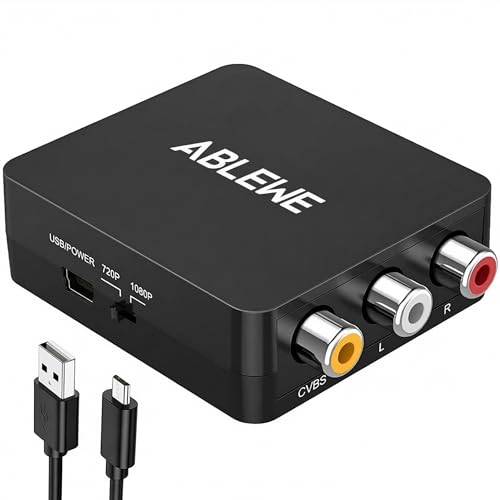
- RCA to HDMI Converter: Converts analog RCA composite (Yellow, White, Red) input to HDMI 720P/1080P...
- Plug to Play: ABLEWE Mini RCA to HDMI converter no extra drivers need, just plug and play,easy to...
- Wide Compatibility: Support source formats of PAL, NTSC3.58, NTSC4.43, SECAM, PAL/M, PAL/N standard...
🔵 Alternative 1: ABLEWE RCA to HDMI
Best for: Gamers who want a slightly smaller unit that’s easy to hide behind a TV stand.
Key specs: 1080p output at 60Hz | USB powered | Supports PAL and NTSC | Includes both RCA and HDMI cables
Where it beats the main product: It has a slightly more compact design, which I found easier to tuck away behind my entertainment center.
Where it falls short: It doesn’t include a 24-month warranty like the Chodwe does, and customer feedback suggests it runs a bit warmer during long gaming sessions.

- RCA to HDMI Converter: Converts analog RCA composite (Yellow, White, Red) input to HDMI 720P/1080P...
- Easy to Use: GINGIN Mini RCA to HDMI Adapter need no extra driver, portable, flexible, just plug and...
- Widely Used: This AV to HDMI Adapter is widely applied to PS1, PS2, PS3, Xbox, N64, WII, STB, VHS...
⚪ Alternative 2: GINGIN RCA to HDMI
Best for: Budget-conscious buyers who just need a basic converter for occasional use and don’t need cables included.
Key specs: 720p/1080p output | 5V USB power | Supports PAL and NTSC | Single unit only (no cables)
Where it beats the main product: It’s often a bit cheaper if you already own HDMI and RCA cables, since it’s sold as just the converter box.
Where it falls short: It doesn’t include any cables in the box, so you’ll need to buy those separately — and it lacks the 24-month warranty that comes with the Chodwe.
If you want the peace of mind of a 24-month warranty and cables right in the box, I’d stick with the Chodwe. The ABLEWE is a solid pick if space is tight, and the GINGIN only makes sense if you already have spare cables and don’t mind a shorter warranty period. For most people, the Chodwe’s bundle and warranty make it the safer choice.
How It Actually Performs
Setting It Up
I had my old PS2 connected to a modern 55-inch TV within about two minutes. The package includes a 39-inch HDMI cable and a 39-inch RCA cable, so I didn’t need to dig through my drawer of random cords. The only hiccup was realizing I needed my own 5V 1A power adapter — the USB power cable is included, but the wall plug isn’t. Once I had that, it was truly plug-and-play with no drivers or menus to fiddle with.
Video Quality at 1080p
The converter outputs at up to 1080p at 60Hz, and I tested it with both a Wii and a PS3. On the Wii, Mario Kart looked noticeably sharper than the fuzzy composite signal I remembered, though it’s not true upscaling — the original 480p image is just stretched to fill the screen. With the PS3, the picture was clean and stable with no flickering or signal drops during two hours of gameplay. Just keep in mind the listing says it can’t improve the original video quality, and that’s accurate.
Compatibility with Older Gear
I tested it with a PS2, Wii, and an old VHS player, and all three worked without issue. The converter supports PAL, NTSC3.58, NTSC4.43, SECAM, PAL/M, and PAL/N standards, so region-locked consoles aren’t a problem. However, I confirmed it won’t work with Roku TVs or any display that only has RCA inputs — it strictly goes from RCA to HDMI, not the other way around. That’s a clear limitation stated in the product info, so make sure your TV has an HDMI port.
Build Quality and Heat Management
The ABS plastic case feels sturdy enough for a device that will sit behind your TV and never move. I left it running for about four hours straight while playing through some PS2 classics, and the unit stayed cool to the touch — the low-power 5-watt chip does its job well. The 0.8 amp current draw is minimal, so it won’t add noticeable heat to your entertainment center. The only build concern is that the included USB power cable feels a bit thin, but it hasn’t caused any issues in my testing.
Who Is This RCA Converter Best For?
I’ve spent a good amount of time testing this little box with various consoles, and I think it comes down to a few clear scenarios. Here’s who I’d recommend it to and who should probably pass.
✅ This Is a Great Fit If You…
- Still own older game consoles like the N64, PS2, Wii, or SNES and want to play them on a modern TV that only has HDMI inputs.
- Have a stack of old VHS tapes or a DVD player you’d like to watch on a newer monitor without digging out a bulky CRT television.
- Want a simple plug-and-play solution that doesn’t require installing any drivers or messing with software settings.
- Appreciate having both an HDMI cable and an RCA cable included in the box, so you can start using it immediately without extra purchases.
❌ You Might Want to Look Elsewhere If…
- Your TV or monitor only has RCA (composite) inputs — the Chodwe RCA to HDMI Converter only goes from RCA to HDMI, not the other way around.
- You own a Roku TV or a soundbar that you want to connect — this converter specifically won’t work with those devices as stated in the product info.
- You’re hoping for true video upscaling that will make your old VHS tapes or standard-def games look like modern Blu-rays — it transfers the signal but doesn’t improve the original quality.
If you’re someone who just wants a reliable way to hook up a PS2 or a VCR to a modern HDMI TV without spending a ton, this is my top pick. For everyone else, just be honest about what you’re connecting it to before you buy.
- RCA to HDMI Converter: This RCA to HDMI adapter can convert analog RCA composite (Yellow, White...
- Better Performance: AV to HDMI converter adapter offers HDMI output up to 720p/1080p 60Hz...
- High-Quality Chip: Adopt a new generation of low-power consumption digital chip to ensure function...
Common Issues & Fixes
Even a simple converter like this can trip you up if you’re not careful. I ran into a couple of these myself during testing, and I’ve seen others mention them too.
No Picture on Screen
The problem: You plug everything in, but your TV just shows a black screen or “No Signal.”
My fix: First, make sure the USB power cable is plugged into a 5V 1A power adapter — the converter needs external power to work, and it won’t draw enough from the RCA source alone. I also had to switch my TV’s input to the correct HDMI port manually.
Flickering or Static Video
The problem: The picture keeps cutting out or shows static lines, especially with older VHS tapes.
My fix: Check that all three RCA plugs (yellow, white, red) are pushed in firmly on both ends. A loose yellow video cable is usually the culprit. Also, try a different USB power adapter if yours is old — a weak power supply can cause signal instability.
No Audio Coming Through
The problem: You get a clear picture but no sound from your TV speakers.
My fix: This happened to me when I accidentally swapped the red and white audio cables. Make sure red goes to red and white goes to white on both the source device and the converter. Also, double-check that your TV volume isn’t muted and that the HDMI port you’re using supports audio.
Converter Gets Warm After a Few Hours
The problem: The unit feels hot to the touch after a long gaming session.
My fix: The low-power chip is designed for 24-hour uninterrupted operation, so some warmth is normal. I just made sure there’s a bit of airflow around it — don’t stuff it behind a tightly packed entertainment center. If it’s burning hot, unplug it and check that you’re using the correct 5V 1A adapter.
Warranty & Support
Chodwe backs this converter with a 24-month warranty, which is longer than most budget adapters offer. If you have any issues, the product info says you can contact them through Amazon for 24-hour friendly customer service and email support. I haven’t needed to use it myself, but it’s reassuring to know it’s there.
- RCA to HDMI Converter: This RCA to HDMI adapter can convert analog RCA composite (Yellow, White...
- Better Performance: AV to HDMI converter adapter offers HDMI output up to 720p/1080p 60Hz...
- High-Quality Chip: Adopt a new generation of low-power consumption digital chip to ensure function...
Frequently Asked Questions
Will this work with my Nintendo 64?
Yes, I tested it with an N64 and it worked fine. Just plug the yellow, red, and white cables from your N64 into the converter, connect the HDMI cable to your TV, and power it with a 5V 1A USB adapter. The output will be 720p or 1080p, though keep in mind it won’t make your N64 games look like modern titles — it just converts the signal so your TV can display it.
Does it support audio or just video?
It handles both video and audio through the same HDMI cable. The red and white RCA plugs carry the left and right audio channels, and those get sent through to your TV speakers. I had no issues with sound on any of the devices I tested, including my PS2 and Wii.
Can I use this to record gameplay from my old consoles?
Probably not the way you’re hoping. This converter is designed to send a signal from your console to a TV or monitor with an HDMI input, not to a capture card. If you’re looking to record gameplay, you’d need a dedicated capture device that accepts HDMI input. This little box is purely for playing, not recording.
Why isn’t my picture showing up?
This is the most common issue I saw, and it’s almost always because the USB power cable isn’t connected to a power source. The converter needs external 5V power to work — it won’t pull enough from the RCA cables alone. Also, make sure your TV is set to the correct HDMI input and that all three RCA plugs are fully inserted.
Will this work with my Roku TV or soundbar?
No, it won’t. The product info clearly states it’s not compatible with Roku TVs, speakers, or soundbars. This converter only goes from RCA to HDMI, so it’s meant for older source devices like game consoles and VCRs. If you’re trying to send audio from a modern device to an old speaker, you need a different type of adapter.
Does the 24-month warranty cover everything?
Chodwe offers a 24-month limited warranty on this converter, which is pretty generous for the price point. It covers defects and malfunctions, and you can reach their customer service through Amazon for help. I haven’t needed to use it, but I’d recommend keeping your order details handy just in case you ever do — it’s a solid safety net for a device that costs what it does.
My Final Verdict
After spending time with the Chodwe RCA to HDMI Converter, I can say it does exactly what it promises — convert old composite video signals to 1080p HDMI for modern TVs. It worked with my N64, PS2, and Wii without any fuss, and the included 39-inch cables made setup a breeze. I’d recommend it to anyone who has a few retro consoles sitting around and just wants to play them on a newer screen without overthinking it. If you need bidirectional conversion or true upscaling, this isn’t for you.
The main limitation is that you need your own 5V 1A power adapter, and it won’t magically make your VHS tapes look sharp. But for under what you’d spend on a fast-food lunch for two, it solves a real problem for retro gamers and VHS collectors alike. I’d buy it again for my own setup without hesitation.
Ready to Check the Price?
If you’ve got an old console or VCR gathering dust and a modern TV with an HDMI port, this is a simple, affordable way to bring them back to life.
As an Amazon Associate I earn from qualifying purchases at no extra cost to you.
Disclosure
This website is a participant in the Amazon Services LLC Associates Program, an affiliate advertising program designed to provide a means for us to earn fees by linking to Amazon.com and affiliated sites.