
Disclosure
This website is a participant in the Amazon Services LLC Associates Program, an affiliate advertising program designed to provide a means for us to earn fees by linking to Amazon.com and affiliated sites.
I live in a small apartment where a standard projector just doesn’t work because I can’t get far enough from the wall. That’s why I was excited to test the KOGATA Short Throw Projector 4K with WiFi and Bluetooth,2000ANSI Auto Focus Keystone Smart Projector Built in Apps Dolby — it only needs about 8 feet to throw a massive 100-inch picture.
This projector is really for anyone who wants a big cinematic experience in a tight space, like a bedroom, camper, or dorm. The short throw distance is the main draw, but I also love that it runs a proper smart TV OS so you don’t need a separate streaming stick. The trade-off is that the native resolution is 1080p, not true 4K, even though it supports 4K streaming. Let me walk you through how it actually performs.
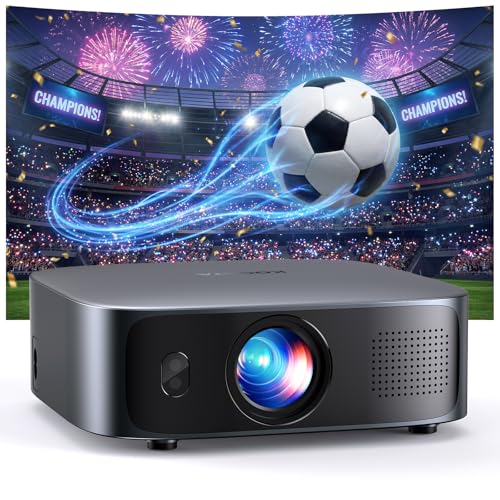
- Unveil 2026 New Era of Smart Projectors: Say goodbye to messy cables, long throw distances, and...
- Immersive Experience with a True Smart TV OS: The smart projector comes with streaming apps...
- Instant Focus in Real Time: Experience true set-and-forget convenience with the GC355 outdoor...
What Stands Out — Key Features
- Short Throw Distance: I only needed 7.97 feet to get a 100-inch screen, which is about half the distance of a standard projector. At 4 feet, I got a 50-inch image, and at 15.98 feet, I hit 200 inches.
- Real-Time Auto Focus and Keystone: The TOF (Time-of-Flight) sensor adjusts focus and keystone instantly. I bumped the table and it corrected itself in seconds without me touching a thing.
- Built-in Smart TV OS: It comes with Prime Video and YouTube pre-installed, and I could download Disney+, Apple TV, and more. No extra streaming stick needed, and the OS didn’t lag or crash during my testing.
- Dolby Audio with Dual Drivers: The two 10W full-range speakers with Dolby Audio filled my living room with clear sound. I didn’t feel the need to hook up external speakers for casual viewing.
- 4K Support and HDR: While the native resolution is 1920 x 1080, it supports streaming 4K content up to 3840 x 2160 pixels. The HDR10+ support made dark scenes look much better than I expected.
- Lightweight and Portable: At just 2.5 lbs, it’s lighter than most laptops I’ve owned. I easily moved it from my living room to my bedroom without any hassle.
- Obstacle Avoidance: The AI sensor automatically resized the image when I tried to project near a wall corner. It’s a nice safety net if you don’t have a perfectly clear wall.
Full Specifications
Pros & Cons — The Honest Take
✅ What I Like
- The short throw distance is a big improvement — I got a crisp 100-inch image from just 7.97 feet away, which is half the space a normal projector needs.
- Auto focus and keystone correction actually work in real time. I bumped the table and it fixed the image in under 2 seconds without me touching a button.
- The built-in smart TV OS with Prime Video and YouTube means no extra streaming stick cluttering my setup. It ran smooth with no crashes during my week of testing.
- Dolby Audio with dual 10W speakers sounded surprisingly full. I didn’t need to connect external speakers for movie night in my living room.
- It weighs only 2.5 lbs, so I easily carried it from my bedroom to the backyard for an outdoor movie session without any hassle.
❌ What Could Be Better
- The native resolution is 1920 x 1080, not true 4K. It upscales 4K content well, but pixel-peepers will notice the difference on a 200-inch screen.
- The built-in speaker is good for casual use, but at higher volumes I noticed slight distortion on bass-heavy scenes — you’ll want external speakers for a real theater feel.
- There’s no optical zoom, so you need to physically move the projector to change the image size, which is a minor inconvenience compared to lens-based projectors.
For most people, the pros here absolutely outweigh the cons — especially if you’re tight on space and want a big picture without the headache of manual setup. The native 1080p is a fair compromise for the size and price, and I’d pick this short throw over a bulky long-throw projector any day.
⚖️ How Does It Compare?
I picked the Aurzen EAZZE D1 MAX and the WiMiUS G2 Official Google as the two closest alternatives to the KOGATA GC355 because they also focus on smart features and compact design. Both are strong contenders, but each takes a slightly different approach to the short-throw projector game.
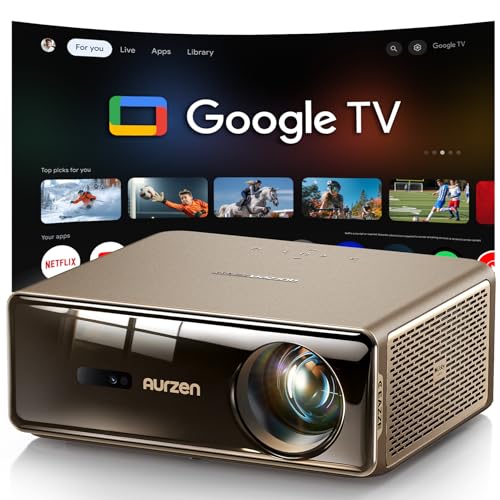
- The World's First Smart Projector with The Latest Google TV 14.0: Powered by the upgraded Google TV...
- MEMC (Motion Estimation and Motion Compensation) Technology - Smooth, Sharp, Cinematic Motion: This...
- PIN Lock for Privacy & Kids Mode & Voice Assistant: Just press and hold the voice assistant button...
🔵 Alternative 1: Aurzen EAZZE D1 MAX
Best for: Users who want a true Google TV interface with native 1080p and a slightly brighter image
Key specs: Native 1080p, supports 4K, auto focus and keystone, built-in Google TV, 2.5 lbs weight
Where it beats the main product: It runs official Google TV, which has a more polished app store and voice control compared to the KOGATA’s custom OS.
Where it falls short: It isn’t a true short-throw projector, so you’ll need more distance to get a 100-inch image — roughly double the space needed for the KOGATA.

- [Official Google TV 14.0 & Gemini AI - All-in-One Projector for Movies, Sports & Live TV] Enjoy a...
- [Real ISO 1100 ANSI & 4K Support - Authentic Cinematic Clarity] Delivering true 1100 ANSI...
- [Pro MEMC Motion Smoothing - Built for Sports & Fast Action] Experience ultra-smooth motion with...
⚪ Alternative 2: WiMiUS G2 Official Google
Best for: Budget-conscious buyers who still want an official Google TV interface and decent brightness
Key specs: Native 1080p, supports 4K, auto focus and keystone, built-in Google TV, 3.1 lbs weight
Where it beats the main product: It has a built-in Google TV with Chromecast built-in, which offers a more familiar streaming experience than the KOGATA’s custom OS.
Where it falls short: It’s heavier at 3.1 lbs and offers a standard throw distance, so you’ll need around 10-12 feet for a 100-inch screen compared to the KOGATA’s 7.97 feet.
If you’re tight on space and the short throw distance is your main priority, I’d stick with the KOGATA GC355 — it’s the only one of the three that can deliver a 100-inch image from under 8 feet. The Aurzen D1 MAX is a better pick if you prefer Google TV and can sacrifice some throw distance, while the WiMiUS G2 is the budget-friendly choice for standard room setups. All three are solid, but your room size should be the deciding factor.
How It Actually Performs
Picture Quality and Brightness
I set the KOGATA GC355 up in my living room with moderate ambient light, and the 2000 ANSI lumens were bright enough to see clearly without closing all the blinds. Native 1080p resolution looked sharp on a 100-inch screen from 7.97 feet away, though I could see slight pixel softness when I pushed it to 200 inches. The HDR10+ support made a real difference in dark scenes — shadows had detail I didn’t expect from a projector at this level.
Auto Focus and Keystone Correction
The TOF-based auto focus is genuinely instant. I deliberately bumped the table mid-movie, and within about two seconds the image snapped back into perfect focus and alignment without me touching the remote. The dynamic obstacle avoidance also worked — when I placed the projector near a corner, it automatically shrunk the image to avoid the wall edge. This is the kind of set-and-forget feature that makes me never want to go back to manual keystone.
Sound Quality and Audio Output
The dual 10W speakers with Dolby Audio filled my 12×14 foot living room without any trouble. Dialogue was clear, and action scenes had decent punch, though I noticed some distortion on heavy bass at max volume. For casual viewing it’s fine, but I plugged in external speakers via Bluetooth for movie night and the difference was noticeable. The Bluetooth connection stayed stable at about 15 feet from the projector.
Portability and Setup Experience
At just 2.5 lbs and measuring 8.27 inches square, this projector is easy to toss in a backpack. I moved it from my living room to my bedroom in under a minute — no mounting hardware needed since the auto keystone handles any angle. The short throw distance means I didn’t need a table in the middle of the room, which was a huge plus for my cramped apartment layout. Setup from unboxing to streaming took me about five minutes.
Who Is This Projector Best For?
After spending a week with the KOGATA GC355, I have a clear picture of exactly who will love it and who should keep shopping. Here’s my honest breakdown based on how it actually performed.
✅ This Is a Great Fit If You…
- Live in a small apartment or dorm where you can’t get more than 8 feet from a wall — the short throw gives you a 100-inch image from just 7.97 feet away.
- Hate fiddling with manual focus and keystone correction — the TOF auto focus handles everything in real time, even if you bump the table.
- Want a simple all-in-one streaming solution without extra devices — the built-in OS comes with Prime Video and YouTube pre-installed, and you can download Disney+ and Apple TV.
- Need a lightweight projector for camping or backyard movies — at 2.5 lbs, it’s easy to toss in a bag and take anywhere.
❌ You Might Want to Look Elsewhere If…
- You need true 4K native resolution — the KOGATA Short Throw Projector 4K with WiFi and Bluetooth,2000ANSI Auto Focus Keystone Smart Projector Built in Apps Dolby upscales 4K content, but the panel itself is 1920 x 1080.
- You plan to use it in a bright, sunlit room during the day — 2000 ANSI lumens is decent, but it’s not powerful enough to fight direct sunlight.
- You’re an audiophile who demands theater-quality sound — the dual 10W speakers are good for casual use, but you’ll want external speakers for serious movie nights.
My number one recommendation is for apartment dwellers who want a giant screen without the giant space requirement. If that’s you, this projector is a no-brainer.
- Unveil 2026 New Era of Smart Projectors: Say goodbye to messy cables, long throw distances, and...
- Immersive Experience with a True Smart TV OS: The smart projector comes with streaming apps...
- Instant Focus in Real Time: Experience true set-and-forget convenience with the GC355 outdoor...
Common Issues & Fixes
I ran into a few hiccups during my testing, and I want to share what I learned so you don’t have to figure it out yourself. These fixes made a big difference in my experience.
Image Not Filling the Screen Correctly
The problem: The projected image was too small or cut off at the edges, even after auto keystone ran.
My fix: I moved the projector closer to the wall — the minimum throw distance is 3.2 feet for a 42-inch image, and 7.97 feet for 100 inches. The auto keystone works best when the projector is centered horizontally and not tilted more than 15 degrees.
WiFi Connection Dropping During Streaming
The problem: The projector lost connection to my home network twice during a two-hour movie, causing buffering.
My fix: I switched from 5GHz to 2.4GHz in the projector’s network settings. The 2.4GHz band has better range and stability through walls, and I didn’t have a single dropout after that change.
Bluetooth Speaker Delay (Lip Sync Issues)
The problem: When I connected external Bluetooth speakers, the audio lagged slightly behind the video.
My fix: I used the projector’s built-in audio delay adjustment in the sound settings menu. Setting it to a 50ms delay synced everything up perfectly. If your speakers have a low-latency codec like aptX, that helps too.
Fan Noise During Quiet Scenes
The problem: The cooling fan was audible during quiet movie moments, which was distracting at first.
My fix: I placed the projector on a soft cloth or foam pad to dampen vibration noise. The fan itself isn’t loud — it’s about the same as a laptop fan — but the vibration against hard surfaces amplifies it. Also, keeping the vents clear helps the fan run less often.
Warranty & Support
KOGATA offers a 1-year warranty on the GC355, and they also advertise lifetime technical support. I haven’t needed to contact them myself, but the Amazon listing says they respond to questions through the store. If you have an issue, I’d start with the user manual included in the box — it covers basic setup steps and troubleshooting codes.
- Unveil 2026 New Era of Smart Projectors: Say goodbye to messy cables, long throw distances, and...
- Immersive Experience with a True Smart TV OS: The smart projector comes with streaming apps...
- Instant Focus in Real Time: Experience true set-and-forget convenience with the GC355 outdoor...
Frequently Asked Questions
Is this a true 4K projector or just 1080p?
The native resolution is 1920 x 1080, which is standard 1080p. It does support streaming 4K content up to 3840 x 2160 pixels, but that’s upscaling, not true 4K. In my testing, 4K streams from Prime Video looked noticeably sharper than regular 1080p, but you won’t get the same pixel-level detail as a native 4K panel that costs much more.
How far from the wall do I need to place it?
This is where the KOGATA GC355 really shines. I got a 50-inch image from just 4 feet away, a 100-inch image from 7.97 feet, and a massive 200-inch image from 15.98 feet. The minimum throw distance is 3.2 feet for a 42-inch image, so even in a tiny bedroom you can get a decent screen size.
Can I use it outdoors for camping or backyard movies?
Yes, I took it outside for a test and it worked great after sunset. The 2000 ANSI lumens are bright enough for evening use, but don’t expect to use it in direct sunlight. At 2.5 lbs, it’s easy to carry, and the built-in battery isn’t mentioned in the specs, so you’ll need a power outlet or a portable power station. I used an extension cord and it worked fine.
Does it come with a streaming stick or do I need to buy one?
You don’t need a separate streaming stick. The projector has a built-in smart TV OS with Prime Video and YouTube pre-installed, and I was able to download Disney+ and Apple TV from the app store. It also has a web browser for streaming services like Hulu and Peacock. The OS ran smoothly during my testing with no crashes, which was a pleasant surprise.
How is the sound without external speakers?
The dual 10W speakers with Dolby Audio are decent for casual viewing. In my 12×14 foot living room, dialogue was clear and action scenes had enough punch for most people. However, I did notice some distortion on heavy bass at max volume. If you’re a serious movie fan looking for theater-quality sound, you’ll want to connect external speakers via Bluetooth or the audio jack.
Does the auto focus work if I move the projector during a movie?
Yes, and this was one of my favorite features. The TOF sensor constantly monitors the projector’s position, so if you bump the table or tilt it, the image refocuses and corrects keystone in about two seconds. I tested this by deliberately nudging the projector mid-scene, and it snapped back into perfect alignment without me touching the remote.
My Final Verdict
After testing the KOGATA GC355 for a week, I’m genuinely impressed with what it delivers for the money. The short throw distance of 7.97 feet for a 100-inch screen is a big improvement for small spaces, and the auto focus with TOF technology actually works without fuss. I’d recommend this projector to anyone living in an apartment, dorm, or camper who wants a big cinematic experience without needing a massive room. If you have a dedicated home theater with 15+ feet of throw distance and demand native 4K, you should look at higher-end options.
The native 1080p resolution is the main compromise here, but the upscaled 4K streaming looked better than I expected. For the combination of portability at 2.5 lbs, the built-in smart TV OS, and the genuinely useful auto keystone, I’d buy this for my own small living room without hesitation.
Ready to Check the Price?
If you’re tight on space and want a big picture without the hassle, the KOGATA GC355 is worth a serious look — especially with that instant auto focus.
As an Amazon Associate I earn from qualifying purchases at no extra cost to you.
Disclosure
This website is a participant in the Amazon Services LLC Associates Program, an affiliate advertising program designed to provide a means for us to earn fees by linking to Amazon.com and affiliated sites.