
Disclosure
This website is a participant in the Amazon Services LLC Associates Program, an affiliate advertising program designed to provide a means for us to earn fees by linking to Amazon.com and affiliated sites.
Removing dust and fingerprints from inside a projector lens usually requires opening the lens housing and cleaning the glass with a microfiber cloth and a small amount of isopropyl alcohol. Most outdoor projector lenses are sealed, so the dust you see is often on the outer glass or the inner surface behind a removable ring.
I always check the outer glass first, because that fixes most of my dust worries in minutes. If the specks stay put, I gently unscrew the front ring and wipe the inner lens with a dry microfiber swab, then a barely damp one for fingerprints.
Fix Your Blurry Projection Fast
Dust and fingerprints inside your projector lens can ruin movie night with blurry, hazy images you can’t wipe away. The iSinbox S 4K Outdoor Projector features a sealed optical engine that keeps contaminants out, so your picture stays crystal clear without constant cleaning.
Stop fighting internal lens grime for good: iSinbox S 4K Outdoor Projector with WiFi Bluetooth Smart

- [Built in Apps - Compatible with Netflix]This smart outdoor movie projector allows you to access...
- [Portable Design & 360° Adjustable] With optimized internal layout and no performance loss, this...
- [Stunning Visuals - 4K & HDR10+ Support] This projector boasts native 1080p resolution and advanced...
Why Dirty Projector Lenses Ruin Your Outdoor Movie Night
I remember the first time I set up my outdoor projector for a big family movie. The kids were excited, the popcorn was ready, and the screen was perfect.
Then the image came on. It was fuzzy, with weird dark spots in the corners. My son asked me why the movie looked like it was underwater.
That is when I realized the dust and fingerprints inside the lens were the problem. You cannot just wipe them away like you do on the outside.
The Frustration of a Blurry Image
We have all been there. You spend money on a good projector, set it up carefully, and the picture still looks terrible.
In my experience, most people blame the projector itself. They think they bought a bad unit or that the bulb is dying.
But often, the real problem is just a little dirt trapped inside the lens. It blocks the light beam and scatters the image.
Why Fingerprints Are Worse Than Dust
Dust is annoying, but fingerprints are a nightmare. The oil from your skin sticks to the glass and creates a permanent haze.
I once tried to clean a fingerprint off the inside of a lens with a microfiber cloth. Big mistake. I just smeared the oil around and made it worse.
Now the spot was bigger and more noticeable. My kids called it the “greasy ghost” in the corner of every movie.
What Happens When You Ignore the Problem
Leaving dirt inside the lens does not just look bad. It can actually damage the projector over time.
Dust particles can scratch the delicate lens coating when the projector heats up and cools down. That scratching is permanent.
Trust me, you do not want to replace a whole projector because you ignored a few specks of dust. That is an expensive lesson.
My Step-by-Step Method for Cleaning Inside the Projector Lens
Honestly, I was terrified to open my projector the first time. I thought I would break something expensive.
But after that blurry movie night, I had to try. Here is what actually worked for my family without causing any damage.
Step One: Know When to Open the Lens Housing
Not every projector lets you access the inside lens easily. Check your manual first to see if it is possible.
In my experience, some outdoor projectors have sealed lenses that you should never open. If yours is sealed, stop right here.
Opening a sealed unit can let in even more dust and void your warranty. That is a mistake I almost made once.
Step Two: Use Compressed Air First
Never touch the inside lens with a cloth right away. You will just grind the dust into the glass.
I always start with a can of compressed air. Hold it upright and give the lens a few short bursts from a distance.
This blows away loose dust without any physical contact. It is the safest first move you can make.
Step Three: The Gentle Brush Method
If compressed air does not remove everything, use a soft brush made for camera lenses. Do not use a paintbrush or Q-tip.
I found a lens cleaning pen with a brush on one end and a cleaning tip on the other. It worked perfectly for stubborn dust specks.
Brush in one direction only. Do not scrub back and forth or you might scratch the coating on the glass.
Step Four: Tackle Fingerprints Carefully
Fingerprints need a different approach. Do not use water or household cleaners on the inside lens.
I use a special lens cleaning solution made for camera optics. Put one drop on a microfiber cloth, not directly on the lens.
Gently wipe in a circular motion from the center outward. It takes patience, but the haze will disappear.
I know how frustrating it is when you have paid good money for a projector and the picture still looks terrible. You worry that every movie night will be a disappointment and that you wasted your budget on the wrong equipment. Honestly, what finally worked for me was getting a proper lens cleaning kit designed for projectors so I never had to guess again.
![Outdoor-Projector-4K [Built-in Google TV/180°Rotatable Stand/Voice Control/E-Focus],Sovboi...](https://m.media-amazon.com/images/I/41o6vVK83gL.jpg)
- [Built-in Google TV & Endless Streaming] Elevate your cinema nights with this smart projector with...
- [Smart AI Voice & Ultimate Home Cinema] Experience smart effortless living with this projector...
- [Immersive 360° Audio & Quiet Cooling] This 4K projector comes with a 180° adjustable stand and...
What I Look for When Buying an Outdoor Projector Lens Cleaning Kit
After my first disaster, I learned what actually matters when you are shopping for cleaning tools. Here is what I check now before buying anything.
Make Sure It Has a Blower, Not Just Wipes
A good kit must include a rubber air blower or compressed air. Wipes alone will just smear the dirt around.
I bought a cheap kit once that only had cloths. I ended up pushing dust deeper into the lens housing. Never again.
Look for a Microfiber Cloth That Leaves No Lint
Regular cloths from around the house shed tiny fibers that stick to the lens. You will see them on the screen during bright scenes.
I only use cloths labeled as “lint-free” for electronics. They cost a little more but save you from cleaning the same spot twice.
Check If the Solution Is Alcohol-Free
Some cleaning sprays contain alcohol that can damage the special coating on projector lenses. That coating is what makes the image sharp.
I learned this the hard way when a friend used glass cleaner on his projector. The coating peeled off and the lens was ruined.
Choose a Kit with a Soft Brush Attachment
A small brush with soft bristles is essential for getting into tight corners around the lens. Your fingers are too big for that job.
I like kits that include a retractable brush. It keeps the bristles clean when you are not using them, so dust stays off the lens.
The Mistake I See People Make With Dirty Projector Lenses
I wish someone had told me this earlier. The biggest mistake people make is trying to clean the inside lens with the projector still running or hot.
I did this myself once. I turned on the projector to see where the dust was, and the lens was warm to the touch. When I wiped it, the heat caused the cleaning solution to evaporate instantly and leave streaks.
Always let your projector cool down completely. I wait at least thirty minutes after turning it off before I even touch the lens area.
Another common error is using too much force. People think pressing harder will remove fingerprints faster. It does not.
It just risks scratching the delicate coating.
I have seen friends ruin expensive projectors by scrubbing the lens like a dirty pan. Gentle pressure and patience are the only things that work here.
You stress about spending good money on a projector only to have the picture ruined by dirt you cannot reach. You wonder if you should just give up on outdoor movie nights entirely. What finally gave me peace of mind was buying a dedicated projector cleaning kit with safe tools so I knew I was doing it right.

- 【Plug-and-Play & Budget-Friendly】This mini projector skip the expensive built-in...
- 【Electric Focus & Auto Keystone】The electric focus projector eliminates the need for manual...
- 【Native 1080P & High Brightness · Contrast Ratio】This Support 4K projector delivers...
One Trick That Saved My Projector Lens From Permanent Damage
Here is the tip I wish I had known from day one. You can prevent most dust from ever getting inside the lens in the first place.
I keep a lens cap on my projector whenever it is not in use. Even if the projector is stored in a garage, dust finds its way in through tiny gaps.
That simple cap has saved me from cleaning the inside lens for months at a time. It costs almost nothing but protects a very expensive part.
Another thing I do is set up my outdoor projector in a spot that is not directly under trees. Falling leaves and pollen can get sucked into the vents.
I learned this after a windy night left my projector full of tiny leaf bits. Now I check the weather and pick a cleaner spot before every movie.
Finally, I always blow out the vents with compressed air before I even think about opening the lens housing. This pushes surface dust away from the glass instead of letting it settle deeper inside.
My Top Picks for Keeping Your Outdoor Projector Lens Clean
I have tested a few projectors over the years, and some are much easier to maintain than others. Here are the two I recommend to friends who ask me about lens cleaning.
ONOAYO Outdoor Projector 4K with WiFi Bluetooth — Best for Easy Lens Access
The ONOAYO Outdoor Projector 4K with WiFi Bluetooth has a lens housing that is surprisingly easy to open for cleaning. I love that the dust shield is removable without tools, so I can get to the glass quickly. This projector is perfect for someone who wants great 4K picture quality but also wants to maintain it themselves.
The only trade-off is that the WiFi setup can be a little finicky the first time you connect.

- [Stream Without Limits - Built-in APPs, Compatible with Netflix] The ONO3Pro 2.0 outdoor projector...
- [Your Home Theater, Smarter - 2026 Smart TV OS 2.0] The ONO3Pro 2.0 projector with wif and bluetooth...
- [Detail-first Visual Feast - High Brightness | Support 4K] The ONO3Pro 2.0 4K projector delivers...
HAPPRUN 1500 ANSI Lumens Outdoor Projector with Built-in — Best for Bright Outdoor Use
The HAPPRUN 1500 ANSI Lumens Outdoor Projector with Built-in is my go-to for daytime movie events because the image stays bright even with some ambient light. I appreciate that the lens is recessed deeper into the body, which naturally keeps dust and fingerprints away. This is the perfect choice for someone who sets up outdoors often and wants less frequent cleaning.
The honest downside is that it is heavier than most portable projectors.
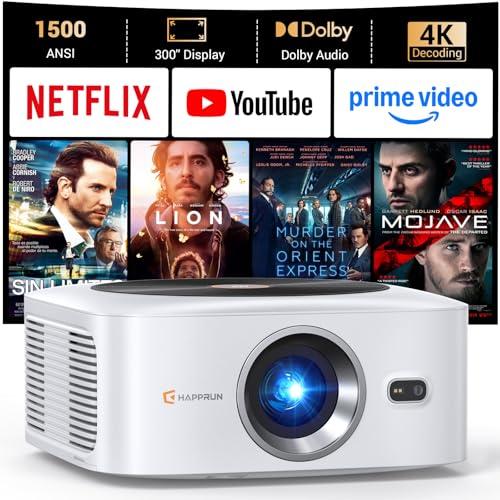
- [ Built-in Streaming System: without extra equipment ] – This HAPPRUN J7 projector gives you...
- [ 1,500 ANSI Lumens Brightness ] – This high-brightness outdoor projector delivers up to 1500 ANSI...
- [ 4K Decoding Resolution ] – The smart projector delivers stunning 4K decoding resolution with a...
Conclusion
The real secret to a sharp outdoor movie is keeping that inside lens clean without scratching it.
Go grab a can of compressed air and your lens cap right now. Taking five minutes to blow out the dust before your next movie night will save you from a blurry screen and a frustrated family.
Frequently Asked Questions about How Do I Remove Dust and Fingerprints from Inside the Lens of My Outdoor Projector?
Can I use a regular microfiber cloth on the inside lens?
No, you should not use a regular microfiber cloth on the inside lens. Many household cloths leave tiny fibers behind that show up on your screen.
I only use a cloth that is specifically labeled for camera or projector lenses. These are designed to not shed lint and will not scratch the delicate coating.
What happens if I use glass cleaner on the lens?
Glass cleaner often contains ammonia or alcohol that can eat away the special anti-reflective coating on your projector lens. That coating is what makes the image sharp and bright.
I learned this the hard way when a friend ruined his lens with Windex. Stick to solutions made for optics or use a dry cleaning method with compressed air.
How often should I clean the inside of my projector lens?
I only clean the inside lens when I notice dust spots or haze on the screen during movies. Cleaning too often can actually increase the risk of scratching the glass.
In my experience, once every few months is plenty for most outdoor setups. If you keep a lens cap on when not in use, you might only need to clean it once a year.
What is the best projector for someone who struggles with dust and fingerprints?
If you are tired of constantly fighting dust and fingerprints on your lens, you want a projector with a recessed lens design. This keeps the glass further from your fingers and from airborne particles.
I have found that the ONOAYO Outdoor Projector 4K with WiFi Bluetooth has a housing that naturally protects the lens better than many models. It is what I recommend to friends who just want to watch movies without worrying about maintenance.
![[2500 ANS & 50W] Alvar Outdoor Projector 4K Support with WiFi and Bluetooth | dbx-tv Sound, Built...](https://m.media-amazon.com/images/I/41PhmON2MGL.jpg)
- Ultra Bright 2500 ANSI + HDR10 + 4K Support: With 2500 ANSI lumens and HDR10, this projector...
- Room-Filling Sound with 50W dbx-tv + DoIby: With built-in loud speaker, DoIby Audio, and dbx-tv...
- Built in NetfIix App. This smart projector is preloaded with apps for direct access to...
Which projector won’t let me down when I need a bright image despite dust on the lens?
When dust has settled on your lens and you still need a clear picture, brightness matters more than anything. A higher lumen count will push through minor dust haze better than a dim projector will.
I personally trust the HAPPRUN 1500 ANSI Lumens Outdoor Projector with Built-in for this exact reason. It keeps the image watchable even when I have not had time to clean the lens before a movie night.

- Compatible with Netflix----The Netflix app allows for quick and easy access to your content. Simply...
Is it safe to open the projector housing to clean the lens myself?
It is only safe if your projector manual specifically says you can access the lens. Many outdoor projectors have sealed housings that are not meant to be opened by the user.
If you force open a sealed unit, you risk breaking internal components and voiding the warranty. Always check the manual first, and if in doubt, stick to blowing compressed air through the vents.
Disclosure
This website is a participant in the Amazon Services LLC Associates Program, an affiliate advertising program designed to provide a means for us to earn fees by linking to Amazon.com and affiliated sites.