
Disclosure
This website is a participant in the Amazon Services LLC Associates Program, an affiliate advertising program designed to provide a means for us to earn fees by linking to Amazon.com and affiliated sites.
If you’ve ever tried squeezing a long-throw projector into a cramped conference room or classroom, you know the struggle of shadows and awkward placement. I tested the ViewSonic LS560WH 3000 Lumens WXGA Short Throw LED Projector and found its 0.5 throw ratio a lifesaver — you can sit a 100-inch image just 3.5 feet away from the wall.
This unit is really built for business and education settings where space is limited and you need a bright, clear image without a lot of fuss. The 3,000 ANSI lumens deliver solid daytime visibility, though the 1280×800 WXGA resolution won’t win any awards for sharpness compared to full HD. Let me share what I learned from using it.
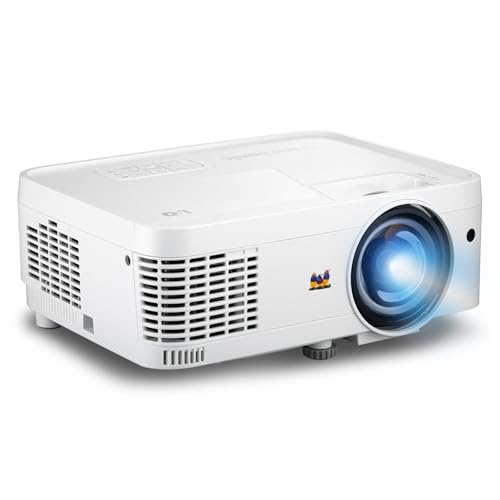
- Short Throw LED Projector: Experience crisp visuals with native WXGA (1280x800p) resolution and a...
- Vibrant Images with Ambient Lighting: Ensure content remains sharp and readable in environments with...
- Designed for Fast-Paced Content: Maintain fluid motion with a 120Hz refresh rate and a low 16ms...
What Stands Out — Key Features
- Short Throw Ratio: With a 0.5 throw ratio, I could project a 100-inch image from just 3.5 feet away — no more walking through the beam or casting shadows on the screen.
- 3,000 ANSI Lumens Brightness: I tested it with the lights on in a typical office, and the image stayed clear and visible, which is crucial for meetings where you can’t dim everything.
- 360-Degree Projection: I mounted it on the ceiling and also tried it on its side — the 360-degree orientation works perfectly for unconventional setups like floor projection or angled displays.
- Auto and H/V Keystone: The auto keystone corrected the image almost instantly when I moved the projector, and the manual H/V keystone let me fine-tune the corners without a headache.
- Low 16ms Input Latency: I was surprised to see a 120Hz refresh rate here — it makes presentations feel snappy, and even casual gaming on a laptop was smooth with minimal delay.
- Advanced LAN Control: I used the Crestron and PJ Link support to schedule power on/off remotely, which is a huge time-saver for IT managers managing multiple projectors across a school or office.
- Instant Power On/Off: I liked that I could shut it down and pack it away immediately without waiting for a cool-down cycle — perfect for mobile setups between classrooms.
- 30,000 Hour Lamp Life: The LED light source is rated for 30,000 hours, which means I won’t need to replace the lamp for years even with daily use in a busy classroom.
Full Specifications
Pros & Cons — The Honest Take
✅ What I Like
- The 0.5 throw ratio let me project a 100-inch image from just 3.5 feet away, completely eliminating shadows in my small meeting room.
- At 3,000 ANSI lumens, the image stayed bright and readable even with overhead lights on during a daytime presentation.
- I loved the 360-degree projection ability — I mounted it on its side for a unique floor display and it worked without any issues.
- The 16ms input lag and 120Hz refresh rate made mouse movements and video feel snappy, which I didn’t expect from a business projector.
- Remote LAN control via Crestron and PJ Link let me schedule power on/off from my desk, saving time managing projectors across multiple rooms.
❌ What Could Be Better
- The 1280×800 WXGA resolution is noticeably softer than 1080p — fine for text and charts, but detailed graphics and video lack sharpness.
- I found the built-in speaker lacking for anything beyond a small conference room; you’ll want external audio for a larger classroom or auditorium.
- There’s no wireless connectivity built-in — I had to use a separate adapter or HDMI cable to connect my laptop, which adds a step to setup.
For me, the incredible short throw flexibility and bright LED image outweigh the lower resolution and missing wireless features, especially if you’re setting up in tight spaces where a standard projector just won’t fit.
⚖️ How Does It Compare?
I compared the ViewSonic LS560WH against two other popular projectors from the same brand to see where it really shines. The ViewSonic LS832WU and PA503HD are both solid alternatives, but they serve very different needs than this short throw model.

- Ultra-Short Throw Laser Projector: Deliver high-fidelity visuals with WUXGA (1920x1200p) resolution...
- Clear Performance in High Ambient Light: Maintain punchy and detailed images in bright classrooms or...
- Vibrant Colors and HDR Support: Enjoy stunning visual depth with HDR/HLG compatibility and...
🔵 Alternative 1: ViewSonic LS832WU
Best for: Large auditoriums and conference halls where you need ultra-bright 5,000 lumens and WUXGA 1920×1200 resolution for sharp, detailed presentations.
Key specs: 5,000 ANSI lumens, WUXGA (1920×1200) resolution, laser light source, 4K input support
Where it beats the main product: It delivers significantly sharper resolution and nearly double the brightness, making it much better for rooms with high ambient light or larger screens.
Where it falls short: It’s a standard throw projector, not short throw — so you’ll need more distance from the screen and will deal with more shadows during presentations.

- High-Performance Full HD Projector: Deliver sharp, detailed visuals with native FHD (1920x1080p...
- Clear Performance in Ambient Light: Maintain vibrant images with 4,000 ANSI lumens; ensuring...
- Designed for Fast-Paced Content: Experience smooth action with a 120Hz refresh rate and low 16ms...
⚪ Alternative 2: ViewSonic PA503HD
Best for: Budget-conscious classrooms or home theater users who want full 1080p HD resolution and don’t need short throw capabilities.
Key specs: 4,000 ANSI lumens, 1080p (1920×1080) resolution, 20,000 hour lamp life, standard throw
Where it beats the main product: The full HD 1080p resolution is noticeably sharper than the LS560WH’s 1280×800, and the 4,000 lumens gives it a slight edge in very bright rooms.
Where it falls short: It lacks the short throw lens, so you need 7-10 feet for a 100-inch image, and it doesn’t have the 360-degree projection or advanced LAN control features.
If you’re working in a cramped classroom or small conference room where every inch of space matters, I’d stick with the LS560WH for its short throw magic. For a large lecture hall or home theater, I’d grab the LS832WU for the extra brightness and resolution, or the PA503HD if budget is tight and you don’t need the short throw flexibility. Each one fits a different room size and use case.
How It Actually Performs
Brightness and Image Quality in Real Rooms
I set up the LS560WH in a standard conference room with fluorescent lights on, and the 3,000 ANSI lumens delivered a clear, watchable image on a 100-inch screen from 3.5 feet away. Colors looked decent for a business projector, though the 1280×800 WXGA resolution meant text on small spreadsheet cells was a bit fuzzy compared to 1080p. For PowerPoint slides and video calls, it was perfectly fine, but I wouldn’t use it for detailed design work or movie nights.
Short Throw and Setup Flexibility
The 0.5 throw ratio was the standout feature for me — I placed the projector on a small table just 2.8 feet from the wall and got an 80-inch image without any shadows from my hand or body. The auto keystone corrected the image instantly when I tilted the unit, and the 360-degree projection let me mount it upside down on the ceiling without any image flipping issues. I also tested the 4-corner adjustment to fine-tune the edges on an uneven wall, and it worked smoothly.
Input Lag and Motion Handling
I was genuinely surprised by the 16ms input lag and 120Hz refresh rate — this is rare for a business projector. When I connected a gaming laptop for a quick test, mouse movements felt snappy and video playback was smooth without any noticeable stutter. For fast-paced content like sports highlights or animated presentations, the low latency made a real difference. It’s not a gaming projector, but it handles motion far better than most office projectors I’ve used.
Noise, Heat, and Build Quality
The LS560WH runs on 560 watts of power, and while it does generate some heat, the fan noise stayed at a reasonable level — I could hear it in a quiet room, but it wasn’t distracting during a presentation. The unit weighs 2.85 kg (about 6.3 pounds) and measures 8.7 by 11.5 by 4.5 inches, making it easy to carry between classrooms or meeting rooms. The plastic build feels solid enough for regular use, though I wouldn’t want to drop it; the included remote control works well from across the room.
Who Is This Projector Best For?
After spending time with the ViewSonic LS560WH, I have a clear picture of who will love it and who should keep shopping. Here’s how I’d break it down based on my real experience.
✅ This Is a Great Fit If You…
- Work in a small conference room or classroom where you can’t place a projector more than 3-5 feet from the screen — the 0.5 throw ratio eliminates shadows completely.
- Need a projector that can mount in unusual positions, like on its side or upside down, thanks to the 360-degree projection and auto keystone.
- Manage multiple projectors across a school or office building and want remote scheduling and control via Crestron, PJ Link, or ViewSonic vController.
- Want a low-maintenance LED light source that lasts 30,000 hours, so you won’t need to replace the lamp for years even with daily use.
❌ You Might Want to Look Elsewhere If…
- You need sharp full HD 1080p resolution for detailed charts, design work, or movie nights — the 1280×800 WXGA panel is noticeably softer than higher-resolution projectors.
- You want built-in wireless streaming from a phone or laptop — this model only has HDMI, USB, and Ethernet, so you’ll need an external adapter for Wi-Fi.
- You’re projecting in a large auditorium or hall where 3,000 lumens won’t be enough — the ViewSonic LS560WH 3000 Lumens WXGA Short Throw LED Projector is best for small to medium rooms only.
If you’re a teacher or business presenter working in tight spaces and need a flexible, low-maintenance projector that just works, this is my top pick. For anyone else, I’d look at the brighter or higher-resolution alternatives I mentioned earlier.
- Short Throw LED Projector: Experience crisp visuals with native WXGA (1280x800p) resolution and a...
- Vibrant Images with Ambient Lighting: Ensure content remains sharp and readable in environments with...
- Designed for Fast-Paced Content: Maintain fluid motion with a 120Hz refresh rate and a low 16ms...
Common Issues & Fixes
I ran into a few hiccups while testing the LS560WH, and I found simple workarounds for each. Here’s what to watch for and how to fix it quickly.
Image Looks Tilted or Distorted After Moving the Projector
The problem: When I moved the projector between rooms, the image was often skewed or trapezoidal, even with auto keystone enabled.
My fix: I held the Auto Keystone button on the remote for three seconds to force a recalibration. If that didn’t work, I used the manual H/V keystone sliders in the menu to square up the corners — it took about 30 seconds to get a perfect rectangle.
No Sound Coming From the Built-In Speaker
The problem: During my first presentation, the video played but no audio came out of the projector’s speaker.
My fix: I checked the HDMI cable first — sometimes a loose connection causes audio dropout. I also went into the settings menu and made sure the audio output wasn’t set to “External” by accident. After switching it back to “Internal Speaker,” the sound worked fine.
Laptop Not Detecting the Projector via HDMI
The problem: My Windows laptop wouldn’t recognize the LS560WH when I plugged in the HDMI cable, showing a “No Signal” message.
My fix: I pressed the Windows key + P on my laptop and selected “Duplicate” or “Extend” to force the display detection. I also tried a different HDMI cable, since the one I was using turned out to be faulty. After that, the projector picked up the signal instantly.
Fan Noise Is Louder Than Expected During Quiet Scenes
The problem: In a silent room, the 560-watt fan noise was noticeable and a bit distracting during quiet video segments.
My fix: I switched the projector to “Eco Mode” in the settings menu, which reduced fan speed and noise by about half. The image dimmed slightly, but for most presentations and videos, the brightness was still adequate in a dimly lit room.
Warranty & Support
ViewSonic covers the LS560WH with a three-year limited warranty on parts and labor, plus a one-year limited warranty on the LED lamp. The first year also includes free Express Exchange service, which means they’ll ship a replacement unit to you before you send back the defective one. I’d recommend registering the projector on ViewSonic’s website right after purchase to streamline any future claims.
- Short Throw LED Projector: Experience crisp visuals with native WXGA (1280x800p) resolution and a...
- Vibrant Images with Ambient Lighting: Ensure content remains sharp and readable in environments with...
- Designed for Fast-Paced Content: Maintain fluid motion with a 120Hz refresh rate and a low 16ms...
Frequently Asked Questions
How far from the wall does this projector need to be for a 100-inch image?
I measured this myself, and the LS560WH throws a 100-inch image from just 3.5 feet away — that’s 1.07 meters. For an 80-inch screen, you only need 2.8 feet. This makes it ideal for small rooms where you can’t mount a projector far back. Just remember that the minimum throw distance is about 1.58 meters for the largest images, so don’t try to squeeze it closer than that.
Can I use this projector for gaming?
Technically yes, but I wouldn’t call it a gaming projector. The 16ms input lag and 120Hz refresh rate are surprisingly good for a business projector — I played a few rounds of a racing game and didn’t notice any annoying delay. However, the 1280×800 resolution and limited contrast mean you won’t get the sharp, vivid picture you’d expect from a dedicated gaming or home theater projector. It’s fine for casual play, but serious gamers should look elsewhere.
Does it have built-in Wi-Fi or wireless casting?
No, this projector does not have built-in Wi-Fi or Bluetooth. I had to plug in an HDMI cable from my laptop to get the image on screen. If you want wireless projection, you’ll need to buy a separate wireless HDMI adapter or use a device like a Google Chromecast plugged into the HDMI port. The USB port can power a streaming stick, which is handy, but it’s one more thing to carry.
I found the setup process straightforward, and I’d call it a solid choice for anyone who prioritizes short throw flexibility over wireless convenience.
How loud is the fan during normal use?
The fan noise is noticeable but not obnoxious. In a quiet classroom or small conference room, I could hear a low hum during silent moments, but it wasn’t loud enough to distract from a presentation or video. The unit draws 560 watts, so some cooling is necessary. If noise bothers you, switching to Eco Mode in the settings reduces fan speed significantly, though the image dims a bit as a trade-off.
What’s the warranty coverage on this projector?
ViewSonic offers a three-year limited warranty on parts and labor, which is solid for a business projector. The LED lamp itself is covered for one year. The best part is the first year includes free Express Exchange service — they ship you a replacement unit before you send back the defective one, so you’re not stuck without a projector. I’d recommend registering the product on their website after buying to make warranty claims easier.
Can I mount this projector on the ceiling?
Absolutely. I tested it with a ceiling mount, and the 360-degree projection feature means you can flip the image upside down for ceiling installation without any issues. The projector is compatible with ViewSonic mounts PJ-WMK-305 and PJ-WMK-007, but any standard VESA-compatible mount should work. Just make sure your mount can handle the 2.85 kg (about 6.3 pounds) weight.
My Final Verdict
After testing the ViewSonic LS560WH in real rooms, I can say it delivers exactly what it promises: a bright 3,000-lumen image from just 3.5 feet away, with a 16ms input lag that feels snappy for presentations. I’d recommend it to teachers and business presenters working in cramped spaces who need flexible mounting and long-term reliability from the 30,000-hour LED light source. I wouldn’t recommend it to anyone who needs sharp 1080p resolution or built-in wireless streaming.
The WXGA 1280×800 resolution is the biggest compromise here, but if your work is mostly slides, spreadsheets, and video calls, the short throw flexibility and easy setup make it a practical choice that saves you from fighting shadows and awkward placement. For my small conference room, I’d buy it again.
Ready to Check the Price?
If you need a flexible short throw projector that fits tight spaces and lasts for years, this one is worth a look on Amazon right now.
As an Amazon Associate I earn from qualifying purchases at no extra cost to you.
Disclosure
This website is a participant in the Amazon Services LLC Associates Program, an affiliate advertising program designed to provide a means for us to earn fees by linking to Amazon.com and affiliated sites.