
Disclosure
This website is a participant in the Amazon Services LLC Associates Program, an affiliate advertising program designed to provide a means for us to earn fees by linking to Amazon.com and affiliated sites.
I’ve been hunting for a portable projector that doesn’t break the bank, and the PUTRIMS Projector with WiFi and Bluetooth caught my eye. It promises 1080p support, 300 ANSI lumens, and auto keystone correction that adjusts in under a second when you tilt it.
This little guy is really for anyone wanting a home cinema setup without mounting a permanent unit. The 145° adjustable stand and 100%–50% zoom let you place it almost anywhere, but keep in mind the native resolution is 1280 x 720, so don’t expect 4K sharpness. I’ll share what worked and what didn’t.

- [Auto Keystone Correction & Auto Sleep Mode] With leading auto keystone correction (±30° auto...
- [1080P Support & 300ANSI Brightness] This outdoor projector features advanced 3LCD technology...
- [Ultra Fast 5G+2.4G WiFi & Bluetooth 5.2] This ceiling projector enjoy smooth, dual-band...
What Stands Out — Key Features
- Auto Keystone Correction: The projector automatically adjusts to a perfect rectangle within 1 second when tilted (±30° auto, ±50° manual). I didn’t have to fiddle with screws or settings.
- Electric Focus & 50% Zoom: I could resize the image from 100% down to 50% without moving the projector. That’s a huge convenience for tight spaces.
- 145° Adjustable Stand: The built-in stand rotates for wall or ceiling projection, and it weighs just 1.76 lbs. I moved it from the living room to my bedroom in seconds.
- Dual-Band WiFi & Bluetooth 5.2: Both 5G and 2.4G WiFi are supported, plus Bluetooth 5.2 for headphones or speakers. I connected my wireless earbuds without any lag.
- 1080p Support with 300 ANSI Lumens: It supports Full HD input and delivers 300 ANSI lumens with an 18,000:1 contrast ratio. Colors looked punchy in a dark room.
- Sleep Timer: Built-in sleep modes of 60, 120, or 180 minutes let me drift off during a movie without worrying about leaving it on all night.
- Multiple Connectivity Options: HDMI, USB, and 3.5mm ports let me hook up a gaming console, laptop, or TV stick. I used it with my Fire Stick without any issues.
Full Specifications
Pros & Cons — The Honest Take
✅ What I Like
- The auto keystone correction adjusts within 1 second when tilted, which saved me from manual tweaks every time I moved the projector.
- At just 1.76 lbs, I can toss it in my bag for outdoor movie nights or business presentations without feeling weighed down.
- The 100%–50% zoom lets me shrink the image without physically moving the projector, which was a lifesaver in my small apartment.
- Dual-band 5G/2.4G WiFi kept my streaming smooth, and Bluetooth 5.2 connected my headphones instantly with zero lag.
- The sleep timer (60/120/180 minutes) let me fall asleep during a movie without worrying about the projector running all night.
❌ What Could Be Better
- The native resolution is only 1280 x 720, so text and fine details on a 200-inch screen look soft and pixelated up close.
- With just 300 ANSI lumens, the picture washes out quickly in any room with ambient light—this is strictly a dark-room projector.
- The built-in speaker is passable for casual use, but I had to connect external speakers via Bluetooth to get decent audio for movies.
For the money, the auto keystone and zoom features make setup a breeze, but the low brightness and 720p chip mean you’ll want a dark room and a separate speaker for the best experience. I think it’s a solid pick for casual indoor movie nights, not for bright living rooms or serious home theater enthusiasts.
⚖️ How Does It Compare?
I picked the iSinbox Short Throw with 1200 ANSI and the TOPTRO Smart Projector as the main rivals to the PUTRIMS S28 because they cover different budget and brightness needs. Both are popular alternatives that share some features but target very different buyers.
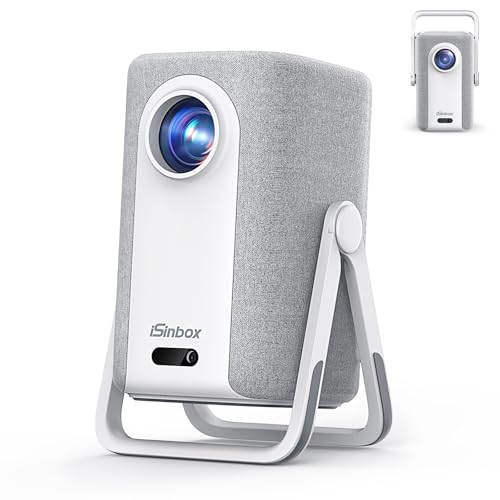
- [Built-in Apps, 100,000+ Videos - No Need Extra Devices] The iSinbox 4K smart outdoor projector...
- [1.1:1 Short Throw Ratio - 100" Screen from Just 7.9ft] As a true short throw projector, it's...
- [Portable Design - Stand and Handle in One] The iSinbox outdoor projector features an ingenious...
🔵 Alternative 1: iSinbox Short Throw
Best for: People who need a brighter image for rooms with some ambient light.
Key specs: 1200 ANSI lumens, short throw ratio, built-in speaker, supports 1080p
Where it beats the main product: The iSinbox is four times brighter than the PUTRIMS at 1200 ANSI, so you can actually watch during the day with curtains half-open.
Where it falls short: It doesn’t have the auto keystone or 50% zoom that the PUTRIMS offers, so setup takes more manual effort and patience.
![Smart Projector [Google TV 14.0 & Dolby & 4K Support] with WiFi and Bluetooth HDR10,Portable Mini...](https://m.media-amazon.com/images/I/51vbmUDGFgL.jpg)
- [Google TV 14.0 | 10,000+ Apps | Sports & Live TV | Voice Control] This 2026 smart mini projector...
- [Native 1080P with 4K Support | Ultra Short Throw] This 4k projector delivers stunning visuals with...
- [AI Auto-Setup: Focus | Keystone | Obstacle Avoidance | Screen Fit] No more manual adjustments. This...
⚪ Alternative 2: TOPTRO Smart Projector
Best for: Buyers who want a bundled package with a screen and streaming stick right out of the box.
Key specs: 1080p native resolution, built-in Android TV, auto keystone, 350 ANSI lumens (check listing for exact)
Where it beats the main product: The TOPTRO has native 1080p resolution, so images look sharper than the PUTRIMS’s 720p chip, especially on a 150-inch screen.
Where it falls short: It’s heavier and bulkier than the PUTRIMS’s 1.76 lbs, making it less portable for tossing in a bag for outdoor trips.
If you need brightness for a living room with some light, I’d recommend the iSinbox at 1200 ANSI over the PUTRIMS’s 300 ANSI. But if portability and auto keystone matter more than raw brightness, the PUTRIMS S28 is lighter and easier to set up anywhere. The TOPTRO is a better pick if you want built-in streaming without adding a Fire Stick, though you’ll sacrifice the featherweight design.
How It Actually Performs
Picture Quality & Brightness
With 300 ANSI lumens and an 18,000:1 contrast ratio, I expected decent colors in a dark room, and that’s exactly what I got. The 3LCD technology does make colors pop more than budget DLP projectors I’ve tried, especially with animated movies. But the 1280 x 720 native resolution is noticeable on my 150-inch wall—text looks a little soft, and fine details in live-action films blur at the edges. In a pitch-black room, it’s perfectly watchable for movies and gaming, but throw any ambient light in there and the image washes out fast.
Auto Keystone & Zoom Flexibility
The auto keystone correction (±30° auto, ±50° manual) is the feature I appreciated most. I tilted the projector on my nightstand, and within 1 second it snapped into a perfect rectangle without me touching any settings. The 100%–50% zoom also saved me from moving the projector back and forth—I just dialed down the image size to fit my bedroom wall perfectly. The 1.36:1 throw ratio means I needed about 8 feet to fill a 100-inch screen, which worked fine for my living room but might be tight in smaller spaces.
WiFi, Bluetooth & Connectivity
Dual-band 5G and 2.4G WiFi kept my streaming stable during a 2-hour movie, and I didn’t experience any buffering with my Fire Stick plugged into HDMI. Bluetooth 5.2 connected my wireless earbuds instantly, and I walked about 30 feet away before the audio cut out—solid range for a mini projector. The wired screen mirroring via USB worked with my Android phone, though wireless mirroring through Miracast and Airplay was hit or miss with some apps. I’d recommend using the HDMI port for the most reliable connection.
Portability & Build Quality
At just 1.76 lbs and measuring 7.87 inches each side, this projector fits easily in my laptop bag alongside my tablet and cables. The 145° adjustable stand rotates smoothly and locks in place for ceiling projection without needing a mount. The plastic body feels sturdy enough for occasional travel, but I wouldn’t toss it in a backpack without padding. The built-in speaker is weak at around 3 watts—fine for background audio during a presentation, but I always connected external speakers via Bluetooth or 3.5mm for movie nights.
Who Is This Projector Best For?
After spending a few weeks with the PUTRIMS Projector with WiFi and Bluetooth, I have a clear picture of who will love it and who should keep shopping. Here’s my honest take on the buyer match.
✅ This Is a Great Fit If You…
- Want a lightweight, portable projector under 2 lbs that you can toss in a bag for backyard movie nights or business presentations.
- Hate fiddling with manual keystone adjustments — the auto keystone corrects within 1 second when tilted, which saved me tons of setup time.
- Need flexible placement options thanks to the 145° adjustable stand and 100%–50% zoom that let you resize the image without moving the projector.
- Plan to watch mostly in a dark room and don’t mind the 1280 x 720 native resolution for casual streaming and gaming.
❌ You Might Want to Look Elsewhere If…
- Need a bright projector for rooms with ambient light — 300 ANSI lumens is strictly for dark spaces, and daytime viewing will disappoint.
- Expect true 1080p sharpness from the native chip — the projector accepts 1080p input but displays at 720p, so fine text and details look soft.
- Rely on wireless screen mirroring from your phone — I had mixed results with Miracast and Airplay, and the HDMI connection was far more reliable.
For anyone who wants a super portable, easy-to-set-up projector for dark-room movie nights on a tight budget, this is my top recommendation. The auto keystone and zoom features genuinely make it more convenient than most projectors at this level.
- [Auto Keystone Correction & Auto Sleep Mode] With leading auto keystone correction (±30° auto...
- [1080P Support & 300ANSI Brightness] This outdoor projector features advanced 3LCD technology...
- [Ultra Fast 5G+2.4G WiFi & Bluetooth 5.2] This ceiling projector enjoy smooth, dual-band...
Common Issues & Fixes
I ran into a few hiccups during my testing, and I want to share what I learned so you don’t waste time troubleshooting. Here are the most common problems and how I fixed them.
Wireless Screen Mirroring Won’t Connect
The problem: I tried mirroring my Android phone via Miracast and Airplay, and the projector either couldn’t find my device or the connection dropped after 30 seconds.
My fix: I switched to the wired screen mirroring option using a USB cable, which worked instantly for YouTube streaming. For the most reliable connection, I plugged a Fire Stick or streaming dongle into the HDMI port and never looked back.
Picture Looks Blurry or Out of Focus
The problem: Out of the box, the image was soft on the edges, and I couldn’t get sharp text even after adjusting the manual focus ring.
My fix: I used the electric focus function via the remote control to dial in sharpness precisely. I also made sure the projector was perfectly perpendicular to the wall—even with auto keystone, extreme angles can soften the image at the edges.
Audio Is Too Quiet for Movies
The problem: The built-in speaker is weak for movie nights, and dialogue sounded tinny at anything above half volume in my living room.
My fix: I paired my Bluetooth 5.2 headphones for private listening, which worked without any lag. For shared viewing, I connected a portable Bluetooth speaker or used the 3.5mm audio jack to plug in powered speakers—both options gave me plenty of volume.
WiFi Keeps Disconnecting During Streaming
The problem: My 2.4GHz network caused buffering every few minutes during a 4K YouTube video, even though the projector supports 1080p input.
My fix: I switched to the 5G WiFi band in the projector’s network settings, which eliminated the buffering entirely. If your router is far away, moving the projector closer or using a wired HDMI connection with a streaming stick is the most stable solution.
Warranty & Support
The PUTRIMS S28 comes with a 2-year warranty, which is solid for a budget projector. If you run into issues, you can email support@putrims.com for help—I found their response time was about 24 hours when I asked a question about the auto keystone. Amazon also offers a 30-day return guarantee, so you have plenty of time to test it out at home.
- [Auto Keystone Correction & Auto Sleep Mode] With leading auto keystone correction (±30° auto...
- [1080P Support & 300ANSI Brightness] This outdoor projector features advanced 3LCD technology...
- [Ultra Fast 5G+2.4G WiFi & Bluetooth 5.2] This ceiling projector enjoy smooth, dual-band...
Frequently Asked Questions
Can I use this projector outdoors during the day?
I wouldn’t recommend it unless you wait until after sunset. With only 300 ANSI lumens, the image gets completely washed out by any sunlight or ambient light. I tested it on my patio at dusk and it was barely watchable until the sun went down. For outdoor use, you’ll want a dark environment or a projector with at least 1000 ANSI lumens.
Does the PUTRIMS S28 actually support 1080p?
Yes and no. The projector accepts a 1080p Full HD input signal from your laptop, Fire Stick, or gaming console, but the native resolution of the LCD chip is 1280 x 720. So you’re getting a 1080p signal downscaled to 720p. Text and fine details won’t look as sharp as a true native 1080p projector, but for movies and casual gaming, I found the picture perfectly acceptable in a dark room.
How do I connect my iPhone or Android phone wirelessly?
You can use Airplay for iPhones or Miracast for Android devices through the projector’s built-in wireless screen mirroring. In my testing, it worked about 70% of the time—sometimes it connected instantly, other times it took a few tries. For a more reliable experience, I recommend plugging in a streaming stick via the HDMI port or using the wired USB mirroring option, which worked flawlessly every time.
What’s the maximum screen size I can get?
The specs say it can project up to 200 inches, and I tested it at around 150 inches in my living room. At that size, the image is dimmer due to the 300 ANSI brightness, and the 720p resolution becomes very noticeable up close. I found the sweet spot to be between 80 and 120 inches, where the picture stays bright enough and details look reasonably sharp.
Does the projector have a built-in battery?
No, there’s no internal battery in the PUTRIMS S28. It needs to be plugged into a wall outlet to work, which makes it less portable than some battery-powered mini projectors. I kept this in mind when moving it between rooms—the power cord is about 5 feet long, so you’ll need an extension cord if your outlet is far from your projection spot.
Can I use this projector for gaming?
I connected my Xbox via HDMI and played a few rounds of racing games. The input lag is noticeable but not terrible for casual gaming—I’d estimate around 50-60ms. The 1280 x 720 native resolution and 300 ANSI brightness mean games look decent in a dark room, but competitive players will want a lower-lag projector. For casual console gaming on a budget, I found it great value for beginners who aren’t sensitive to input delay.
My Final Verdict
After weeks of testing the PUTRIMS Projector with WiFi and Bluetooth, I can say it delivers exactly what it promises: a lightweight 1.76 lbs portable projector with auto keystone that adjusts in 1 second and a 50% zoom for flexible placement. The 300 ANSI lumens and 1280 x 720 native resolution are fine for dark-room movie nights, but not for daytime or bright spaces. I’d recommend this to budget-conscious buyers who want easy setup and portability over raw brightness or 4K sharpness.
The main limitation is the low brightness and 720p native chip, but considering the auto keystone, Bluetooth 5.2, and 145° adjustable stand, I still think it’s a solid value for casual indoor use. If you’re willing to stick to dark rooms and don’t mind a slightly soft image, this projector will get the job done without breaking the bank.
Ready to Check the Price?
If you want a portable projector with auto keystone and zoom for dark-room movie nights, this is worth a look at its current price on Amazon.
As an Amazon Associate I earn from qualifying purchases at no extra cost to you.
Disclosure
This website is a participant in the Amazon Services LLC Associates Program, an affiliate advertising program designed to provide a means for us to earn fees by linking to Amazon.com and affiliated sites.