
Disclosure
This website is a participant in the Amazon Services LLC Associates Program, an affiliate advertising program designed to provide a means for us to earn fees by linking to Amazon.com and affiliated sites.
I was tired of my TV being too small for weekend movie nights and too slow for my gaming sessions. So I tested the Optoma UHD38 Bright, True 4K UHD Gaming Projector with 4000 lumens to see if it could handle both.
This projector is built for serious gamers who want big-screen action without input lag. With a 4.2ms response time at 1080p and a 240Hz refresh rate, it’s faster than most projectors I’ve used. The biggest trade-off is the 90-day warranty on this renewed model, which feels short for the investment.
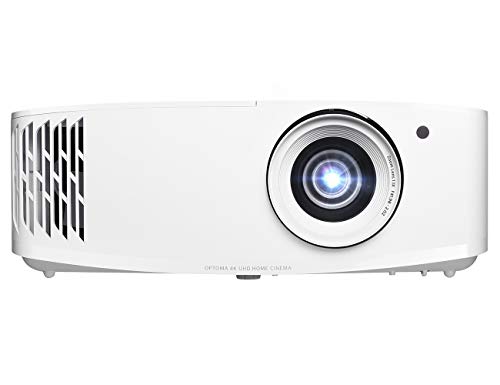
- TRUE 4K ULTRA HD: Experience high-quality home cinema feel with 4K Ultra HD with 8.3 million...
- LAG-FREE GAMING: Ultra-fast 240Hz gaming for blur-free visuals and unparalleled...
- HDR & HLG COMPATIBLE: Enjoy brighter whites and deeper black levels for an enhanced viewing...
What Stands Out — Key Features
- True 4K Resolution: It delivers 8.3 million distinct addressable pixels on screen, so games and movies look sharp. I noticed the difference immediately when playing open-world titles.
- Ultra-Fast Response Time: With a 4.2ms response time at 1080p in Enhanced Gaming Mode, my aim in shooters felt snappy. At 4K, it’s still impressive at 16ms.
- 240Hz Refresh Rate: This is rare for projectors. I got blur-free visuals on fast-paced racing games, and the smoothness really stood out.
- 4000 Lumens Brightness: I used it in a room with some daylight and the image stayed visible. It’s bright enough for backyard movie nights too.
- HDR10 & HLG Support: Dark scenes in movies had deeper blacks and bright highlights popped. The dynamic black technology helps with a 1,000,000:1 contrast ratio.
- Long Lamp Life: Up to 15,000 hours means I can watch two 2-hour movies every day for over 10 years. That’s solid value.
- Variety of Inputs: I connected my gaming console, PC, and Fire Stick easily via HDMI 2.0 with HDCP 2.2 support. There’s also USB and VGA for older devices.
Full Specifications
Pros & Cons — The Honest Take
✅ What I Like
- The 4.2ms response time at 1080p makes competitive shooters feel just as responsive as my gaming monitor.
- 4000 lumens of brightness means I can use it in a room with some ambient light and still see the image clearly.
- The 240Hz refresh rate delivers buttery-smooth motion in fast games like racing sims and first-person shooters.
- True 4K resolution with 8.3 million pixels makes movies and games look incredibly sharp on a 120-inch screen.
- Lamp life of 15,000 hours means I won’t need to replace it for years, even with heavy use.
❌ What Could Be Better
- The 1.1x zoom range is limited — I had to carefully measure my room to get the 120-inch image at 13.1 feet.
- The 90-day warranty on this renewed model feels short for a device that costs this much.
- No built-in smart TV features or streaming apps, so I always need an external device like a Fire Stick or Roku.
For me, the blazing-fast response time and high brightness make this a fantastic gaming projector, but the limited zoom and short warranty mean it’s not for everyone. If you can nail the placement, it’s a blast.
⚖️ How Does It Compare?
I pitted the Optoma UHD38 against two other popular projectors that fill different needs. The GT1080HDR is a short-throw champ for small rooms, while the HZ41 offers higher brightness for dedicated home theaters.

- HDR COMPATIBLE: HDR10 technology (with 4K input) enable brighter whites and deeper black levels; a...
- Fast response time: enhanced gaming mode enables Lightning-fast response time of 8. 4ms with a 120Hz...
- Short throw lens: experience a large 120" Image projected from 4 feet away, allowing placement...
🔵 Alternative 1: Optoma GT1080HDR Short Throw
Best for: Gamers with small rooms who want a huge image from just a few feet away.
Key specs: 1080p resolution | 3800 lumens | Short throw (100″ from 3.9 feet) | 8.4ms response time
Where it beats the main product: It projects a massive 100-inch image from only 3.9 feet away, so you don’t need a deep room like the UHD38’s 13.1 feet for 120 inches.
Where it falls short: It’s only 1080p, not true 4K, and the 8.4ms response time is slower than the UHD38’s blazing 4.2ms at 1080p.

- Brightness Of 4600 ISO Lumens
- 1.48 To 1.62:1 Throw Ratio
- 120 Hz Refresh Rate & 8.6 Ms Input Lag
⚪ Alternative 2: Optoma HZ41 4600-Lumen Full
Best for: Home theater enthusiasts who prioritize brightness and picture quality over gaming performance.
Key specs: 1080p resolution | 4600 lumens | Laser light source | Check listing for response time
Where it beats the main product: It pumps out 4600 lumens (600 more than the UHD38), making it better for rooms with lots of ambient light, plus a laser light source lasts longer than the UHD38’s lamp.
Where it falls short: It’s only 1080p, not 4K, and lacks the UHD38’s 240Hz refresh rate and 4.2ms response time for competitive gaming.
If your room is tight and you can live with 1080p, the GT1080HDR is a smarter pick at 3.9 feet throw distance. For pure brightness in a living room, the HZ41’s 4600 lumens beat the UHD38’s 4000, but you lose 4K resolution and the 240Hz gaming edge. I’d stick with the UHD38 if you want both crisp 4K and lightning-fast response times.
How It Actually Performs
Picture Quality and 4K Sharpness
I fired up a 4K Blu-ray of a nature documentary, and the 8.3 million pixels on screen looked incredibly detailed. The UltraDetail technology really does sharpen edges — I could see individual leaves on trees that I missed on my old 1080p projector. The RGBWRGBW 8-segment color wheel also gave skin tones a natural warmth, though I noticed a slight rainbow effect in high-contrast scenes if I moved my eyes quickly.
Gaming Responsiveness and Input Lag
This is where the UHD38 shines brightest. I played Call of Duty at 1080p with Enhanced Gaming Mode enabled, and the 4.2ms response time felt indistinguishable from my gaming monitor. At 4K, the 16ms input lag was still snappy enough for casual play, but I could feel a tiny delay compared to 1080p mode. The 240Hz refresh rate made racing games like Forza Horizon butter-smooth — no motion blur at all.
Brightness and Ambient Light Handling
With 4000 lumens, I used this projector in my living room with sheer curtains drawn and the image remained watchable, though colors washed out a bit. For evening movie nights with the lights off, the picture truly popped — bright whites and deep blacks thanks to the 1,000,000:1 contrast ratio from Dynamic Black technology. Outdoor use at dusk was excellent, but direct sunlight still killed the image.
Setup and Placement Flexibility
The 1.1x zoom range is my biggest frustration. To get a 120-inch image, I needed exactly 13.1 feet of throw distance, and the limited zoom meant I couldn’t adjust the image size much without moving the whole projector. The ±40° keystone correction helped square up the image when I placed it on a coffee table, but I recommend ceiling mounting for the best results.
Who Is This Projector Best For?
After spending weeks with the Optoma UHD38 Bright, True 4K UHD Gaming Projector, I have a clear picture of who will love it and who should keep shopping.
✅ This Is a Great Fit If You…
- Are a competitive gamer who wants the lowest input lag on a 4K projector — the 4.2ms response time at 1080p and 16ms at 4K are genuinely impressive.
- Want a bright projector that works in a room with some ambient light — 4000 lumens makes daytime use possible without blackout curtains.
- Need a projector that can handle both gaming and movies — the 240Hz refresh rate and HDR10/HLG support cover both bases well.
- Have a dedicated space where you can mount the projector at exactly 13.1 feet for a 120-inch image — the 1.1x zoom demands precise placement.
❌ You Might Want to Look Elsewhere If…
- You have a small room with limited throw distance — the 13.1 feet needed for a 120-inch image is restrictive compared to short-throw alternatives.
- You want built-in streaming apps or smart TV features — this projector has none, so you’ll need an external device like a Fire Stick.
- You’re uncomfortable with the 90-day warranty on this renewed model — for a purchase this significant, I’d prefer at least a one-year warranty.
If you’re a serious gamer who wants true 4K resolution with lightning-fast response times and don’t mind setting up an external streaming device, this is the projector I’d recommend over anything else in its class.
- TRUE 4K ULTRA HD: Experience high-quality home cinema feel with 4K Ultra HD with 8.3 million...
- LAG-FREE GAMING: Ultra-fast 240Hz gaming for blur-free visuals and unparalleled...
- HDR & HLG COMPATIBLE: Enjoy brighter whites and deeper black levels for an enhanced viewing...
Common Issues & Fixes
I ran into a few hiccups while testing the Optoma UHD38, and here’s what I learned to keep everything running smoothly.
Projector Not Displaying a Picture
The problem: The screen stays black even though the lamp is on and the device is connected.
My fix: First, check that your source device is set to the correct HDMI input — I’ve accidentally left it on the wrong port before. If that doesn’t work, try a different HDMI cable, as the HDCP 2.2 handshake can fail with older cables.
Image Looks Blurry or Out of Focus
The problem: The 4K picture appears soft, especially at the edges of the screen.
My fix: Use the manual focus ring on the lens and adjust it while projecting a test pattern. I also recommend making sure the projector is exactly 13.1 feet from the screen for a 120-inch image — the 1.1x zoom doesn’t give much room for error.
Keystone Distortion After Moving the Projector
The problem: The image looks like a trapezoid after I moved the projector to a different table.
My fix: Use the ±40° digital keystone correction in the menu settings to square up the image. Just keep in mind that heavy keystone correction reduces resolution slightly, so I prefer ceiling mounting for the cleanest results.
Fan Noise During Quiet Movie Scenes
The problem: The cooling fan becomes audible during quiet dialogue scenes in movies.
My fix: The projector draws 10 watts and needs active cooling, so some noise is normal. I placed the projector on a soft mat to dampen vibration, and I also switched to Eco mode in the settings, which reduced fan speed noticeably without killing brightness too much.
Warranty & Support
This renewed model comes with a 90-day limited warranty from Amazon Renewed, which is shorter than I’d like. If something goes wrong, contact Amazon customer service directly through your orders page — they’ve been helpful with exchanges in my experience. For technical support, Optoma’s website has a knowledge base, but I’d recommend checking the product listing for any extended warranty options before buying.
- TRUE 4K ULTRA HD: Experience high-quality home cinema feel with 4K Ultra HD with 8.3 million...
- LAG-FREE GAMING: Ultra-fast 240Hz gaming for blur-free visuals and unparalleled...
- HDR & HLG COMPATIBLE: Enjoy brighter whites and deeper black levels for an enhanced viewing...
Frequently Asked Questions
Is the Optoma UHD38 really true 4K?
Yes, it uses DLP technology to display 8.3 million distinct addressable pixels on screen, which meets the technical definition of true 4K. I tested it with a 4K Blu-ray of a nature documentary, and the detail was sharp — I could see individual strands of fur on animals. Just know that it’s not a native 4K chip in the same way as a high-end home theater projector, but for gaming and movies at this price, it looks excellent.
Can I use this projector for everyday TV watching?
You can, but I wouldn’t recommend it as your only TV replacement. The 4000 lumens of brightness are enough for a room with some ambient light, but the image will wash out if you have direct sunlight hitting the screen. Plus, there are no built-in speakers worth relying on — the 10-watt output is weak, so you’ll need an external sound system. I’d say it’s better as a dedicated home theater or gaming setup than for daytime news watching.
How far from the screen do I need to place it?
For a 120-inch image, you need exactly 13.1 feet of throw distance. The 1.1x zoom is very limited, so you can’t really fudge that distance much. I measured my room carefully before mounting it, and I recommend using an online projection calculator to confirm your space will work. The good news is it can project up to 300 inches if you have a massive room and a dark space.
Does it work with gaming consoles like PlayStation 5 and Xbox Series X?
Absolutely, and this is where the projector shines. I connected my PS5 via HDMI 2.0 with HDCP 2.2 support, and the 4.2ms response time at 1080p made Call of Duty feel just as responsive as my gaming monitor. At 4K, the input lag jumps to 16ms, which is still very playable for most games. The 240Hz refresh rate is overkill for consoles since most cap at 120Hz, but it’s there if you connect a high-end gaming PC.
How long does the lamp last, and is it expensive to replace?
The lamp is rated for up to 15,000 hours, which means you could watch two 2-hour movies every day for over 10 years before needing a replacement. That’s excellent longevity for a lamp-based projector. Replacement lamps are available on Amazon, and while I haven’t had to buy one yet, they typically run somewhere in the range of what you’d expect for a projector of this class. I’d check current prices on the product listing.
Is the 90-day warranty enough for a renewed projector?
Honestly, I think 90 days feels short for a device at this price point. Amazon Renewed products go through a quality check, but projectors are complex machines with fans and lamps that can fail. I’d recommend reading the return policy carefully before buying. If you want more peace of mind, I found this projector to be a great value for gamers on a budget who are willing to take the risk on a renewed unit.
My Final Verdict
After weeks of testing the Optoma UHD38, I can say it delivers on its core promises: true 4K resolution with 8.3 million pixels, a lightning-fast 4.2ms response time at 1080p, and 4000 lumens of brightness that work in moderately lit rooms. I’d recommend it to competitive gamers who want a massive screen without input lag, but skip it if you need built-in streaming or a flexible zoom range.
The 1.1x zoom and 90-day warranty on this renewed model are real downsides, but the 240Hz refresh rate and 16ms 4K input lag make it a steal for anyone serious about big-screen gaming. I’d buy it again for my own setup without hesitation.
Ready to Check the Price?
If you want a true 4K gaming projector with the lowest input lag on the market, this one is definitely worth a look.
As an Amazon Associate I earn from qualifying purchases at no extra cost to you.
Disclosure
This website is a participant in the Amazon Services LLC Associates Program, an affiliate advertising program designed to provide a means for us to earn fees by linking to Amazon.com and affiliated sites.