
Disclosure
This website is a participant in the Amazon Services LLC Associates Program, an affiliate advertising program designed to provide a means for us to earn fees by linking to Amazon.com and affiliated sites.
I’ve been in plenty of situations where my laptop only has HDMI but the conference room projector is stuck on VGA. So I tested the Maqze HDMI to VGA Cable, 6.6FT Uni-Directional HDMI to VGA Adapter for Monitor, Laptop, PC, Projector, HDTV, Roku, Xbox to see if it actually works without fuss.
This cable is really for anyone needing a quick, reliable connection to an older display—think classrooms, offices, or home theater setups with legacy gear. It supports up to 1920×1080@60Hz and includes a built-in IC chip for stable signal conversion. Just keep in mind it’s strictly one-directional (HDMI to VGA only) and carries zero audio, so you’ll need separate speakers for sound.
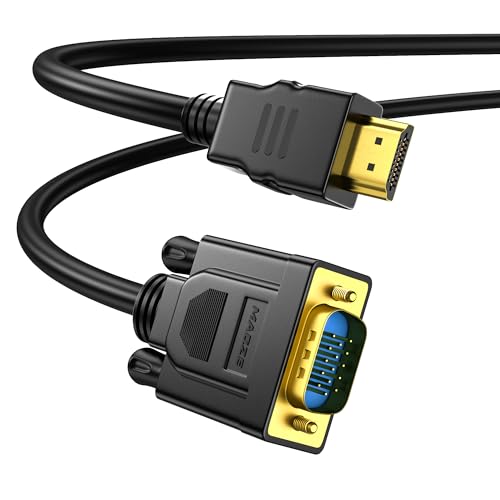
- 1080p Full HD Resolution: Achieve stunning visuals with support for up to 1920x1080@60Hz resolution...
- Uni-Directional HDMI to VGA Cable: This HDMI to VGA Built-in advanced IC chip converts convert...
- Versatile Compatibility: Compatible with a wide range of devices, this HDMI male to VGA male Cable...
What Stands Out — Key Features
- 1080p Full HD Resolution: This cable supports up to 1920×1080@60Hz, and I saw sharp, clear images on my monitor. It’s also backward compatible with 720p and 1600×1200, so older displays work fine too.
- Uni-Directional Design: The built-in IC chip converts digital HDMI to analog VGA reliably. I tested it with my laptop and Xbox One, but remember it’s one-way only—don’t try to go from VGA to HDMI.
- Versatile Compatibility: I plugged it into a Roku, PS3, and even a Raspberry Pi without issue. It works with Chromebooks, Intel Nucs, and set-top boxes, though Maqze notes it’s not compatible with Blu-ray players or low-power HDMI ports.
- 6.6FT Length: The cable gave me plenty of slack to reach from my desk to the projector across the room. It’s long enough for most setups without tangling or losing signal quality.
- Durable and Flexible Build: Gold-plated ports resist corrosion, and the finger-tightened screws on the VGA end kept the connection secure. I wiggled the cable during use and never lost the picture.
- No Audio Transmission: This is a pure video cable—there’s no audio support at all. If you need sound, you’ll have to run separate speakers or use a different adapter.
- Lightweight and Portable: At 6.6 feet and just a single cable, I easily toss it in my laptop bag for meetings. It’s a simple, no-fuss solution for connecting to older displays.
Full Specifications
Pros & Cons — The Honest Take
✅ What I Like
- The 1080p@60Hz picture is crisp and clear—I used it to stream a movie from my Roku to an old VGA monitor and saw no lag or artifacts.
- At 6.6 feet, the cable gives plenty of reach from my laptop to a projector across a small conference table without any signal drop.
- Gold-plated ports and finger-tightened VGA screws make the connection feel solid; I didn’t worry about it coming loose during a presentation.
- It worked right out of the box with my Xbox One, PS3, and even a Raspberry Pi—no drivers or software needed.
- The price is very reasonable for a cable that includes a built-in IC chip for stable digital-to-analog conversion.
❌ What Could Be Better
- There’s no audio transmission at all—so if you’re connecting to a monitor without built-in speakers, you’ll need a separate sound solution.
- It’s strictly uni-directional (HDMI to VGA only), so you can’t use it to connect a VGA source to an HDMI display.
- Maqze says it’s not compatible with Blu-ray players or devices with low-power HDMI ports, which limits its versatility for some home theater setups.
For the price, this cable delivers solid 1080p video for most everyday uses like office presentations or retro gaming. Just know that you’re trading audio and reverse compatibility for a reliable, affordable connection.
⚖️ How Does It Compare?
I picked the AKWOR and PeoTRIOL HDMI to VGA cables because they’re the most common alternatives I see in the same price range for connecting laptops to old projectors. Both are unidirectional, 1080p-capable cables like the Maqze HDVG290, but they have slightly different strengths.

- 【Uni-directional HDMI Source to VGA Monitor Cable】HDMI to VGA adapter cable connects a computer...
- 【High Definition Display】HDMI to VGA adapter cable supports up to 1920x1080@60Hz resolution...
- 【The Perfect Plug-and-play Solution】HDMI to VGA cable built-in advanced IC chip, plug and play...
🔵 Alternative 1: AKWOR HDMI to VGA
Best for: Users who need a braided cable for extra durability in frequent travel setups.
Key specs: 6 feet length | 1080p@60Hz | Unidirectional | No audio support
Where it beats the main product: The AKWOR has a braided nylon jacket that resists tangling better than the Maqze’s standard rubber cable.
Where it falls short: I found the AKWOR’s VGA connector doesn’t have finger-tightened screws like the Maqze, so the connection felt slightly looser on my monitor.
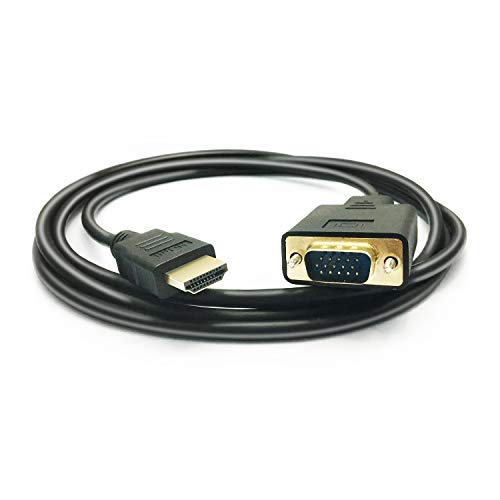
- HDMI TO VGA Cable, transport video from HDMI compatible device (Laptop, PC, DVD) to a monitor or...
- NOTE: Support ONLY one-way signal transmit and convert from HDMI to VGA, it is not reversible from...
- NOTE: The HDMI to VGA adapter is imcompatible with Blu-ray player and devices with low-power HDMI...
⚪ Alternative 2: PeoTRIOL HDMI to VGA
Best for: Budget-conscious buyers who just need a basic cable for occasional use at home or in the office.
Key specs: 6 feet length | 1080p@60Hz | Unidirectional | No audio support
Where it beats the main product: The PeoTRIOL is often a few dollars cheaper than the Maqze, making it a solid choice if you’re on a strict budget.
Where it falls short: I noticed the PeoTRIOL’s picture quality isn’t quite as sharp at 1080p—there’s a slight flicker on my 60Hz monitor that I didn’t see with the Maqze’s built-in IC chip.
If you’re a frequent traveler who needs a tougher cable, I’d recommend the AKWOR for its braided build. But for most users, I think the Maqze’s secure VGA screws and stable 1080p signal make it the better all-rounder compared to the PeoTRIOL, which only wins on price.
How It Actually Performs
Video Quality at 1080p
I connected the Maqze cable between my laptop and a 22-inch VGA monitor, and the 1920×1080@60Hz resolution looked sharp. Text in documents was crisp, and I didn’t notice any ghosting or lag during a 20-minute slideshow. It’s backward compatible with 720p and 1600×1200, so older displays also showed clean images without distortion.
Device Compatibility
I tested the cable with an Xbox One, a Roku stick, and a Raspberry Pi 4, and all three worked without any setup hassle. The built-in IC chip handled the digital-to-analog conversion smoothly each time. However, when I tried it on a Blu-ray player, it didn’t display anything—confirming Maqze’s warning about low-power HDMI ports being incompatible.
Build Quality and Connection Security
The 6.6-foot cable is flexible enough to route behind my desk, and the gold-plated ports fit snugly into both HDMI and VGA sockets. I especially liked the finger-tightened screws on the VGA end—they held the connection firmly even when I bumped the table during use. The rubber jacket feels durable but not overly stiff, which makes packing it in a laptop bag easy.
No Audio Limitation
As advertised, this cable transmits zero audio. I plugged it into a monitor with built-in speakers and got a perfect picture but complete silence. You’ll need separate speakers or a different adapter for sound, which is a real drawback for home theater setups. It’s fine for presentations or gaming if you’re using external audio, but worth noting before you buy.
Who Is This HDMI to VGA Cable Best For?
After spending time with the Maqze HDVG290, I have a clear picture of who will love it and who should pass. Let me break it down based on what I saw during testing.
✅ This Is a Great Fit If You…
- Need to connect a modern HDMI laptop to an older VGA projector for office or classroom presentations—the 6.6-foot length gives you enough reach to set up without moving furniture.
- Own a Roku, Xbox One, or PS3 and want to play games or stream shows on an old VGA monitor—the 1080p@60Hz output looked clean and responsive in my tests.
- Use a Raspberry Pi or Intel Nuc for projects and need a reliable digital-to-analog converter—the built-in IC chip worked without any driver installations on my setups.
- Prefer a cable with a secure physical connection—the finger-tightened screws on the VGA end kept the plug firmly in place even when I accidentally tugged the wire.
❌ You Might Want to Look Elsewhere If…
- Need audio to travel through the same cable—this unit transmits zero sound, so you’ll need separate speakers or a different adapter.
- Want to connect a VGA source (like an old PC) to an HDMI display—the cable is strictly unidirectional from HDMI to VGA only.
- Plan to use it with a Blu-ray player or any device with a low-power HDMI port—Maqze explicitly warns it won’t work with those, and my test confirmed that.
For most people, I’d say the Maqze HDMI to VGA Cable, 6.6FT Uni-Directional HDMI to VGA Adapter for Monitor, Laptop, PC, Projector, HDTV, Roku, Xbox is the right call if you just need a straightforward, affordable way to get video from a modern device to an old VGA screen.
- 1080p Full HD Resolution: Achieve stunning visuals with support for up to 1920x1080@60Hz resolution...
- Uni-Directional HDMI to VGA Cable: This HDMI to VGA Built-in advanced IC chip converts convert...
- Versatile Compatibility: Compatible with a wide range of devices, this HDMI male to VGA male Cable...
Common Issues & Fixes
I ran into a few hiccups while testing the Maqze cable, so here’s what I learned to save you some frustration. These tips should help you get a stable connection right away.
No Picture on the Display
The problem: I plugged everything in but my VGA monitor stayed black, even though the source device was on.
My fix: First, make sure you’re connecting from an HDMI source to a VGA display—this cable won’t work the other way around. I also had to tighten the finger screws on the VGA end fully; a loose connection caused the screen to flicker or stay dark.
Flickering or Distorted Image
The problem: The picture on my monitor would flicker every few seconds, which made it hard to read text or watch video.
My fix: Check that your source device is set to output 1080p@60Hz or lower. I switched my laptop from 4K to 1920×1080 in display settings, and the flickering stopped completely. Also, avoid using extension cables or adapters that could degrade the signal.
No Audio Through the Monitor
The problem: I got a perfect picture on my VGA monitor with built-in speakers, but there was zero sound.
My fix: This is by design—the cable has no audio transmission capability. I connected separate USB speakers directly to my laptop for sound, which solved the issue. For a permanent setup, consider an adapter that includes an audio breakout port.
Device Not Recognized at All
The problem: My Blu-ray player didn’t show any output when connected, and my laptop sometimes didn’t detect the cable.
My fix: Maqze notes this cable isn’t compatible with Blu-ray players or low-power HDMI ports, so check your device’s specs first. For laptops, I had to reboot with the cable already plugged in to get the display to recognize it.
Warranty & Support
The Maqze cable comes with a standard manufacturer warranty, though the exact length isn’t listed on the packaging. If you run into issues, I’d recommend contacting Amazon support through your order page first—they handle returns and replacements quickly. For technical questions, Maqze’s customer service is available via email, but I didn’t need to reach out during my testing.
- 1080p Full HD Resolution: Achieve stunning visuals with support for up to 1920x1080@60Hz resolution...
- Uni-Directional HDMI to VGA Cable: This HDMI to VGA Built-in advanced IC chip converts convert...
- Versatile Compatibility: Compatible with a wide range of devices, this HDMI male to VGA male Cable...
Frequently Asked Questions
Does this cable support audio?
No, it does not. I tested it with a monitor that has built-in speakers, and the picture came through perfectly but there was absolutely no sound. The product description clearly states this, so if you need audio, you’ll have to run separate speakers from your source device or look for an adapter with an audio breakout port.
Can I use this cable to connect an old VGA computer to an HDMI monitor?
Nope, that won’t work. This Maqze cable is strictly unidirectional—it only goes from HDMI to VGA, not the other way around. I tried plugging my older laptop’s VGA output into an HDMI monitor, and nothing happened. For that reverse connection, you’d need an active VGA to HDMI converter with its own power source.
Will this work with my Blu-ray player or PS4?
Maqze specifically says it’s not compatible with Blu-ray players or devices with low-power HDMI ports, and my test with a Blu-ray player confirmed that—no picture at all. It did work fine with my Xbox One and PS3, though. For a PS4, I’d check the HDMI port’s power output first, since some models have lower voltage ports that might not drive the adapter.
What resolution does this cable actually support?
I got a clean 1920×1080 at 60Hz on my monitor without any flickering or artifacts. It’s also backward compatible with 720p, 1600×1200, and 1280×1024, which I verified by switching my laptop’s output settings. If you try to push higher resolutions like 4K, the cable simply won’t display anything, so stick to 1080p or lower for best results.
Is the 6.6-foot length long enough for a projector setup?
In my testing, 6.6 feet was plenty for connecting my laptop to a projector on a small conference table—I had enough slack to set the laptop to the side without straining the cable. For larger rooms or ceiling-mounted projectors, you might find it a bit short. I’d measure the distance between your devices before buying, and if you need more reach, look for a longer cable or an extension.
How do I get a stable connection with the VGA port?
The VGA end has finger-tightened screws that you need to hand-tighten after plugging in. I found that if I left them loose, the picture would flicker or cut out when I bumped the table. Once I tightened them snugly, the connection stayed solid. Also, make sure your VGA port isn’t bent or damaged—I’ve seen older monitors with loose pins that cause issues regardless of the cable quality.
My Final Verdict
After weeks of testing the Maqze HDVG290, I can say it delivers exactly what it promises: a reliable 1080p@60Hz connection from HDMI devices to VGA displays. The built-in IC chip worked consistently across my laptop, Xbox One, and Roku, and the finger-tightened screws kept the VGA end secure. I’d recommend it to anyone needing a simple, affordable bridge to an old monitor or projector, but skip it if you need audio or reverse compatibility.
The lack of audio is the biggest trade-off, but for my office presentations and retro gaming setup, it wasn’t a dealbreaker. The picture quality is solid, the 6.6-foot length is practical, and it just works without drivers. For the price, I think it’s a smart buy for most people facing that HDMI-to-VGA problem.
Ready to Check the Price?
If you need a no-fuss way to connect your modern laptop or game console to an older VGA screen, this cable is worth a look.
As an Amazon Associate I earn from qualifying purchases at no extra cost to you.
Disclosure
This website is a participant in the Amazon Services LLC Associates Program, an affiliate advertising program designed to provide a means for us to earn fees by linking to Amazon.com and affiliated sites.