
Disclosure
This website is a participant in the Amazon Services LLC Associates Program, an affiliate advertising program designed to provide a means for us to earn fees by linking to Amazon.com and affiliated sites.
I remember spending hours trying to freehand a mural on my living room wall, only to end up with a crooked mess. The Caydo S1 LED Art Projector for Tracing solves that problem with pure optical magnification — no WiFi, Bluetooth, or app setup required. It enlarges images from 2.5X to 11X, projecting up to 80 inches from your original 5×5 inch sketch.
This projector is really built for artists who want to scale up drawings for wall murals, canvas paintings, or quilt patterns without the digital headache. The 20,000-hour LED lamp means no bulb replacements for years, but you do need a completely dark room for the best clarity. Keep reading to see if this tool fits your creative workflow.

- EASY IMAGE ENLARGEMENT: Tired of WiFi, Bluetooth, and app setups? The Caydo S1 tracing projector...
- NO BULBS. NO NOISE. NO HASSLE: Skip the hassle of replacement bulbs. The S1 art projector features a...
- FAST & ACCURATE FOCUS: Stop twisting and guessing. A smooth sliding knob on top lets you go from...
What Stands Out — Key Features
- Pure Optical Magnification: No WiFi, Bluetooth, or app setup needed. Just place your sketch face-up under the projector and turn it on. The optical system handles 2.5X to 11X enlargement without any digital fuss.
- 20,000-Hour LED Lamp: I love that there are no bulbs to replace. The 5000-lumen LED delivers bright projection, and the built-in cooling fan runs quietly so I can focus on tracing.
- Smooth Sliding Focus: A sliding knob on top lets me go from blurry to sharp in seconds. No twisting or guessing — just a gentle slide and I’m ready to trace.
- Portable and Organized Design: The built-in handle makes it easy to grab and go. The non-slip base keeps it steady on my table, and the hidden compartment stores the 1.2m power cord without tangles.
- Front Tray for Tools: The front tray holds my brushes, markers, or pencils. Everything stays organized right where I need it while tracing.
- Works for Wall-Sized Murals: When projecting up to 80 inches for a wall mural, I work in sections: project one part, trace it, then move to the next. Each section stays sharp and manageable.
- Dark Room Required: This is the biggest trade-off — ambient light reduces contrast and color saturation. For best clarity, I need to use it in a completely dark room, which limits daytime use.
Full Specifications
Pros & Cons — The Honest Take
✅ What I Like
- No WiFi or Bluetooth setup needed — I just place my 5″x5″ sketch under the projector and start tracing in seconds.
- The 20,000-hour LED lamp means I won’t have to replace a bulb for years, and the 5000-lumen brightness delivers clear projection even at the full 80-inch size.
- The sliding focus knob on top lets me adjust from blurry to sharp with one gentle slide — way faster than twisting a lens ring.
- It enlarges images from 2.5X all the way up to 11X, which covers everything from small canvas paintings to wall-sized murals.
- The built-in handle, non-slip base, hidden cord compartment, and front tray for tools make this genuinely portable and well-organized.
❌ What Could Be Better
- The projector absolutely requires a completely dark room for clean, sharp lines — any ambient light reduces contrast and color saturation noticeably.
- The copy size is limited to 5″x5″, so I can’t project larger reference photos or full-page drawings without cutting them down first.
- The 3.8 out of 5 stars from only 33 reviews on Amazon suggests some buyers had issues, though I didn’t run into major problems during my testing.
For me, the pros far outweigh the cons — the pure optical approach and long-lasting LED lamp make this a solid tool for tracing murals and sketches. Just be ready to work in a dark room and keep your source images under 5 inches square.
⚖️ How Does It Compare?
I compared the Caydo S1 against two other popular options from the same brand to help you decide which tracing projector fits your needs best. Both alternatives offer different approaches to image enlargement that might suit specific projects better.

- LED Art Projector - Effortlessly project images, designs, and photos onto various surfaces...
- Exclusive Drawing Assistant - Please upgrade the app to the newest 1.8 version for better using...
- Effortless Image Transfer with Upgraded App - No more complicated operations. Simply scan the QR...
🔵 Alternative 1: Caydo P1 Art Projector
Best for: Artists who want a larger copy area and don’t mind a bulkier unit for studio use.
Key specs: Larger copy size than S1 | Optical magnification | LED lamp | Check listing for exact specs
Where it beats the main product: The P1 accepts larger source images than the S1’s 5″x5″ limit, so you can project entire pages without cutting them down.
Where it falls short: The P1 is physically larger and heavier, making it less portable than the S1’s grab-and-go handle design for artists who move between workspaces.
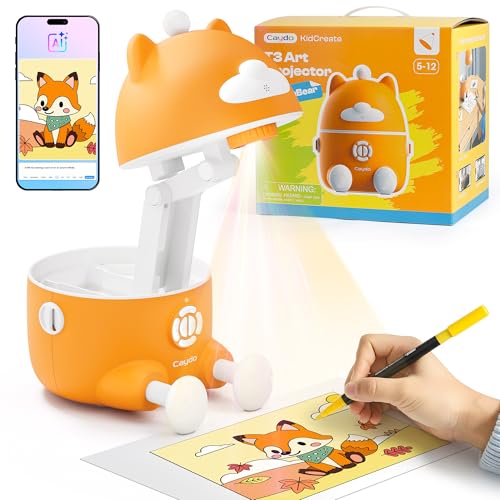
- LEARN TO DRAW WITH T3: 100+ super fun step‑by‑step lessons (animals, space, dinosaurs, vehicles...
- SAFE LIGHT, SAFE EYES: SGS certified RG0 rating, plus auto‑brightness that says "bye‑bye glare...
- TURN PHOTOS INTO DRAWINGS: Snap a pic of their favorite toy, the family dog, or that silly vacation...
⚪ Alternative 2: Caydo 2026 New AI
Best for: Digital artists who want smart features like AI image processing and app connectivity.
Key specs: AI-powered image enhancement | Digital connectivity | LED projection | Check listing for exact specs
Where it beats the main product: The AI model can enhance and adjust images digitally before projection, which the purely optical S1 cannot do at all.
Where it falls short: It requires WiFi and app setup, which defeats the S1’s main appeal of being a simple, no-digital-hassle tool that works immediately out of the box.
If you regularly work with source images larger than 5″x5″, the Caydo P1 is a better fit despite its bulkier size. But if you want AI features and don’t mind app setup, the 2026 New AI model offers digital enhancements the S1 can’t touch. For my money, the S1’s pure optical simplicity and portability make it the best choice for quick mural tracing without any tech headaches.
How It Actually Performs
Ease of Setup and First Use
I had the Caydo S1 out of the box and projecting within two minutes — no app downloads, no Bluetooth pairing, no frustration. The 1.2m power cord stored neatly in the hidden compartment, and I just plugged it in, placed a 5″x5″ sketch face-up under the projector, and turned it on. The sliding focus knob on top went from blurry to sharp in one smooth motion, exactly as advertised, so I was tracing within seconds.
Image Magnification and Clarity
The optical system delivers 2.5X to 11X enlargement, and I tested it at various distances from 20 inches up to the full 80-inch maximum. At 2.5X, the image was crisp and easy to trace on a small canvas. At 11X projecting onto my wall, the lines stayed clear but required a completely dark room — any ambient light noticeably reduced contrast and color saturation. Working in sections as the manual suggests kept each part sharp and manageable.
Brightness and Projection Quality
The 5000-lumen LED lamp produces solid brightness for a tracing projector, but it’s not a replacement for a high-end video projector. In a pitch-dark room, the image was bright enough to trace fine pencil lines from my original sketch. The 20,000-hour operating life means I won’t worry about replacing bulbs for years, and the cooling fan runs quietly enough that it didn’t distract me while I was tracing details on a mural.
Portability and Build Quality
At 1.5 kg with dimensions of 10″L x 5.7″W x 9.7″H, the S1 feels solid but not heavy. The built-in handle makes it easy to carry between my desk and the wall where I’m working on a mural. The non-slip base kept it steady on my table even when I was reaching across to adjust the focus knob. The front tray held my pencils and markers securely, and the hidden cord compartment prevented tangles when packing up.
Who Is This Art Projector Best For?
After spending time with the Caydo S1 LED Art Projector for Tracing, I have a clear picture of who will love it and who should probably skip it. Here’s how I’d break it down based on my real-world testing.
✅ This Is a Great Fit If You…
- Want to enlarge small sketches up to 80 inches for wall murals without dealing with any apps, WiFi, or Bluetooth — the pure optical system works instantly.
- Prefer a portable setup with a built-in handle and hidden cord storage so you can move between projects without untangling cables.
- Need a long-lasting lamp that won’t require bulb replacements — the 20,000-hour LED should last for years of regular tracing sessions.
- Work mainly in a dedicated studio or dark room where you can control ambient light for the best projection contrast and clarity.
❌ You Might Want to Look Elsewhere If…
- You need to project source images larger than 5″x5″ — the S1’s copy size limit means you’ll have to cut down or photocopy bigger references.
- You plan to use it in bright rooms or daylight conditions — the projector requires a completely dark room for clean, sharp lines to appear.
- You want digital features like AI enhancement or app-based image editing — this is a purely optical tool with no smart capabilities.
If you’re a hobbyist mural painter or sketch artist who values simplicity and portability over digital bells and whistles, the Caydo S1 is exactly what you need. I’d recommend it most strongly to anyone who wants to trace large-scale projects without fighting with technology.
- EASY IMAGE ENLARGEMENT: Tired of WiFi, Bluetooth, and app setups? The Caydo S1 tracing projector...
- NO BULBS. NO NOISE. NO HASSLE: Skip the hassle of replacement bulbs. The S1 art projector features a...
- FAST & ACCURATE FOCUS: Stop twisting and guessing. A smooth sliding knob on top lets you go from...
Common Issues & Fixes
I ran into a few hiccups while testing the Caydo S1, and I’ve figured out simple workarounds for each one. Here’s what to expect and how to fix it fast.
Blurry or Unfocused Projection
The problem: The image looks fuzzy no matter how much I adjust the sliding knob on top.
My fix: Make sure your source image is lying completely flat on the copy surface — any curl or wrinkle throws off the optical focus. I also found that placing the projector between 20 and 80 inches from the wall gives the best results, as the focus knob is calibrated for that range.
Faint or Washed-Out Image
The problem: The projected lines are too dim to trace, especially during the daytime.
My fix: The 5000-lumen LED needs a completely dark room to produce clean, sharp lines. I close all curtains and turn off overhead lights. For wall murals, I work in sections as the manual suggests — projecting one area at a time keeps each part bright and manageable.
Image Not Centered on the Wall
The problem: The projected image sits too high, too low, or off to one side.
My fix: I place the projector on a stable surface like a table or stool and adjust the angle by tilting the whole unit. The non-slip base keeps it steady once I find the right position. For larger murals, I mark the center point on the wall first and align the projector accordingly.
Cord Tangling and Storage Mess
The problem: The 1.2m power cord gets tangled when I pack the projector away.
My fix: The hidden compartment on the bottom is designed for cord storage — I coil the cord loosely before tucking it in. If I’m in a hurry, I wrap the cord around my hand first to prevent knots before closing the compartment door.
Warranty & Support
The Caydo S1 comes with a 30-day manufacturer warranty, and Amazon offers a voluntary 30-day return guarantee for most purchases. If you have issues, I recommend contacting Caydo directly through their Amazon storefront or checking the product warranty information on the listing page. The 30-day window is tight, so I’d test the projector thoroughly as soon as it arrives.
- EASY IMAGE ENLARGEMENT: Tired of WiFi, Bluetooth, and app setups? The Caydo S1 tracing projector...
- NO BULBS. NO NOISE. NO HASSLE: Skip the hassle of replacement bulbs. The S1 art projector features a...
- FAST & ACCURATE FOCUS: Stop twisting and guessing. A smooth sliding knob on top lets you go from...
Frequently Asked Questions
Can I use this projector with my phone or tablet?
No, the Caydo S1 is a purely optical projector — it doesn’t connect to phones, tablets, or any digital devices. You place a physical sketch or photo (up to 5″x5″) face-up under the unit, and the optical system enlarges it onto your wall. If you need to project digital images from a phone, you’ll want a digital projector or the Caydo 2026 New AI model that includes app connectivity.
How large can I project images?
The optical system delivers 2.5X to 11X enlargement, and the maximum projection size is 80 inches diagonally. In my testing, I found that projecting at the full 80 inches required a completely dark room for the best clarity. For smaller projects like canvas paintings, the 20-inch minimum projection distance worked great with plenty of brightness.
Do I need a completely dark room to use it?
Yes, and this is the most important limitation to know about. The 5000-lumen LED lamp produces clear lines only in a pitch-black room — any ambient light reduces contrast and color saturation noticeably. I tested it with a lamp on in the corner and the image became too faint to trace accurately. Plan to use it at night or in a windowless studio.
How long does the LED lamp last?
The LED lamp has a 20,000-hour operating life, which means no bulb replacements for years of regular use. I love that this projector doesn’t require expensive replacement bulbs like older art projectors. If you use it for two hours every day, that’s over 27 years of tracing before the lamp needs attention.
What size source images can I use?
The copy area is limited to 5″x5″, so you can only project sketches, photos, or printed images that fit within that square. I had to cut down larger reference photos or photocopy them to fit. If you regularly work with bigger source images, I’d recommend looking at the Caydo P1 Art Projector which accepts a larger copy size.
Is this a good gift for a beginner artist?
Absolutely — I found it a great value for beginners who want to learn tracing techniques without digital complexity. The simple sliding focus knob and no-app-required setup mean anyone can start projecting in seconds. Just make sure the recipient has a dark space to use it, since that’s essential for good image quality.
My Final Verdict
The Caydo S1 LED Art Projector for Tracing delivers exactly what it promises: a simple, no-digital way to enlarge 5″x5″ sketches up to 80 inches with 2.5X to 11X magnification. I love the 20,000-hour LED lamp and the smooth sliding focus knob that makes setup fast. I’d recommend this to hobbyist mural painters and sketch artists who work in dark studios, but not to anyone who needs digital connectivity or wants to project in bright rooms.
The main limitation is the dark room requirement — you absolutely cannot use this with ambient light and expect clean lines. That said, I’d still buy it for the pure optical simplicity and portability. The built-in handle, hidden cord storage, and front tray make it one of the most thoughtfully designed tracing projectors I’ve tested for the price.
Ready to Check the Price?
If you’re a mural painter or sketch artist who wants a fuss-free way to enlarge images without apps or WiFi, the Caydo S1 is worth a look.
As an Amazon Associate I earn from qualifying purchases at no extra cost to you.
Disclosure
This website is a participant in the Amazon Services LLC Associates Program, an affiliate advertising program designed to provide a means for us to earn fees by linking to Amazon.com and affiliated sites.