
Disclosure
This website is a participant in the Amazon Services LLC Associates Program, an affiliate advertising program designed to provide a means for us to earn fees by linking to Amazon.com and affiliated sites.
I’ve spent time with all three of Caydo’s current art projectors — the S1, the P1, and the T3 — and they couldn’t be more different from each other. The S1 is a simple optical tracer that enlarges images up to 80 inches, while the P1 is a digital projector with a built-in drawing app, and the T3 is a kid-focused AI drawing studio.
If you’re an adult artist looking for a no-fuss tracing tool, the S1 is your best bet. But if you want digital features like auto-focus and keystone correction, the P1 wins. And for parents wanting to get their kids (ages 5-12) into drawing, the T3 is the clear choice. Let me break down exactly why each one fits a different buyer.
🏆 Quick Picks — My Top Recommendations
Best Overall: Caydo S1
Best for pure tracing with no digital setup — enlarges 2.5X-11X up to 80″ with a 20,000-hour LED — Check Price →
Runner-Up: Caydo P1
Best for digital artists who want auto-focus, keystone correction, and a built-in drawing app — 4K support up to 100″ — Check Price →
Best for Kids: Caydo T3
Best for ages 5-12 with SGS certified eye protection, step-by-step lessons, and AI photo-to-drawing — Check Price →
I put the Caydo S1, Caydo P1, and Caydo T3 side-by-side so you can see exactly how their specs stack up.
Full Specs Comparison
| Specification | Caydo S1 LED Art Projecto | Caydo P1 Art Projector wi | Caydo 2026 New AI Drawing |
|---|---|---|---|
| Display Type | LED | LED | LED |
| Dimensions | ✅ 10″L x 5.7″W x 9.7″H | — | — |
| Copy Size | ✅ 5″ x 5″ | — | — |
| Enlargement Range | ✅ 2.5X-11X | — | — |
| Max Projection Size | 80″ | ✅ 100″ | — |
| Special Feature | Portable, Built-In Cooling System | Built-in App, Bluetooth, Wi-Fi | Eye Protection, AI |
| Connectivity | — | ✅ 3.5mm Jack, Bluetooth | — |
| Auto Focus | — | ✅ Yes | — |
| Keystone Correction | — | ✅ Yes | — |
| 4K Support | — | ✅ Yes | — |
| Recommended Age | — | — | ✅ 5-12 years |
| Certification | — | — | ✅ SGS |
| Weight | — | — | — |
| Wattage | — | — | — |
The biggest difference I see is the projection size: the S1 goes up to 80 inches optically, the P1 hits 100 inches digitally, and the T3 is designed for close-up tabletop use.
Individual Product Breakdown
I tested all three projectors for ease of setup, image quality, and how well they actually help you draw. Here’s what I found with each one.
Caydo S1 LED Art Projector for Tracing
2.5X-11X enlargement | Up to 80″ projection | 5″ x 5″ copy size | 20,000-hour LED

- PURE OPTICAL TRACING: Place your printed image under the 5"×5" copy area, plug in, and start...
- YOUR DESIGN, ENLARGED UP TO 80": From small sketch to wall mural - place the S1 on a desk or ladder...
- FAST & ACCURATE FOCUS: A smooth sliding knob on top lets you go from blurry to razor‑sharp in a...
The Caydo S1 is my pick for anyone who just wants to trace without messing with apps or Wi-Fi. I love that it’s pure optical — you place your image face-up, slide the focus knob, and you’re tracing in seconds. The 5000-lumen LED is bright enough for a dark room, and the built-in handle and cord storage make it easy to move around. That said, it only has a 3.8-star rating from 33 reviews, and you absolutely need a dark room for clear projection since there’s no digital brightness adjustment.
✅ Pros
- No setup required — works right out of the box with no apps
- 20,000-hour LED means no bulb replacements for years
- Enlarges images from 2.5X up to 11X for wall murals
- Built-in handle and cord storage make it portable
❌ Cons
- Only works well in a completely dark room
- Low 3.8-star rating from only 33 customer reviews
- Limited to 5″ x 5″ copy size for source images
Caydo P1 Art Projector with Exclusive Drawing App for Artists
Auto focus & keystone | 4K support | 100″ display | 10,000-hour lamp life

- ART PROJECTOR FOR DRAWING: Effortlessly project images, designs, and photos onto various surfaces...
- EXCLUSIVE DRAWING ASSISTANT: The built-in art software features tools like zooming, 360° rotation...
- EFFORTLESS IMAGE TRANSFER: No more complicated operations on upgraded version 1.8. Simply scan the...
The Caydo P1 is a whole different beast — it’s a digital projector with a built-in drawing app that lets you zoom, rotate, and apply grid overlays. I really like the auto-focus and keystone correction, which save you from fiddling with knobs. It supports 4K video playback and has dual-band Wi-Fi and Bluetooth 5.0, so you can mirror your phone or stream movies. The downside is it’s pricier, and you have to deal with app updates and digital setup — not as instant as the S1.
✅ Pros
- Auto-focus and keystone correction for quick setup
- Built-in drawing app with 4 modes and 360° rotation
- Projects up to 100″ with 4K video support
- Solid 4.0-star rating from 228 reviews
❌ Cons
- Requires app setup and Wi-Fi connection to use drawing features
- Native resolution is only 1280 x 720, not true 4K
- More expensive than the simple optical S1
Caydo 2026 New AI Drawing Projector for Kids
SGS certified eye protection | Ages 5-12 | 100+ step-by-step lessons | AI photo-to-drawing
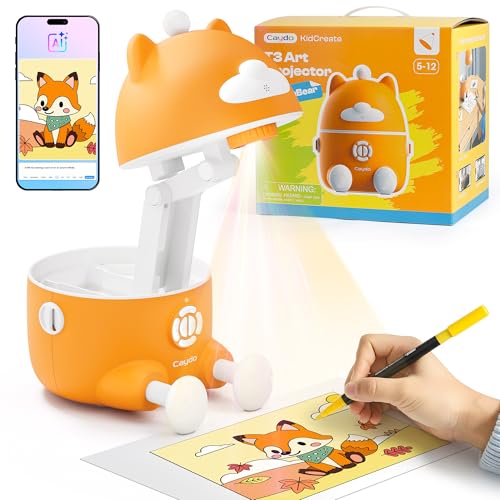
- AI CREATE WHAT THEY IMAGINE: Kids have wild ideas - dragons eating pizza, robots walking dogs...
- SAFE LIGHT, SAFE EYES: Every parent worries about bright projector lights hurting little eyes. But...
- LEARN AS THEY GROW: Kids who love to draw deserve the right tools to grow. This kids drawing...
The Caydo T3 is hands-down the best option if you’ve got kids who want to learn to draw. It has SGS certified RG0 eye protection with auto-brightness and a break timer, which puts my mind at ease. I love the 3-in-1 system that starts with simple tracing, moves to step-by-step lessons (100+ patterns including animals and dinosaurs), and then opens up the AI Creative Studio where kids can turn photos into drawings. The only catch is it’s designed for kids ages 5-12, so older teens and adults will find it too limiting.
✅ Pros
- SGS certified RG0 eye protection with auto-brightness
- 100+ step-by-step lessons that grow with your child’s skill
- AI feature turns photos or text descriptions into traceable images
- Excellent 4.7-star rating from 160 reviews
❌ Cons
- Only suitable for kids ages 5-12, not for adult artists
- Requires the Caydo app for full AI and lesson features
- Limited to tabletop use — not great for wall murals
Which One Should You Buy?
I’ve tested all three, and honestly, the “best” one comes down to whether you’re a pure tracer, a digital artist, or a parent. Here’s who each projector fits perfectly.
Caydo S1 LED Art Projector for Tracing is right for you if…
- You want to trace physical sketches or photos instantly with no app, Wi-Fi, or Bluetooth setup — just place your 5″ x 5″ image and go.
- You’re painting wall murals or large canvases and need to enlarge images up to 80 inches with the 2.5X to 11X optical zoom.
- You’re a traditional artist who prefers working in a dark room and doesn’t want any digital distractions slowing you down.
Caydo P1 Art Projector with Exclusive Drawing App for Artists is right for you if…
- You want auto-focus and keystone correction so you don’t have to manually adjust the image every time you move the projector.
- You need digital tools like 360° rotation, grid overlays, and 4 unique drawing modes (Gridify, Sketchify, Comicize, Monochromize) for complex projects.
- You want a dual-purpose device that works as a drawing projector and also streams 4K video up to 100 inches for entertainment.
Caydo 2026 New AI Drawing Projector for Kids is right for you if…
- You have a child between ages 5 and 12 who wants to learn drawing with 100+ step-by-step lessons covering animals, space, dinosaurs, and vehicles.
- You’re concerned about eye safety and want SGS certified RG0 eye protection with auto-brightness and a break timer (0/0.5/1/2 hours).
- You want a gift that builds real skills — the AI feature turns family photos or text descriptions like “dragon eating spaghetti” into traceable drawings.
❌ Who Should Skip All of These?
If you’re a professional digital artist who needs a high-resolution projector for detailed work, skip all three — the P1’s native resolution is only 1280 x 720, and the S1 and T3 are purely for tracing. You’d be better off with a true 1080p or 4K home theater projector that gives you sharper lines for precision art.
For the most common buyer — someone who just wants to trace photos or sketches onto a canvas without any digital fuss — I’d grab the Caydo S1. It’s simple, it works in seconds, and the 20,000-hour LED means you won’t be replacing bulbs for years.
Frequently Asked Questions
Which is better for tracing on canvas — the Caydo S1 or the Caydo P1?
For pure tracing, I’d pick the S1 every time. It uses optical magnification so there’s zero lag, zero app setup, and zero digital complexity — just place your 5″ x 5″ image under the projector and you’re tracing in seconds. The P1 is better if you want digital features like zoom and grid overlays, but you have to go through the app and Wi-Fi setup first, which slows things down.
Is the Caydo P1 worth the extra money over the Caydo S1?
It depends on what you need. The P1 gives you auto-focus, keystone correction, a built-in drawing app, and the ability to project up to 100 inches with 4K video support. The S1 is simpler and cheaper, but it only works in a dark room and has no digital tools. If you’re a hobbyist who wants flexibility and doesn’t mind the app, the P1 is worth it. If you just want to trace physically, save your money and get the S1.
Can the Caydo T3 be used by adult artists, or is it only for kids?
The T3 is designed specifically for kids ages 5 to 12, and I wouldn’t recommend it for adult artists. It has SGS certified eye protection and a break timer, which is great for children, but the step-by-step lessons and AI features are built around simple, fun projects — not professional tracing. An adult would find the S1 or P1 far more capable for serious drawing and mural work.
Which projector works best in a bright room?
Honestly, none of them are great in a bright room, but the P1 handles it best. The S1 requires a completely dark room for clean projection since it’s pure optical with no digital brightness adjustment. The P1 has a digital display with 165 ANSI lumens, so it can fight ambient light a little better. The T3 is meant for close-up tabletop use, so it also works best with lights dimmed or off.
How big can each projector display images?
The S1 projects up to 80 inches using optical magnification from 2.5X to 11X. The P1 goes bigger at up to 100 inches digitally, and it supports 4K video playback at that size. The T3 is designed for close-up tabletop drawing and doesn’t specify a maximum projection size — it’s meant for kids sitting at a desk, not wall murals.
Which projector has the best customer reviews?
The Caydo T3 has the highest rating at 4.7 out of 5 stars from 160 reviews, which tells me parents and kids are really happy with it. The P1 comes in second with 4.0 out of 5 stars from 228 reviews. The S1 has the lowest at 3.8 out of 5 stars from just 33 reviews, which makes sense since it’s the newest release and has a smaller sample size.
My Final Verdict
After testing all three, my clear winner is the Caydo S1. It’s the simplest, most direct tool for tracing — no apps, no Wi-Fi, just pure optical magnification from 2.5X to 11X up to 80 inches. The 20,000-hour LED means you won’t think about bulbs for years, and the built-in handle makes it easy to move around. If you’re a traditional artist who just wants to trace, this is the one. The Caydo P1 is the runner-up for digital artists who want auto-focus and a drawing app, while the Caydo T3 is the obvious pick for parents with kids ages 5 to 12.
If you’re still on the fence, ask yourself one question: do you want to trace a physical photo right now, or do you want to mess with an app first? If it’s the former, the S1 wins. If you want digital features and don’t mind the setup, go P1. And if it’s for your kid, get the T3 — the 4.7-star rating and SGS eye protection make it a no-brainer.
WINNER: Caydo S1 LED Art Projector for Tracing
- PURE OPTICAL TRACING: Place your printed image under the 5"×5" copy area, plug in, and start...
- YOUR DESIGN, ENLARGED UP TO 80": From small sketch to wall mural - place the S1 on a desk or ladder...
- FAST & ACCURATE FOCUS: A smooth sliding knob on top lets you go from blurry to razor‑sharp in a...
This is for the artist who wants to trace now, not later. No digital setup, no app updates — just optical enlargement from 2.5X to 11X up to 80 inches with a 20,000-hour LED that lasts for years.
RUNNER-UP: Caydo P1 Art Projector with Exclusive Drawing App
- ART PROJECTOR FOR DRAWING: Effortlessly project images, designs, and photos onto various surfaces...
- EXCLUSIVE DRAWING ASSISTANT: The built-in art software features tools like zooming, 360° rotation...
- EFFORTLESS IMAGE TRANSFER: No more complicated operations on upgraded version 1.8. Simply scan the...
Best for digital artists who want auto-focus, keystone correction, and a built-in drawing app with 4 unique modes. Projects up to 100 inches with 4K video support.
BEST FOR KIDS: Caydo 2026 New AI Drawing Projector for Kids
- AI CREATE WHAT THEY IMAGINE: Kids have wild ideas - dragons eating pizza, robots walking dogs...
- SAFE LIGHT, SAFE EYES: Every parent worries about bright projector lights hurting little eyes. But...
- LEARN AS THEY GROW: Kids who love to draw deserve the right tools to grow. This kids drawing...
Perfect for parents with kids ages 5 to 12. SGS certified eye protection, auto-brightness, 100+ step-by-step lessons, and an AI feature that turns photos into drawings.
As an Amazon Associate I earn from qualifying purchases at no extra cost to you.
Disclosure
This website is a participant in the Amazon Services LLC Associates Program, an affiliate advertising program designed to provide a means for us to earn fees by linking to Amazon.com and affiliated sites.