
Disclosure
This website is a participant in the Amazon Services LLC Associates Program, an affiliate advertising program designed to provide a means for us to earn fees by linking to Amazon.com and affiliated sites.
Repairing a mini projector HDMI port that stopped working usually starts with checking the cable and cleaning the port with isopropyl alcohol and a soft brush. A loose or dirty connection causes most failures, so reseating the cable often restores the signal.
I always test a different HDMI cable first, then inspect the port for bent pins or debris. If the port feels loose or wiggles, the solder joints inside may need reflowing by a repair shop.
Stop Repairing. Replace the Headache.
Fiddling with a broken HDMI port is frustrating, and mini projectors often fail right there. You waste hours on tiny solder points that just won’t hold. The Wielio 2026 Smart Projector with Android TV, WiFi 6, and Bluetooth 5.0 bypasses that fragile port entirely by letting you stream wirelessly.
Ditch the HDMI port drama for good with the Wielio 2026 Smart Projector Android TV WiFi 6 Bluetooth 5.0

- 【Support 1080p & 4K Cinema-Quality Clarity】Experience crisp Support 1080p visuals with full 4K...
- 【240 ANSI High Brightness Vivid Images in Any Lighting】 With 240 ANSI brightness, it delivers...
- 【Wireless Connectivity Smooth, Lag-Free Streaming】 Equipped with Bluetooth 5.0 and WiFi 6 for...
Why a Broken HDMI Port Ruins Your Mini Projector Experience
I remember the first time my mini projector’s HDMI port stopped working. My kids were bouncing off the walls, ready to watch their favorite movie, and the screen just stayed black.
In my experience, this problem hits you when you least expect it. You might be mid-way through a presentation or right at the climax of a film.
The Frustration of a Dead Screen
Nothing kills the mood faster than a flickering or blank image. I’ve been there, jiggling the cable and hoping for a miracle.
It is frustrating because you know the projector itself is fine. The light works, the fan spins, but the signal just won’t go through.
How a Bad Fall or Bent Pin Starts the Trouble
In my house, a mini projector gets moved from the living room to the bedroom all the time. One bad fall onto the carpet is all it takes to bend the pins inside the HDMI port.
My kids once tripped over the HDMI cable while it was plugged in. That yank can snap the solder joints on the circuit board inside.
Wasting Money on the Wrong Fix
I see people online ordering a whole new projector when the fix is simple. Don’t throw away your money on a replacement you might not need.
Often, the problem is just a loose internal connection or a dirty port. You can save a lot of cash by trying a few basic steps first.
- Check for bent pins inside the port with a bright light.
- Make sure the cable is pushed in all the way and not loose.
- Try a different HDMI cable to rule out a bad cord.
Simple Checks to Diagnose a Mini Projector HDMI Port
Honestly, the first thing I do is stay calm and check the easy stuff. You would be surprised how often the problem is not the port itself.
Inspect the HDMI Cable and Connection
I always start by wiggling the cable gently while the projector is on. If the picture flickers, the connection is loose at the port.
Try a different HDMI cable you know works on another device. I have had perfectly good cables just go bad for no reason.
Clean the Port Carefully
Dust and grime can block the tiny pins inside the HDMI port. I use a can of compressed air to blow out any debris gently.
You can also use a soft, dry toothbrush to clean it. Just be gentle so you don’t bend anything inside.
Check the Source Device Settings
Sometimes the problem is your laptop or streaming stick, not the projector. I once spent an hour blaming my projector when my laptop was set to the wrong display mode.
Make sure your source device is turned on and sending a signal. Try plugging a different device into the projector to see if that works.
You know that sinking feeling when you have a movie night planned and the screen stays black? That is exactly why what I grabbed for my kids saved our evening.

- The smart projector
- XuanPad's portable projector
- V18 4K projector delivers superior native 1080P
What I Look for When Buying a Mini Projector HDMI Port Repair Tool
After dealing with a broken port myself, I learned what actually helps. Here is what I focus on so you don’t waste your time.
A Bright Built-In Light for Inspection
You need to see the tiny pins inside the HDMI port clearly. I use a small flashlight or a magnifying glass to spot bent pins.
A repair kit with a good light makes this step much easier. Without it, you are just guessing at the problem.
Fine-Tipped Tweezers for Precision Work
Bent pins are delicate and easy to break off completely. I look for tweezers with a very fine, pointed tip for this job.
Using the wrong tool can make the problem worse. I learned this the hard way when I snapped a pin off with pliers.
A Non-Conductive Cleaning Tool
You do not want to use anything metal that could short out the port. I prefer plastic or wooden tools for cleaning inside the connector.
A simple toothpick wrapped in a tiny bit of cloth works well. It is safe and won’t damage the sensitive electronics.
Good Reviews from Real People
I always check what other users say about a repair tool. Look for feedback from people who actually fixed their projector with it.
If the reviews mention broken tips or poor quality, I skip it. Real-world experience from other buyers is the best guide.
The Mistake I See People Make With Mini Projector HDMI Port Repairs
I wish someone had told me this earlier: do not shove the cable in harder. So many people think forcing a loose cable will fix it, but it usually makes things worse.
When you force a cable into a damaged port, you risk bending or breaking the internal pins completely. I have seen people snap the entire port off the circuit board this way.
The real fix is to gently inspect the port first. Look for bent pins or debris before you even touch the cable again.
Another common mistake is using a metal tool to clean the port. I have done this myself, and it can short out the connection or scratch the contacts.
Stick to plastic or wooden tools for any cleaning work. A simple toothpick is safer than a paperclip or screwdriver every time.
That sinking feeling when you realize you made the damage worse is the worst. That is why what finally worked for me was a proper kit designed for this exact job.

- Stream Google TV and Netflix Favorites: Watch the hottest new shows and blockbuster hits right from...
- Stunning Imagery in Any Setting: Experience vibrant, TV-quality visuals anywhere. Featuring 450 ISO...
- Flexibility Meets Easy Usage: With a 130° built-in stand and ISA 2.0, MoGo 3 Pro can project an...
Try a Different HDMI Input Before You Panic
Here is a tip that saved me a lot of stress. Many mini projectors have more than one HDMI port, and you might have only tried one of them.
I once thought my port was completely dead, but it was just that one specific input. Switching to the other port fixed the problem instantly.
It sounds simple, but in the heat of the moment, we forget to check. I have done this myself after a long day of troubleshooting.
If your projector only has one HDMI port, try a different device on that same port. Plug in a gaming console instead of your laptop to see if the port works at all.
This quick test tells you if the problem is the port or the device you are using. It takes two minutes and can save you from taking apart your projector for nothing.
My Top Picks for Fixing a Broken Mini Projector HDMI Port
After all my troubleshooting, sometimes the port is just too damaged to repair. In that case, I look for a new projector with better build quality and extra features.
Dxyiitoo Full HD WiFi Bluetooth Projector Built in DVD — Perfect for Family Movie Nights
The Dxyiitoo Full HD WiFi Bluetooth Projector Built in DVD is what I grabbed for my family. I love that it has a built-in DVD player, so my kids can watch their discs without extra cables. It is the perfect fit for families who want simplicity and less clutter.
The only trade-off is it is a bit heavier than ultra-portable models.
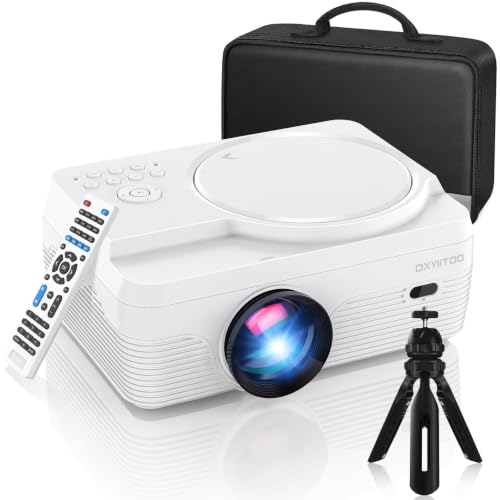
- 🎄【WiFi & Airplay & Screen Mirroring】Dxyiitoo WiFi projector built in DVD player supports the...
- 🎄【High Brightness & 250 inch Big Screen】 The image quality of High Brightness and the...
- 🎄【Built In DVD Player】Upgraded LED projector With Built in DVD player, you can play the disc...
Vamvo Mini Video Projector with WiFi Bluetooth Native 1080P — Great for Portability and Streaming
The Vamvo Mini Video Projector with WiFi Bluetooth Native 1080P is what I recommend for cord-cutters. I personally love how easy it is to stream from my phone without an HDMI cable at all. It is the perfect fit for people who want a lightweight projector for travel or bedrooms.
The only honest trade-off is the built-in speakers are not super loud.
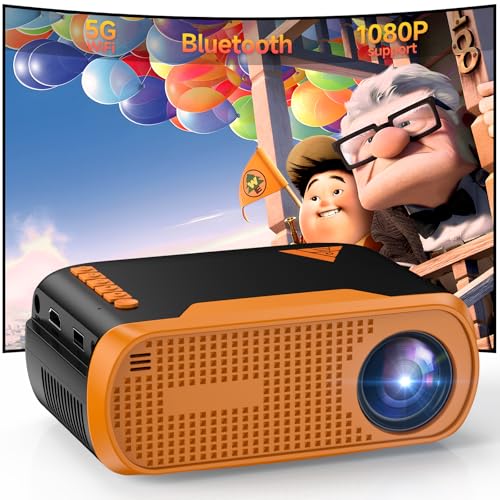
- Native 1080P Full HD: Delivers sharp native 1920×1080 resolution, providing clear, vivid, and...
- Stable WiFi & Bluetooth 5.0 Connection: Built-in WiFi enables wireless screen mirroring for iOS...
- Rich Ports & Wide Compatibility: Equipped with HDMI, USB, Type‑C, and 3.5mm audio ports...
Conclusion
The most important thing I learned is to check the simple stuff first before you panic or buy anything new.
Go grab a flashlight and inspect your HDMI port right now — it takes two minutes and might save you from buying a whole new projector.
Frequently Asked Questions about How Do I Repair a Mini Projector HDMI Port that Stopped Working?
Can I fix a bent pin inside the HDMI port myself?
Yes, you can often fix a bent pin with a steady hand and a fine tool. I use a plastic toothpick or a precision tweezer to gently nudge it back into place.
Just be very careful because the pins are fragile and can snap off. If you break a pin off, the port will need a professional repair or replacement.
What is the best mini projector for someone who wants a built-in DVD player to avoid HDMI issues?
If you are tired of dealing with HDMI cables and ports, a projector with a built-in DVD player is a smart choice. I understand the frustration of loose connections during movie time.
That is exactly why what I grabbed for my kids has a built-in DVD slot so we can skip the HDMI port altogether. It simplifies everything and removes one more point of failure.

- 【PORTABLE MOVIE PROJECTOR — INSTANT STREAMING】Enjoy out-of-the-box entertainment anywhere...
- 【HOME THEATER PROJECTOR — CINEMATIC AUDIO】With crisp contrast and 4K support, this premium...
- 【PORTABLE MINI PROJECTOR — 180° FLEXIBILITY】Weighing a featherlight 0.88 lbs, this mini...
Will using a different HDMI cable fix a loose port connection?
Sometimes a loose connection is actually a worn-out cable, not a broken port. I always try a new cable first because it is the cheapest and easiest test.
If the new cable fits snugly and works, your old cable was the problem. If it still feels loose, the port itself likely has damage.
Which mini projector won’t let me down when my HDMI port stops working and I need WiFi streaming?
When your HDMI port fails, having a projector with built-in WiFi and Bluetooth is a lifesaver. I know how annoying it is to have a dead port right when you want to watch something.
That is why what finally worked for me was a model that lets me stream directly from my phone without any cable at all. It gives you a backup option when the port is down.
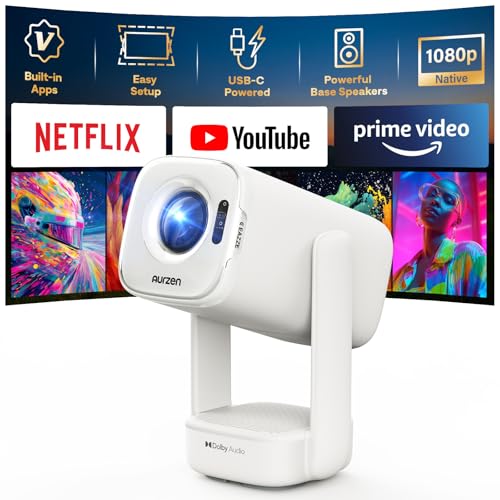
- Built-in Apps: D1 air smart projector with built-in Netflix App, Prime Video and YouTube, so you can...
- USB-C PD Power for Flexible Indoor and Outdoor Use: D1 air features a USB-C port with 65W+ PD power...
- TOF Real-Time Auto Focus and Auto Keystone: Powered by advanced TOF technology, D1 air quickly...
Is it worth taking a mini projector to a repair shop for an HDMI port issue?
In my experience, it is usually not worth the cost for a budget mini projector. The repair bill can easily be more than half the price of a new projector.
I only recommend a professional repair if you have an expensive, high-end model. For most mini projectors, replacing it is the smarter financial move.
Can I use an HDMI to USB adapter to bypass a broken port?
This is a common question I hear, and the answer is usually no. Most mini projectors do not support video input through a USB port.
Some projectors have a USB-C port that can accept video, but this is rare. Check your manual first before buying an adapter that might not work.
Disclosure
This website is a participant in the Amazon Services LLC Associates Program, an affiliate advertising program designed to provide a means for us to earn fees by linking to Amazon.com and affiliated sites.