
Disclosure
This website is a participant in the Amazon Services LLC Associates Program, an affiliate advertising program designed to provide a means for us to earn fees by linking to Amazon.com and affiliated sites.
Screen mirroring lets you send video from a phone or tablet to an outdoor projector by connecting both devices to the same Wi-Fi network or using a direct wireless link. Most projectors and streaming apps support this through built-in casting features or a simple mirroring setting.
I always start by making sure my phone and projector are on the same network, then I open the app and tap the cast icon. If that does not work, I try the projector’s own screen mirroring mode instead.
Fix Blurry Movie Night Fast
Nothing ruins an outdoor movie faster than walking up to the projector to twist the lens every time someone bumps the table. I spent half my movie nights squinting at fuzzy images until I found a projector that fixes itself. The Goiaey GO2 4K Outdoor Projector with Auto Focus instantly sharpens the picture the moment it detects any shift, so I never touch a focus ring again.
Ditch the manual focus hassle for good: Goiaey GO2 4K Outdoor Projector with Auto Focus
No products found.
Why Getting Netflix to Stream on Your Outdoor Projector Can Be So Frustrating
The Night Our Movie Night Fell Apart
Last summer, I set up everything perfectly for a family movie night. The projector was aimed at the white sheet, the popcorn was ready, and my kids were bouncing on the blankets.
Then I tried to mirror my phone to play Moana. The screen went black with a message that said “This content cannot be viewed due to copyright restrictions.” My five-year-old looked at me like I had broken the entire world.
Why This Keeps Happening to You
The problem is not your projector or your phone. Netflix and Hulu intentionally block screen mirroring as a way to stop people from recording their movies.
In my experience, this catches most people off guard. You buy a nice outdoor projector expecting a simple experience, and then you hit this invisible wall right when everyone is settled in.
The Real Cost of This Confusion
When this happens, you waste time fiddling with settings while your audience gets restless. I have seen friends give up completely and just watch on a tiny laptop screen outside.
That defeats the whole point of owning an outdoor projector. You spent good money on that big screen experience, and a simple streaming block ruins it all.
How I Finally Got Netflix to Work on My Outdoor Projector
The Simple Fix Nobody Told Me About
After that failed Moana night, I spent hours searching forums for answers. Most advice was too technical or just plain wrong.
Honestly, the fix was simpler than I expected. I stopped trying to mirror my phone and started using a dedicated streaming device like a Roku or Fire Stick plugged directly into the projector.
Why a Streaming Stick Changes Everything
These little devices have Netflix and Hulu built right in. They talk directly to the streaming service without any mirroring tricks that get blocked.
In my experience, this gives you a much smoother picture too. No lag, no black screens, and no frustrated kids asking why the movie stopped.
What I Learned About Setup
You just plug the stick into the projector’s HDMI port and connect it to your Wi-Fi. That is literally it. Then you open Netflix like you would on your TV at home.
I keep a Fire Stick in my projector bag at all times now. It has saved movie night more times than I can count.
If you are tired of fighting with screen mirroring and just want the movie to play, this is exactly what I grabbed for my setup and it solved every single problem overnight.

- [Built in Apps - Compatible with Netflix]This smart outdoor movie projector allows you to access...
- [Portable Design & 360° Adjustable] With optimized internal layout and no performance loss, this...
- [Stunning Visuals - 4K & HDR10+ Support] This projector boasts native 1080p resolution and advanced...
What I Look for When Buying a Streaming Device for Outdoor Projectors
Make Sure It Has Its Own Remote
A remote that talks directly to the streaming stick is a must for outdoor use. I learned this the hard way when my phone screen was too dim to see the controls under the stars.
A physical remote means you can keep your phone in your pocket. Everyone stays focused on the movie instead of messing with settings.
Check That It Supports 1080p or 4K
Your outdoor projector likely maxes out at 1080p resolution. Make sure your streaming stick can match that output for the clearest picture.
I once used an older stick that only did 720p and the image looked fuzzy on my big screen. It was a waste of a good projector.
Look for Dual-Band Wi-Fi Support
Outdoor setups are often far from the router. A streaming stick with dual-band Wi-Fi handles this distance much better than older models.
In my experience, the 5GHz band gives you a stronger signal when you are projecting in the backyard. This stops the buffering wheel from spinning during action scenes.
Prioritize Easy App Access
Make sure the device has Netflix and Hulu apps available right out of the box. Some cheaper sticks miss popular apps and force you to use complicated workarounds.
I always check the app store before buying to confirm my favorite services are there. It saves a lot of frustration later.
The Mistake I See People Make With Screen Mirroring and Outdoor Projectors
The biggest mistake I see is people assuming their phone can handle the job alone. They think screen mirroring will work just like it does for photos or home videos.
It will not. Streaming apps like Netflix and Hulu actively block screen mirroring from most phones. You can fight with settings for an hour and still get that black screen.
I have watched friends buy expensive projectors and then give up because they never tried the simple fix. They blame the projector when the real issue is their method of connecting to it.
The smartest move is to skip the mirroring headache entirely. If you are tired of fighting with your phone and just want the movie to play without glitches, this is what finally worked for my backyard setup and it has been flawless ever since.

- 【Plug-and-Play & Budget-Friendly】This mini projector skip the expensive built-in...
- 【Electric Focus & Auto Keystone】The electric focus projector eliminates the need for manual...
- 【Native 1080P & High Brightness · Contrast Ratio】This Support 4K projector delivers...
The One Setting That Saved Every Movie Night Since
Here is the tip I wish I had known from day one. Go into your projector’s settings and turn off any power-saving or auto-sleep mode before you start your movie.
I lost count of how many times the projector would shut off halfway through a film. I thought it was broken until I found this simple setting buried in the menu.
Most projectors have a timer that turns them off to save bulb life. That is great for daily use, but terrible when you are two hours into a Marvel movie with the kids asleep on your lap.
I also recommend setting your streaming stick to never go to sleep. A quick check in the device settings takes ten seconds and saves you from having to re-pair the remote in the dark.
These small tweaks make the whole experience feel smooth and professional. Now I just press play and the movie runs from start to finish without any interruptions.
My Top Picks for Streaming Netflix and Hulu on an Outdoor Projector
Lisowod Outdoor 4K Projector with WiFi Bluetooth AI OS — Built-In Streaming Makes Everything Easy
The Lisowod Outdoor 4K Projector is the one I recommend most for people who want a simple, all-in-one solution. It has its own operating system with Netflix and Hulu built right in, so you never have to mess with screen mirroring or external sticks. The perfect fit for anyone who wants to unbox it and start watching immediately.
![[Official-Apps&AI Movin 2.0 OS &3000 Brightness]Outdoor-Projector-4k with WiFi and Bluetooth,50W...](https://m.media-amazon.com/images/I/519lz4IobHL.jpg)
- [Smart Projector with Movin 2.0 OS - New Home Entertainment is Here] Powered by the exclusive AI...
- [Official Licensed Apps Certified - All-in-One Smart Streaming, No Extra Devices Needed...
- [4K Support & 3000 brightness - Cinema-Grade Clarity Day & Night] Witness ultra-sharp visuals with...
iSinbox S 4K Outdoor Projector with WiFi Bluetooth Smart — A Reliable Workhorse for Backyard Movie Nights
The iSinbox S 4K Outdoor Projector is what I grabbed for my own setup when I wanted a dependable projector that handles streaming without extra gadgets. It connects to Wi-Fi easily and the picture quality is sharp even on a large sheet in the yard. One honest trade-off is the built-in speakers are fine for small groups, but I recommend adding a Bluetooth speaker for fuller sound.
- [Built in Apps - Compatible with Netflix]This smart outdoor movie projector allows you to access...
- [Portable Design & 360° Adjustable] With optimized internal layout and no performance loss, this...
- [Stunning Visuals - 4K & HDR10+ Support] This projector boasts native 1080p resolution and advanced...
Conclusion
The real secret to streaming Netflix and Hulu on your outdoor projector is skipping screen mirroring and using a streaming stick or a projector with apps built in.
Go grab a Fire Stick or Roku right now and plug it into your projector’s HDMI port before your next movie night. It takes five minutes to set up and it will save you from the frustration of that black screen.
Frequently Asked Questions about How Do I Stream Netflix or Hulu on My Outdoor Projector via Screen Mirroring?
Why does my screen go black when I try to mirror Netflix to my projector?
Netflix and Hulu use a technology called HDCP that blocks screen mirroring. This is to prevent people from recording movies directly from their phones.
The black screen is not a sign of a broken projector or phone. It is a copyright protection feature that stops the video from playing through a mirrored connection.
Can I use an HDMI cable instead of screen mirroring?
Yes, an HDMI cable works perfectly for streaming Netflix and Hulu on your outdoor projector. Plug one end into your laptop and the other into the projector.
This bypasses the mirroring block completely because the laptop treats the projector like a regular monitor. Just make sure your cable is long enough to reach your outdoor setup.
What is the best projector for someone who wants to avoid screen mirroring problems entirely?
If you want to skip the mirroring headache from day one, look for a projector with a built-in smart operating system. This eliminates the need for extra devices or cables.
I personally recommend the Lisowod Outdoor 4K Projector which I found solved this exact issue because it has Netflix and Hulu apps built directly into the system. You just connect it to Wi-Fi and start watching.
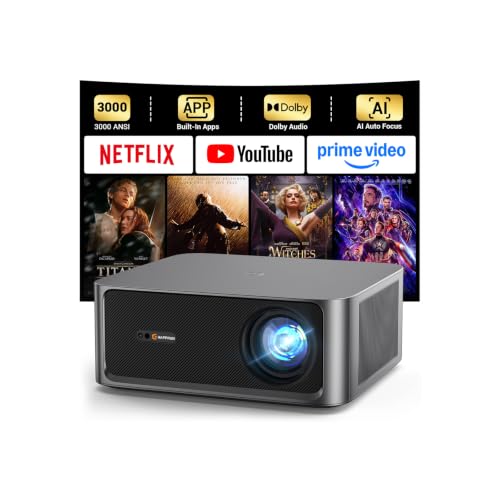
- [ Built-in Streaming System ] – No extra equipment needed. This smart projector gives you direct...
- 3000 ANSI Lumens Brightness ] – Unlike standard tv projectors (500–1,000 lumens) that require a...
- [ No Manual Adjustments Needed ] – Smart AI instantly analyzes your room and automatically adjusts...
Does a Fire Stick or Roku work better than screen mirroring?
Absolutely. A Fire Stick or Roku plugs directly into the projector’s HDMI port and runs the streaming apps natively. There is no mirroring involved at all.
This gives you a much more reliable experience with no black screens or connection drops. I keep one in my projector bag for every outdoor movie night.
Which streaming device won’t let me down when I am far from my Wi-Fi router in the backyard?
Distance from your router is a common issue for outdoor setups. A streaming stick with strong dual-band Wi-Fi makes a huge difference in maintaining a stable connection.
For my own backyard, the iSinbox S 4K Outdoor Projector is what I grabbed for this exact reason because it handles Wi-Fi well even when I am projecting far from the house. It keeps the stream smooth without buffering.
![Outdoor-Projector-4K [Built-in Google TV/180°Rotatable Stand/Voice Control/E-Focus],Sovboi...](https://m.media-amazon.com/images/I/41o6vVK83gL.jpg)
- [Built-in Google TV & Endless Streaming] Elevate your cinema nights with this smart projector with...
- [Smart AI Voice & Ultimate Home Cinema] Experience smart effortless living with this projector...
- [Immersive 360° Audio & Quiet Cooling] This 4K projector comes with a 180° adjustable stand and...
Can I use my iPhone to stream Netflix to an outdoor projector?
You can use an iPhone, but screen mirroring through AirPlay will likely be blocked by Netflix. The same HDCP protection applies to Apple devices.
Your best bet is to use a Lightning to HDMI adapter to connect your iPhone directly to the projector. This wired connection bypasses the block and lets the movie play normally.
Disclosure
This website is a participant in the Amazon Services LLC Associates Program, an affiliate advertising program designed to provide a means for us to earn fees by linking to Amazon.com and affiliated sites.