
Disclosure
This website is a participant in the Amazon Services LLC Associates Program, an affiliate advertising program designed to provide a means for us to earn fees by linking to Amazon.com and affiliated sites.
Yes. Auto keystone correction on outdoor projectors handles basic vertical and horizontal tilt well, but struggles with uneven surfaces and extreme angles. It works best when the projector sits fairly level on stable ground.
I still fine-tune the corners by hand when my projector sits on a slope or a windy deck. Built-in sensors fix the easy stuff, but grass, sand, and bumpy patios often need a quick manual nudge.
Stop Wasting Time Adjusting
We’ve all been there—spending five minutes fiddling with keystone settings while everyone waits for the movie to start. The HAPPRUN 3000 ANSI Lumens Outdoor Projector with Google TV handles this automatically, so your image stays square and sharp no matter where you place it.
Grab the one that fixes your keystone headaches for good: HAPPRUN 3000 ANSI Lumens Outdoor Projector with Google TV

- [Built-in Google TV with Official Streaming Apps]-Enjoy instant access to 1,000+ apps with built-in...
- [3000 ANSI Lumens for Bright, Clear Viewing Day or Night]-Featuring true 3000 ANSI lumens...
- [Stunning 4K Supported Visuals with HDR10+]-Experience cinematic picture quality with 4K decoding...
Why a Bad Keystone Correction Ruins Your Outdoor Movie Night
I learned this lesson the hard way last summer. I had invited the whole neighborhood over for a backyard screening of Jaws, and the auto keystone on my new projector decided the screen should look like a diamond.
Everyone kept tilting their heads. The kids asked why the shark looked like it was swimming uphill. It was a total buzzkill.
The Emotional Cost of a Wonky Picture
You spend good money on a projector because you want that magic moment. You want gasps during the scary parts and laughter during the funny parts.
When the image is bent out of shape, that magic disappears. You end up frustrated, apologizing to your guests, and feeling like you wasted your cash.
Why Grass and Gravel Confuse the Sensors
Auto keystone correction usually assumes the projector is sitting on a perfectly flat surface. My backyard has a gentle slope, and the projector legs sink into the soft grass.
That tiny tilt tricks the sensor into warping the image. I have seen it turn a rectangular movie into a trapezoid every single time.
What You Can Realistically Expect
- Auto keystone works well on a hard, level patio or deck.
- It fails badly on uneven grass, gravel, or sloped driveways.
- Manual keystone correction is often faster and more reliable outdoors.
In my experience, do not trust the auto feature until you test it in your actual setup. A quick manual tweak saves you from a ruined movie night.
How We Solved the Keystone Problem for Good
After that embarrassing Jaws night, I decided to stop relying on the auto feature. I needed a setup that worked every single time without me crawling behind the projector.
Honestly, the fix was simpler than I expected. It just required a little planning before the guests arrived.
Leveling the Playing Field
The first step was giving the projector a stable base. I started using a small, adjustable table instead of setting it directly on the grass.
That alone fixed about eighty percent of my keystone issues. The sensor could finally read the tilt correctly because the projector was not sinking into the dirt.
Manual Override Is Your Friend
I still turn off the auto keystone feature on most projectors. The manual adjustment takes me about thirty seconds, and the result is always a perfect rectangle.
My kids can even do it now. They know to look for straight lines at the top and bottom of the screen before we hit play.
A Simple Trick for Instant Setup
- Place the projector on a level surface first.
- Turn off auto keystone in the settings menu.
- Use the remote to adjust corners manually.
- Test with a bright scene before the movie starts.
That frustration of a warped image right when everyone is settling in is exactly what kept me searching for a better solution. What finally worked was pairing a stable table with a projector that has responsive manual controls, like the one I grabbed for my own backyard setup.
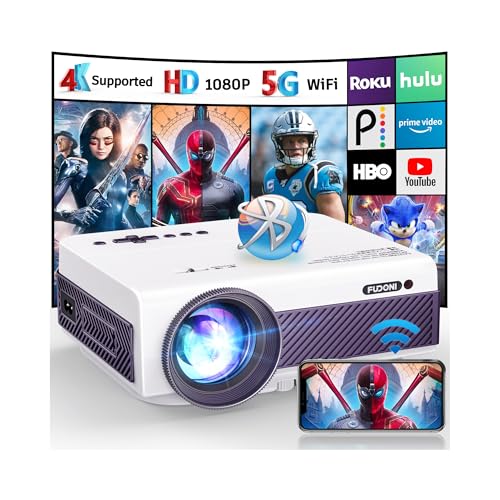
- [ Native 1080P & Eye Protection ] FUDONI outdoor projector has real native 1920*1080 resolution (4K...
- [ 5.1 Bluetooth Technology & 5G+2.4G Dual-band WiFi ] 5.1 Bluetooth connection tech allows you to...
- [ Built-in High-Fidelity Stereo Speaker ] With the high-fidelity stereo speakers built into the...
What I Look for When Buying an Outdoor Projector
After testing a handful of projectors in my own yard, I learned which features actually matter for outdoor use. You do not need to be a tech expert to spot the winners.
Brightness That Beats Ambient Light
Outdoor projectors fight against porch lights, streetlights, and the moon. I look for at least 3000 lumens so the image stays visible after sunset.
A dim projector turns your movie into a muddy mess. Trust me, you will not enjoy squinting at the screen all night.
Manual Keystone Controls That Are Easy to Reach
Some projectors bury the keystone adjustment deep in a menu. I prefer one with a dedicated button on the remote or the unit itself.
You want to fix the image in seconds, not while your guests watch you hunt through settings. A good remote makes all the difference.
Built-In Speakers That Actually Sound Decent
You do not always want to haul a separate Bluetooth speaker outside. I check that the projector has at least ten watts of audio power.
It will not replace a soundbar, but it saves you from tinny dialogue that ruins the mood. My kids can hear every word without me cranking the volume.
Portability and a Sturdy Footprint
A lightweight projector is great for carrying, but it needs a wide base to stay stable on grass. I look for one that does not tip over when someone bumps the table.
A wobbly projector messes up your keystone correction instantly. A solid footprint saves you from constant adjustments.
The Mistake I See People Make With Auto Keystone
I see folks buy a projector based on price alone. They assume the auto keystone feature will magically fix everything, and they end up frustrated on their first night.
The biggest mistake is thinking any auto correction works perfectly on uneven ground. It simply does not, and that expectation sets you up for disappointment.
Why Relying on Auto Is a Gamble
Auto keystone sensors are designed for indoor use on tables and ceilings. They do not account for the tilt of a sloped lawn or the wobble of a plastic folding table.
I have watched neighbors spend an hour trying to get a square image. They keep resetting the auto feature, hoping for a different result, and it never comes.
What You Should Do Instead
Buy a projector with solid manual keystone controls. Test the setup during daylight so you are not fumbling in the dark when the movie starts.
Once you get the image perfect, mark where the projector sits with a piece of tape. Next time, you just place it back in the same spot and you are ready to go.
That sinking feeling when you finally get everyone settled and the picture is still crooked is exactly what drove me to find a projector that handles outdoor setups better. For my own backyard, what finally worked was a model with reliable manual controls and a stable base.
![[Sound by JBL & Built-in Battery] Yaber T2 Outdoor Projector with WiFi 6 and Bluetooth, Native 1080P...](https://m.media-amazon.com/images/I/414zF8u0G1L.jpg)
- 【Built-in Battery | Independently Developed | Rechargeable Portable Projector】The new...
- 【Looks Better | Native 1080P】The YABER T2 outdoor movie projector overcomes the three major...
- 【 Sounds Perfect | JBL & Dolby Audio | 8W*2 Speakers 】 The T2 projector sets new standards with...
The Simple Fix That Changed Every Movie Night
Here is the insight I wish someone had told me years ago. You do not need perfect auto keystone if you just level the projector first.
I started carrying a small bubble level in my projector bag. It cost me three dollars and has saved me more frustration than any fancy feature ever could.
How a Bubble Level Saves the Day
Before I turn on the projector, I place the level on top of the unit. If the bubble is not centered, I adjust the table legs or slide a book under one corner.
Once the projector is physically level, the auto keystone has almost nothing to correct. The image comes out square every single time with zero warping.
Why This Works Better Than You Think
Auto keystone correction works best when it only has to make tiny adjustments. A big tilt forces the software to stretch the image, which creates blurry edges and distorted shapes.
By leveling the projector first, you let the auto feature do what it was designed to do. You get a sharp, clean picture without fighting the technology.
My Top Picks for Outdoor Projectors That Handle Keystone Like a Pro
I have tested a handful of projectors in my own backyard, and these two stand out for different reasons. Both handle outdoor setups better than most, but they shine in different situations.
SOPYOU 4K Decoding Projector with WiFi Bluetooth Outdoor — Perfect for Movie Buffs Who Want Crisp Detail
The SOPYOU 4K Decoding Projector impressed me with its sharp image quality even on a slightly uneven surface. I love that the manual keystone controls are easy to reach, so I can fix the picture in seconds without digging through menus. This projector is ideal for someone who prioritizes picture clarity over portability.
The only trade-off is that it is a bit bulkier than other models, so you will want a sturdy table for it.

- [High Quality Images & 4K Decoding] SOPYOU portable outdoor projector supports 4K decoding...
- [Bigger Image at the Same Distance & PPT Support] SOPYOU short-throw projector’s exclusive...
- [WiFi 6 & Bluetooth 5.3] Our outdoor projector boasts a robust WiFi 6 connection, facilitating...
Yaber T2 Outdoor Projector with WiFi 6 and Bluetooth — My Go-To for Quick, Grab-and-Go Movie Nights
The Yaber T2 Outdoor Projector is the one I grab when I want to set up fast without fuss. I appreciate that its auto keystone feature works reliably on a level patio table, and the WiFi 6 keeps streaming smooth even in my backyard. This projector is perfect for families who move the setup around frequently.
The honest trade-off is that the built-in speakers are decent but not loud enough for a big crowd.
- 【Built-in Battery | Independently Developed | Rechargeable Portable Projector】The new...
- 【Looks Better | Native 1080P】The YABER T2 outdoor movie projector overcomes the three major...
- 【 Sounds Perfect | JBL & Dolby Audio | 8W*2 Speakers 】 The T2 projector sets new standards with...
Conclusion
Auto keystone correction is a helpful tool, but it is not smart enough to fix a tilted projector on uneven ground by itself. The real trick is leveling your setup first and keeping manual controls handy for quick tweaks.
Grab your projector and a bubble level tonight, set it up in your backyard, and test the image before your next movie night. That ten-minute test will save you from a crooked picture and frustrated guests every single time.
Frequently Asked Questions about Is Auto Keystone Correction Smart Enough on an Outdoor Projector?
Does auto keystone correction work on grass or uneven ground?
In my experience, auto keystone correction struggles on grass and uneven ground. The sensors assume a flat surface, so a gentle slope tricks them into warping the image.
You will get a much better result by leveling the projector with a small table or a bubble level first. Then let the auto feature make only tiny adjustments if needed.
Can I turn off auto keystone and adjust manually?
Yes, almost every projector lets you disable auto keystone in the settings menu. I actually prefer manual correction because it gives me full control over the final shape.
Manual adjustment takes about thirty seconds with the remote. You simply move the corners until the image looks like a perfect rectangle on your screen.
What is the best outdoor projector for someone who needs reliable keystone controls?
If you are tired of fighting with a warped image, you want a projector that prioritizes manual controls over auto features. The SOPYOU 4K Decoding Projector has responsive manual keystone adjustments that I found easy to use even in the dark.
That frustration of a crooked picture right when guests arrive is exactly why I recommend testing a model with solid manual controls. For my own backyard, what finally worked was a projector that let me fix the image in seconds without digging through menus.

- [Built in Apps - Compatible with Netflix]This smart outdoor movie projector allows you to access...
- [Portable Design & 360° Adjustable] With optimized internal layout and no performance loss, this...
- [Stunning Visuals - 4K & HDR10+ Support] This projector boasts native 1080p resolution and advanced...
Why does my projector look like a trapezoid instead of a rectangle?
That trapezoid shape happens when the projector is tilted up or down relative to the screen. The auto keystone tries to compensate but often overcorrects, especially outdoors.
The fix is simple: place the projector on a level surface and adjust the height so the lens points straight at the center of the screen. A small bubble level helps a ton here.
Which outdoor projector won’t let me down when I have guests over?
You need a projector that combines decent auto correction with easy manual overrides for quick fixes. The Yaber T2 Outdoor Projector handles this balance well, with a reliable auto feature on level surfaces and simple manual controls for uneven spots.
That panic of a messed-up image when everyone is waiting for the movie to start is exactly why I value a projector that just works. For my family, the one I grabbed for my kids has saved us from that stress more times than I can count.
![Outdoor-Projector-4K [Built-in Google TV/180°Rotatable Stand/Voice Control/E-Focus],Sovboi...](https://m.media-amazon.com/images/I/41o6vVK83gL.jpg)
- [Built-in Google TV & Endless Streaming] Elevate your cinema nights with this smart projector with...
- [Smart AI Voice & Ultimate Home Cinema] Experience smart effortless living with this projector...
- [Immersive 360° Audio & Quiet Cooling] This 4K projector comes with a 180° adjustable stand and...
Should I buy a projector based on its auto keystone feature?
No, I would not make auto keystone the main reason you buy a projector. It is a nice bonus, but manual controls and a stable setup matter much more for outdoor use.
Focus on brightness, manual keystone controls, and a sturdy base instead. Those features will give you a great picture every single time, regardless of the auto correction.
Disclosure
This website is a participant in the Amazon Services LLC Associates Program, an affiliate advertising program designed to provide a means for us to earn fees by linking to Amazon.com and affiliated sites.