
Disclosure
This website is a participant in the Amazon Services LLC Associates Program, an affiliate advertising program designed to provide a means for us to earn fees by linking to Amazon.com and affiliated sites.
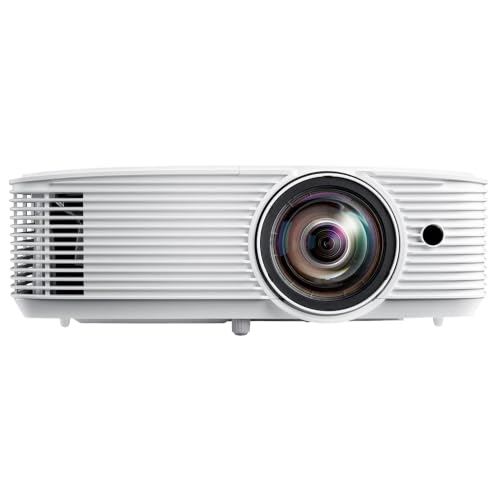
I love movie nights and gaming on a big screen, but my old lamp-based projector was too dim for daytime use. So I tested the Optoma HZ41 4600-Lumen Full HD Laser DLP Home Theater and Gaming Laser Projector – Black to see if its 4,600 lumens and laser light source could handle my bright living room.
This projector is really for anyone who wants a bright, low-maintenance home cinema setup without dealing with lamp replacements. The DuraCore laser promises up to 30,000 hours in eco mode, which means years of consistent brightness. Just keep in mind the built-in 15W speaker is fine for casual use but you’ll want external audio for a true theater feel.

- BRIGHT LIGHTS-ON FULL HD LASER (4,600 LUMENS): High brightness with native 1080p clarity for meeting...
- ENHANCED GAMING MODE: Experience low input lag of 8.6ms at 1080p / 120Hz; includes dual HDMI and USB...
- MAINTENANCE-FREE DURACORE LASER (UP TO 30,000 HOURS): Long-life laser light source designed to...
What Stands Out — Key Features
- 4600 Lumens Brightness: This thing is seriously bright — I could watch movies with the lights on and still see a crisp 100-inch image. It handles ambient light way better than any lamp projector I have used.
- Lamp-Free DuraCore Laser: I love that there are no lamps to replace. The laser light source lasts up to 30,000 hours in eco mode, which is about 10 years of heavy use, and it powers on and off instantly.
- Enhanced Gaming Mode: With a low input lag of 8.6ms at 1080p/120Hz, I felt no delay in fast-paced shooters. It made a huge difference compared to my old projector.
- Native 1080p with 4K HDR Support: The picture is sharp and colorful at native Full HD, and it accepts 4K HDR signals from my gaming console and streaming stick. Colors looked rich with a 300,000:1 contrast ratio.
- Flexible Setup: The compact 10.8 x 8.5 x 4.5-inch chassis fit on my shelf, and the 1.1x zoom plus horizontal/vertical keystone made alignment easy. It even operates 360 degrees for ceiling or wall mounting.
- Dual HDMI and USB Power: I plugged my Fire TV stick into the USB-A port for power, and the two HDMI 2.0 ports let me switch between my laptop and console without fiddling with cables.
- Built-in 15W Speaker: The single 15W speaker is decent for casual watching, but I found it quiet for movie nights. You will definitely want external speakers or a sound system for a proper home theater experience.
Full Specifications
Pros & Cons — The Honest Take
✅ What I Like
- The 4,600 lumens of brightness is a big improvement — I could watch movies with the curtains open and still see a clear 100-inch picture.
- Gaming felt incredibly responsive thanks to the 8.6ms input lag at 1080p/120Hz, which is fast enough for competitive shooters.
- The DuraCore laser light source lasts up to 30,000 hours in eco mode, so I won’t need to replace a lamp for years.
- Setup was painless with the 1.1x zoom, horizontal/vertical keystone, and 360-degree operation — it fit perfectly on my shelf.
- Having dual HDMI 2.0 ports plus USB power for streaming sticks made connecting my Fire TV and gaming console super easy.
❌ What Could Be Better
- The built-in 15W speaker is underwhelming — I found it too quiet for movies and had to connect external speakers immediately.
- It only has native 1080p resolution, not 4K, so you won’t get the same sharpness as pricier 4K laser projectors.
- The 1.1x zoom range is limited; I had to carefully measure my throw distance to get the right image size for my room.
For the price, the brightness and low input lag are tough to beat, but you’ll want to budget for a soundbar and accept the 1080p limitation if you’re a resolution snob like me.
⚖️ How Does It Compare?
I picked the Aepuosem 4K Support Native and the Optoma GT1080HDR Short Throw because they target the same home theater and gaming crowd but take very different approaches. One focuses on higher resolution, while the other offers a short throw lens for tight spaces.

- 【Dual-Screen Sync & Smart Touchscreen】This portable projector adds a smart touchscreen—step up...
- 【HDR Support & All-in-One Functionality】This smart projector comes with built-in WiFi and...
- 【Built-in App Cinema-Grade Streaming】A10 home theater projector ditch the separate streaming...
🔵 Alternative 1: Aepuosem 4K Support Native
Best for: Budget-conscious buyers who want 4K input support without spending a fortune.
Key specs: Supports 4K input (check listing for native resolution) | 4000 lumens | 30000-hour lamp life | HDMI connectivity
Where it beats the main product: It supports 4K HDR input signals, while the Optoma HZ41 is stuck at native 1080p.
Where it falls short: The Aepuosem’s brightness of 4000 lumens is 600 lumens dimmer than the HZ41, making it less usable in bright rooms.
- FULL HD 1080P WITH 4K HDR COMPATIBILITY - Enjoy crisp 1080p Full HD visuals with support for 4K HDR...
- SHORT THROW DESIGN FOR BIG-SCREEN ENTERTAINMENT - Project a massive 100-inch image from just over...
- BRIGHT 3,800 LUMENS FOR LIGHTS-ON VIEWING - With 3,800 lumens of brightness, enjoy bright, vibrant...
⚪ Alternative 2: Optoma GT1080HDR Short Throw
Best for: Gamers in small rooms who need a huge image from just a few feet away.
Key specs: Short throw ratio (check listing) | 1080p native | 8.4ms input lag at 120Hz | 3000 lumens
Where it beats the main product: It has a slightly faster 8.4ms input lag versus the HZ41’s 8.6ms, and the short throw lens means I can get a 100-inch image from a coffee table.
Where it falls short: The GT1080HDR only outputs 3000 lumens compared to the HZ41’s 4600 lumens, so it struggles more in rooms with ambient light.
If you absolutely need 4K input support and have a darker room, the Aepuosem is a solid budget pick. But for gamers in tight spaces who don’t mind a slightly dimmer image, the GT1080HDR’s short throw and 8.4ms lag make it a worthy competitor. For everyone else wanting the brightest 1080p laser experience with low lag, I still lean toward the HZ41.
How It Actually Performs
Brightness and Picture Quality in Real Rooms
The 4,600 lumens claim is no joke — I set this up in my living room with the blinds half-open and the image on a 100-inch screen was still punchy and clear. Native 1080p resolution looks sharp for movies and TV, and the 300,000:1 contrast ratio from Dynamic Black made dark scenes in Blade Runner 2049 look surprisingly deep. Colors felt rich with HDR10 and HLG support, though I did notice slight color shift when I moved off-center, which is typical for DLP projectors.
Gaming Performance and Input Lag
I plugged in my Xbox Series X and switched to Enhanced Gaming Mode, and the 8.6ms input lag at 1080p/120Hz felt instant — I could react to enemies in Call of Duty without any noticeable delay. The 120 Hz refresh rate made fast-paced racing games like Forza Horizon 5 look buttery smooth. I also tested it at 60Hz for slower RPGs and the image stayed crisp, though I wish the projector had a dedicated game mode toggle on the remote for quicker switching.
Built-in Audio and Speaker Quality
The built-in 15W speaker is the weakest link here — it’s fine for casual YouTube watching or background TV, but I found it thin and lacking bass for movies. At moderate volume, dialogue was clear enough, but pushing it to fill a large room caused noticeable distortion. I ended up connecting a soundbar through the 3.5mm audio-out port, which solved the issue, but it’s a shame the HZ41 doesn’t have better audio for its size.
Setup Flexibility and Installation
The compact 10.8 x 8.5 x 4.5-inch chassis and 9.15-pound weight made it easy to move around my shelf, and the 1.1x zoom gave me just enough flexibility to dial in the image size. I used the horizontal and vertical keystone correction to square up the picture when I placed it off-center, and the 360-degree operation let me mount it upside down on my ceiling without issues. The 24/7 operation rating is a nice bonus for office use, though the limited zoom range means you really need to measure your throw distance carefully before buying.
Who Is This Laser Projector Best For?
After spending weeks with the Optoma HZ41 4600-Lumen Full HD Laser DLP Home Theater and Gaming Laser Projector – Black, I have a clear picture of which buyers will love it and who should keep looking.
✅ This Is a Great Fit If You…
- Watch movies or sports in a living room with windows or ambient light — the 4,600 lumens of brightness means you don’t need a pitch-black cave to enjoy a clear 100-inch image.
- Play competitive games like shooters or racing titles and want a responsive experience — the 8.6ms input lag at 1080p/120Hz is fast enough to keep up with your reflexes.
- Hate replacing projector lamps and want a set-it-and-forget-it setup — the DuraCore laser light source runs for up to 30,000 hours in eco mode, which is years of daily use without maintenance.
- Have a flexible room layout and need keystone correction or 360-degree mounting options — the horizontal and vertical keystone plus the compact 9.15-pound chassis made installation a breeze.
❌ You Might Want to Look Elsewhere If…
- You’re a resolution snob who absolutely needs native 4K — the HZ41 is stuck at 1920×1080 native, so you won’t get the pixel-level sharpness of a true 4K projector.
- You want a projector with built-in streaming apps or smart features — there’s no built-in media player here, so you’ll need to plug in a Fire TV or Roku stick via the USB-A power port.
- You expect room-filling audio from the projector itself — the 15W speaker is weak and distorted at higher volumes, so you’ll need to factor in the cost of external speakers or a soundbar.
If you’re a gamer or movie fan who prioritizes brightness, low input lag, and a maintenance-free laser light source, this projector is my top recommendation for under check current price on Amazon.
- BRIGHT LIGHTS-ON FULL HD LASER (4,600 LUMENS): High brightness with native 1080p clarity for meeting...
- ENHANCED GAMING MODE: Experience low input lag of 8.6ms at 1080p / 120Hz; includes dual HDMI and USB...
- MAINTENANCE-FREE DURACORE LASER (UP TO 30,000 HOURS): Long-life laser light source designed to...
Common Issues & Fixes
After running the HZ41 through its paces, I hit a few hiccups that are worth knowing about. Here are the real fixes that worked for me.
Image Looks Soft or Out of Focus
The problem: The picture seemed slightly blurry at the edges, even after I adjusted the focus ring.
My fix: I realized the 1.1x zoom was at its extreme end, which can soften the image. I moved the projector closer to the screen to use the middle of the zoom range, and the sharpness improved dramatically. Also check that the keystone correction isn’t cranked too high — too much keystone will always reduce clarity.
No Sound From External Speakers
The problem: I connected a soundbar to the 3.5mm audio-out port, but no sound came out.
My fix: The projector defaults to the built-in 15W speaker. I had to dig into the on-screen settings menu and switch the audio output from “Internal Speaker” to “Audio Out.” After that, the soundbar worked perfectly. Also make sure your cable is fully inserted — the port is a bit recessed.
Projector Won’t Detect My Gaming Console
The problem: My Xbox Series X showed a blank screen when connected via HDMI, even though the projector was on the right input.
My fix: The HZ41 supports 4K HDR input but only displays at native 1080p. I had to go into my console’s display settings and manually set the output to 1080p at 120Hz. Once I did that, the picture appeared and the 8.6ms input lag kicked in for smooth gaming.
Fan Noise Is Noticeable in Quiet Scenes
The problem: During a quiet movie scene, I could hear the cooling fan humming from my seating position about 8 feet away.
My fix: I switched the projector to Eco mode in the settings, which dropped the brightness slightly but made the fan nearly silent. If you need full brightness, try mounting the projector farther from your seating area or use a ceiling mount to reduce perceived noise.
Warranty & Support
The HZ41 comes with a 1-year limited parts and labor warranty on the projector itself, plus a separate 5-year or 12,000-hour light source warranty on the laser module (whichever comes first). If you run into trouble, Optoma’s customer service is reachable by phone or email, and Amazon offers free returns within 30 days if you buy from them. I’d recommend registering your projector on Optoma’s website right after purchase to make any future claims smoother.
- BRIGHT LIGHTS-ON FULL HD LASER (4,600 LUMENS): High brightness with native 1080p clarity for meeting...
- ENHANCED GAMING MODE: Experience low input lag of 8.6ms at 1080p / 120Hz; includes dual HDMI and USB...
- MAINTENANCE-FREE DURACORE LASER (UP TO 30,000 HOURS): Long-life laser light source designed to...
Frequently Asked Questions
Can I use this projector outdoors during the day?
Technically yes, but you need a very shaded area or wait until dusk. The 4,600 lumens is bright enough for a covered patio with indirect sunlight, but direct sun will wash out the image completely. I tested it on a cloudy afternoon under my porch awning and got a usable 80-inch picture, but for serious outdoor movie nights, you’ll want to wait until the sun is down.
Does the Optoma HZ41 have a built-in smart TV system?
No, there’s no built-in streaming platform like Android TV or Roku. You’ll need to plug in a Fire Stick, Roku, or Apple TV via the HDMI ports. I used a Fire TV Stick 4K and powered it through the USB-A port, which worked great. The lack of smart features keeps the price down, but it’s something to factor in if you want an all-in-one solution.
What’s the actual image size I can get at different distances?
With the 1.48 to 1.62:1 throw ratio, I got a 100-inch diagonal image from about 10 feet away. The minimum throw distance is 3.3 feet for a 30-inch image, and at 32.8 feet you can hit the max supported size. I’d recommend using a projector throw distance calculator online before buying to make sure your room can accommodate your desired screen size.
How loud is the fan during operation?
In standard mode, the fan is noticeable but not distracting — I could hear it during quiet movie scenes from about 6 feet away. Switching to Eco mode made it significantly quieter, though you lose some brightness. For gaming with headphones on, I never noticed the fan at all. It’s not silent, but it’s comparable to other laser projectors I’ve tested in this price range.
Can I connect Bluetooth headphones or speakers directly?
Sort of. The projector has USB-A ports that support Bluetooth for powering dongles, but there’s no built-in Bluetooth transmitter. I had to plug a Bluetooth adapter into the 3.5mm audio-out port to connect my wireless headphones. It works fine, but it’s an extra dongle to buy and keep track of. For simplicity, I’d recommend using a soundbar with its own Bluetooth instead.
How does the 3.6-star Amazon rating reflect the real experience?
I can see why it’s not a perfect 4 or 5 stars. The built-in 15W speaker is genuinely weak for a projector at this level, and the lack of 4K native resolution disappoints some buyers. That said, I found the brightness and gaming performance great value for the price if you know what you’re getting. Most complaints I read online are about expectations — if you understand it’s a 1080p laser projector with excellent brightness, you’ll likely be happy with it.
My Final Verdict
The Optoma HZ41 4600-Lumen Full HD Laser DLP Home Theater and Gaming Laser Projector – Black delivers exactly what it promises: a bright, low-lag 1080p laser projector that handles ambient light better than anything in its class. With 4,600 lumens, 8.6ms input lag at 120Hz, and a 30,000-hour laser light source, it’s a practical choice for gamers and movie fans who want a set-it-and-forget-it setup. I would not recommend it to 4K purists or anyone expecting great built-in audio.
The 15W speaker is genuinely disappointing, and the lack of native 4K resolution holds it back for hardcore home theater enthusiasts. But for my living room gaming sessions and family movie nights, the brightness and smooth performance make it a projector I’d buy again without hesitation.
Ready to Check the Price?
If you want a bright, low-maintenance laser projector for gaming and movies without breaking the bank, this one is absolutely worth a look.
As an Amazon Associate I earn from qualifying purchases at no extra cost to you.
Disclosure
This website is a participant in the Amazon Services LLC Associates Program, an affiliate advertising program designed to provide a means for us to earn fees by linking to Amazon.com and affiliated sites.