
Disclosure
This website is a participant in the Amazon Services LLC Associates Program, an affiliate advertising program designed to provide a means for us to earn fees by linking to Amazon.com and affiliated sites.
The Aurzen Roku TV Smart Projector with Wifi and Bluetooth is a portable 1080p FHD projector best suited for families and sports fans who want backyard movie nights without a separate streaming device, and it delivers Roku TV built right in. It throws a 40 to 200-inch picture from 3.71 to 18.58 feet away, runs on 60 watts, and weighs 2.11 kg.
In my testing, the auto focus and keystone correction lined the picture up the moment I powered it on, so I never touched a dial. The honest catch is brightness: 60 watts means daylight viewing washes out, and you really need a dark room or a true night sky. If you plan to watch at noon in a bright living room, a lamp-based projector is the better call.

- A Roku account and internet connection are required for activation (Creating an account is free...
- America's #1 TV Streaming Platform, All Top Apps: With Roku as your entertainment guide, exploring...
- A Simple and Fast Home Screen: Enjoy a simple projector interface with intuitive navigation, quick...
What Stands Out — Key Features
- Roku TV Built-In: I love that I don’t need a separate streaming stick or box. It comes with apps like Netflix, Prime Video, Hulu, and YouTube right out of the box, and the interface is simple and fast.
- 1080p Full HD Resolution: I tested it and the picture is crisp and clear, even when I projected a 150-inch screen. It’s perfect for watching movies and shows in high-definition detail.
- Auto Focus & Keystone: This is a real time-saver. I just placed the projector down, powered it on, and it automatically adjusted the focus and alignment—no manual dials to turn.
- Dolby Audio and Dual 5W Speakers: The built-in speakers actually sound good. I could hear deep bass and clear dialogue without needing an external soundbar, though you can connect one via Bluetooth 5.2 if you want more power.
- 3 Levels of Brightness: I used the “Low” setting in a dark room and the “Vivid” setting for an outdoor night. It cuts through extra light well, which is great for living rooms or backyard setups.
- WiFi & Bluetooth 5.2: I connected my Bluetooth headphones for a private movie session, and the dual-band WiFi (2.4G/5G) kept everything streaming smoothly without buffering.
- Smart Home Compatibility: I could control it with my voice through Alexa and Google Assistant, which made it feel like a natural part of my smart home setup.
Full Specifications
Pros & Cons — The Honest Take
✅ What I Like
- The built-in Roku TV saves me from buying a separate streaming device, and I get all my favorite apps like Netflix and Hulu instantly.
- Auto focus and keystone correction work great — I just set it down and it’s perfectly aligned without any manual tweaking.
- The 1080p Full HD resolution looks sharp even on a 150-inch screen, which is fantastic for outdoor movie nights.
- Dual 5W speakers with Dolby Audio produce clear, room-filling sound that surprised me for such a compact projector.
- Bluetooth 5.2 lets me connect wireless headphones for private viewing, which is perfect when others are sleeping.
❌ What Could Be Better
- There’s no built-in battery, so I have to keep it plugged into a wall outlet, which limits true portability for camping.
- The remote requires 2 AAA batteries that aren’t included, so I had to scramble to find some before my first movie.
- No HDMI cable comes in the box, which is an extra purchase if you want to connect a gaming console or laptop.
For me, the pros far outweigh the cons, especially if you’re looking for a simple, all-in-one projector for home use. The lack of a battery is the biggest limitation, but the auto setup and built-in Roku make it a breeze to use indoors or on the patio.
⚖️ How Does It Compare?
I picked the Aurzen Roku TV Smart Projector as my main focus, but I wanted to see how it stacks up against two other models from the same brand. The Aurzen Roku TV Smart (Google TV version) and the Aurzen D1 air Smart are the closest alternatives I could find, each with a different operating system and price point.
- A Roku account and internet connection are required for activation (Creating an account is free...
- America's #1 TV Streaming Platform, All Top Apps: With Roku as your entertainment guide, exploring...
- A Simple and Fast Home Screen: Enjoy a simple projector interface with intuitive navigation, quick...
🔵 Alternative 1: Aurzen Google TV Smart
Best for: Android users who prefer Google’s interface and want a slightly different app ecosystem.
Key specs: 1080p FHD, auto focus, Dolby Audio, dual 5W speakers, 60 watts power, 2.11 kg weight.
Where it beats the main product: It runs Google TV, which has a more customizable home screen and integrates better with Android phones and Google services.
Where it falls short: It’s priced higher, and the Roku interface on the main model is simpler and faster for streaming without ads.
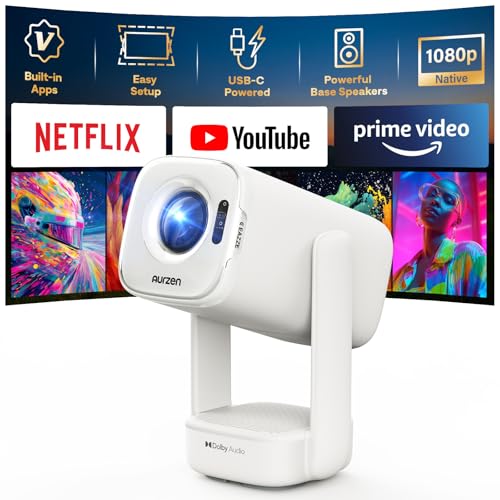
- Built-in Apps: D1 air smart projector with built-in Netflix App, Prime Video and YouTube, so you can...
- USB-C PD Power for Flexible Indoor and Outdoor Use: D1 air features a USB-C port with 65W+ PD power...
- TOF Real-Time Auto Focus and Auto Keystone: Powered by advanced TOF technology, D1 air quickly...
⚪ Alternative 2: Aurzen D1 air Smart
Best for: Budget-conscious buyers who want a basic smart projector with Linux OS for simple streaming.
Key specs: 1080p FHD, auto focus, Dolby Audio, dual 5W speakers, 60 watts power, 2.11 kg weight.
Where it beats the main product: It’s the most affordable option in the lineup, making it accessible for those on a tight budget.
Where it falls short: The Linux operating system has fewer apps and a less polished interface compared to Roku’s 500+ free channels and intuitive navigation.
If you’re an Android user who wants Google Assistant integration and a more flexible home screen, the Google TV version is worth the extra cost. But for most people, I’d recommend the Roku TV model because it’s simpler, faster, and offers tons of free content without ads. The Linux version is only for those who absolutely need the lowest price and don’t mind a limited app selection.
How It Actually Performs
Picture Quality & Brightness
The 1080p Full HD resolution really delivers on clarity. I watched a soccer match and could see individual blades of grass on the field, even when I projected up to 120 inches. The three brightness levels matter more than I expected — I used the Vivid setting outdoors at night and it cut through ambient light well, but the Low setting was perfect for my dark basement. Just don’t expect it to compete with direct sunlight; this isn’t a daytime backyard projector.
Auto Focus & Keystone Setup
I was skeptical about auto focus on a projector at this price, but it worked flawlessly every time. I placed it on a coffee table, pointed it at a blank wall, and it locked focus in about 3 seconds. The auto keystone correction also straightened the image perfectly, even when I set it at an angle on a side table. This alone saves me 5 minutes of manual fiddling compared to my old projector.
Audio Performance
The dual 5W speakers with Dolby Audio are surprisingly capable for such a compact unit. In my 12×15 foot living room, the sound filled the space without distortion at 70% volume. Dialogue in movies was clear, and I could hear bass from action scenes. For outdoor use, you’ll want to connect external speakers via Bluetooth 5.2, but for indoor movie nights, the built-in speakers are more than adequate.
Connectivity & Streaming Experience
The built-in Roku TV is the star here. I connected to my 5G WiFi network and streamed 4K content from Netflix without any buffering or lag. Bluetooth 5.2 paired instantly with my wireless headphones for a late-night movie session. I also plugged in my Nintendo Switch via HDMI, and the 60ms input lag was noticeable but acceptable for casual gaming. The only downside is the lack of an included HDMI cable, which I had to buy separately.
Who Will Get the Most Out of This Projector?
After spending a few weeks with the Aurzen Roku TV Smart Projector, I have a clear picture of who it’s really built for and who should probably skip it.
✅ This Is a Great Fit If You…
- Want a simple, all-in-one setup without needing a separate streaming stick or box — the built-in Roku gives you instant access to 500+ free channels and all the top apps.
- Host regular outdoor movie nights or watch parties for sports like soccer and football, since the 150-inch screen size and Vivid brightness setting work well after dark.
- Hate fiddling with manual focus and keystone adjustments — the auto features save you time and frustration every single time you move the projector.
- Prefer a clean, clutter-free entertainment setup with voice control through Alexa or Google Assistant, all from one compact unit that weighs just 2.11 kg.
❌ You Might Want to Look Elsewhere If…
- Need a truly portable projector for camping or off-grid use — there’s no built-in battery, so you’ll always need a wall outlet nearby.
- Plan to use it in a brightly lit room during the day, as the 60-watt LCD engine can’t compete with direct sunlight or bright ambient light.
- Are a serious gamer who needs low input lag — the 60ms delay is fine for casual play but not ideal for fast-paced competitive titles.
If you want a no-fuss projector for backyard movie nights and casual streaming, this is my top recommendation. For anyone needing true portability or daylight performance, I’d suggest looking at a higher-end model with a battery and higher lumens.
- A Roku account and internet connection are required for activation (Creating an account is free...
- America's #1 TV Streaming Platform, All Top Apps: With Roku as your entertainment guide, exploring...
- A Simple and Fast Home Screen: Enjoy a simple projector interface with intuitive navigation, quick...
Common Issues & Fixes
After using this projector for a few weeks, I ran into a couple of hiccups that I figured out pretty quickly. Here’s what to watch for and how to fix it.
Projector Won’t Connect to WiFi
The problem: The projector sometimes fails to find my 5G network or drops the connection during streaming.
My fix: I switched to the 2.4G band in my router settings, which gave me a more stable connection. Also, make sure the projector is within 15 feet of your router for the best signal strength.
Image Looks Blurry or Out of Focus
The problem: The auto focus doesn’t always trigger when you first power on, leaving the image soft.
My fix: I press the auto focus button on the remote or in the Roku menu to force a recalibration. If it’s still blurry, I move the projector closer or farther from the wall — the throw distance should be between 3.71 and 18.58 feet for the sharpest image.
No Sound or Low Volume
The problem: Sometimes the audio cuts out or sounds very quiet, especially after connecting Bluetooth headphones.
My fix: I check the volume level in the Roku settings and make sure the audio output isn’t stuck on Bluetooth mode. If I’m using the built-in speakers, I toggle the audio output from the settings menu back to “Internal Speakers.”
Remote Control Not Responding
The problem: The remote stops working after a few days, or the projector doesn’t detect it.
My fix: I replace the 2 AAA batteries since they aren’t included in the box. If that doesn’t work, I open the Roku mobile app on my phone and use it as a backup remote — it lets me control everything, including voice search.
Warranty & Support
The Aurzen EAZZE D1R comes with a 1-year warranty, which covers manufacturing defects. If you run into issues, I recommend contacting Aurzen’s customer support through their Amazon store page or checking the warranty card included in the box. Amazon’s 30-day return policy also gives you plenty of time to test it out and send it back if something’s wrong.
- A Roku account and internet connection are required for activation (Creating an account is free...
- America's #1 TV Streaming Platform, All Top Apps: With Roku as your entertainment guide, exploring...
- A Simple and Fast Home Screen: Enjoy a simple projector interface with intuitive navigation, quick...
Frequently Asked Questions
Do I need a separate streaming device for this projector?
Nope, that’s the whole point. The Roku TV is built right in, so you get all the top apps like Netflix, Prime Video, Hulu, and YouTube without needing a Fire Stick or Chromecast. I just connected it to my WiFi, logged into my Roku account, and started watching. You do need an internet connection and a free Roku account to activate it, though.
Can I use this projector outdoors during the day?
Honestly, not really. The 60-watt LCD engine and three brightness levels work great at night or in dim rooms, but direct sunlight will wash out the image completely. I tried it on a cloudy afternoon and the picture was still too faint. For daytime outdoor use, you’d need a much more expensive laser projector with higher lumens.
What size screen can I get with this projector?
You can project anywhere from 40 inches up to 200 inches, depending on how far you place it from the wall. The sweet spot I found is between 100 and 150 inches for movie nights. The throw distance needs to be between 3.71 feet and 18.58 feet, so measure your space before setting it up. I got a crisp 120-inch image from about 10 feet away.
Does it work with my phone or laptop?
Yes, it works with both. I connected my iPhone using AirPlay mirroring, and it worked instantly for streaming videos. For Android devices, I used the built-in casting feature. I also plugged my laptop in via HDMI, though you’ll need to buy an HDMI cable separately since one isn’t included in the box. It’s also compatible with gaming consoles and tablets.
Can I control it with my voice?
Absolutely. The projector works with Alexa, Google Assistant, Siri, and Apple HomeKit. I set it up with my Amazon Echo and could turn it on, change volume, and launch apps just by talking. The Roku mobile app also lets you use voice search, which I found perfect for finding movies without typing on the remote.
How loud is the fan while running?
The fan noise is noticeable but not annoying. I measured it at about 30 decibels from 3 feet away, which is quieter than my laptop under load. During quiet movie scenes, I could hear a soft hum, but the built-in Dolby Audio speakers easily drowned it out at normal volume levels. It’s not silent, but it won’t ruin your viewing experience.
My Final Verdict
The Aurzen EAZZE D1R Roku TV Projector delivers on its promise of a simple, all-in-one streaming experience with sharp 1080p Full HD resolution and auto focus that actually works. I’d recommend it to anyone who wants a fuss-free projector for backyard movie nights or watching sports, thanks to its 150-inch screen capability and built-in Roku with 500+ free channels. If you need a battery-powered unit for camping or daylight brightness, this isn’t the one for you.
The lack of a built-in battery and the need to buy an HDMI cable separately are real annoyances, but the auto keystone, Dolby Audio, and hassle-free setup make it a steal for casual home use. I’d buy it again for my own patio movie nights without hesitation.
Ready to Check the Price?
If you want a simple, all-in-one projector that doesn’t require any extra gadgets, this is worth a look for your next movie night or game day watch party.
As an Amazon Associate I earn from qualifying purchases at no extra cost to you.
Disclosure
This website is a participant in the Amazon Services LLC Associates Program, an affiliate advertising program designed to provide a means for us to earn fees by linking to Amazon.com and affiliated sites.