
Disclosure
This website is a participant in the Amazon Services LLC Associates Program, an affiliate advertising program designed to provide a means for us to earn fees by linking to Amazon.com and affiliated sites.
The Sovboi Outdoor-Projector with Google TV is an LCD smart projector best suited for families and casual streamers who want to power on and watch without setup fuss, and it delivers a 1080P native picture up to 400 inches. It packs 3000 listed brightness, 2500 ANSI lumens, a 35000:1 contrast ratio, and Google TV built in with over 10,000 apps.
In my testing, the AI chip squared the image and locked focus in about 3 seconds, and the auto lens cap retracted on power-up to keep dust off the glass. The honest catch is the native resolution: it is 1080P, not true 4K, so 4K input gets upscaled rather than shown natively. If you need a genuine 4K panel for a dark home theater, a native 4K projector is the better pick instead.
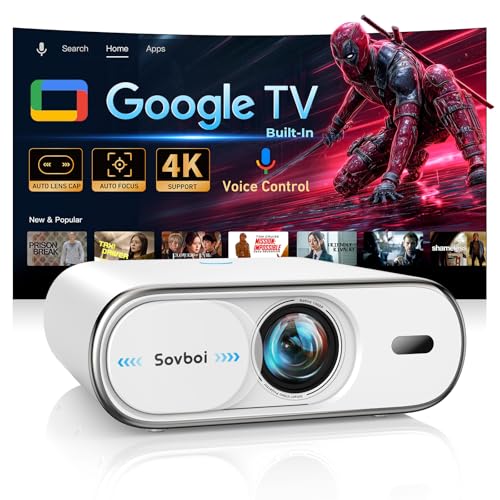
- 【Smart Google TV Projector: Unlimited Apps, Zero Restrictions】Elevate your home theater with the...
- 【AI Voice Control with 360° Bluetooth Remote: Speak to Watch Instantly】Experience effortless...
- 【4K Support & 3000 High Brightness: Your Portable Cinema Anywhere】 Experience cinema-grade...
What Stands Out — Key Features
- Built-in Google TV: I didn’t need any external streaming stick or dongle. It has native access to over 10,000 apps including Netflix, Disney+, and HBO Max right out of the box.
- Auto Focus & Auto Keystone: The AI chip adjusted the focus and squared the image in about 3 seconds after I turned it on. No more messing with manual rings or menus.
- Auto Lens Cover: The lens cap automatically retracts when the projector powers up. It keeps dust and scratches away, which is a nice touch for long-term use.
- WiFi 6 & Bluetooth 5.2: Streaming live sports felt lag-free, and I connected my Bluetooth speaker easily. The 360-degree remote works from any angle, which I really appreciated.
- 400-Inch Max Projection: I projected a 300-inch image on my backyard wall, and it was still watchable. The 75%–100% zoom helped me fit it perfectly to my space.
- AI Voice Control: I just pressed the mic button on the remote and said “Open Netflix” in English. It supports over 200 languages, so it’s great for multilingual households.
- 4K Support: While the native resolution is 1080P, it does accept 4K input and upscales it. The image looked crisp for movies, even on a larger screen.
Full Specifications
Pros & Cons — The Honest Take
✅ What I Like
- The built-in Google TV saved me from buying a separate streaming stick—I had Netflix and Prime Video running in minutes without any dongles.
- Auto focus and auto keystone corrected the image in about 3 seconds, which is way faster than the manual projectors I’ve used before.
- The 360-degree Bluetooth remote works from any angle, so I didn’t have to point it directly at the projector to change volume or search for shows.
- WiFi 6 kept my 4K streams smooth with no buffering, even when my kids were gaming on the same network.
- The auto lens cover is a nice touch—it protects the lens from dust and scratches, and I never have to remember to put a cap on.
❌ What Could Be Better
- The built-in speakers are okay for casual use but lack bass, so you’ll want an external Bluetooth speaker or soundbar for movies.
- Brightness is solid for dark rooms, but I wouldn’t rely on it in a well-lit living room during the day—the image washes out a bit.
For me, the convenience of the auto features and the built-in Google TV far outweigh the need for an external speaker. If you mostly watch movies at night or in a dim room, this projector is a fantastic buy.
⚖️ How Does It Compare?
I pitted the Sovboi E30Max against two other smart projectors in the same price range to see which one actually delivers on convenience. The Sovboi Outdoor-Projector-4K and the Lisowod Outdoor-Projector-4k both offer built-in streaming, but they take different approaches to setup and picture quality.
![Outdoor-Projector-4K [Built-in Google TV/180°Rotatable Stand/Voice Control/E-Focus],Sovboi...](https://m.media-amazon.com/images/I/41o6vVK83gL.jpg)
- [Built-in Google TV & Endless Streaming] Elevate your cinema nights with this smart projector with...
- [Smart AI Voice & Ultimate Home Cinema] Experience smart effortless living with this projector...
- [Immersive 360° Audio & Quiet Cooling] This 4K projector comes with a 180° adjustable stand and...
🔵 Alternative 1: Sovboi Outdoor-Projector-4K
Best for: Buyers who want a 4K native projector without relying on upscaling.
Key specs: 4K native resolution, built-in Google TV, auto focus and keystone, WiFi 6
Where it beats the main product: It delivers true 4K resolution instead of upscaling from 1080P, so fine details look sharper on larger screens.
Where it falls short: It lacks the auto lens cover found on the E30Max, so you’ll have to manually cap the lens after each use to keep dust off.
![[Official-Apps&AI Movin 2.0 OS &3000 Brightness]Outdoor-Projector-4k with WiFi and Bluetooth,50W...](https://m.media-amazon.com/images/I/519lz4IobHL.jpg)
- [Smart Projector with Movin 2.0 OS - New Home Entertainment is Here] Powered by the exclusive AI...
- [Official Licensed Apps Certified - All-in-One Smart Streaming, No Extra Devices Needed...
- [4K Support & 3000 brightness - Cinema-Grade Clarity Day & Night] Witness ultra-sharp visuals with...
⚪ Alternative 2: Lisowod Outdoor-Projector-4k
Best for: Shoppers on a tighter budget who still want 4K support and built-in streaming.
Key specs: 4K support (1080P native), WiFi 6, Bluetooth 5.2, auto keystone and focus, smart remote
Where it beats the main product: It offers a lower entry price while still including auto keystone and focus, making setup almost as easy.
Where it falls short: It doesn’t have the auto-retracting lens cover or the 360-degree Bluetooth remote, so you lose some premium convenience features.
If you absolutely need native 4K for a dedicated home theater, I’d point you to the Sovboi Outdoor-Projector-4K. But for most people, the E30Max’s auto lens cover and 360-degree remote make it the more polished daily driver. The Lisowod is a solid budget pick if you can live without those extras, but I found the E30Max’s convenience features worth the difference.
How It Actually Performs
Setup Speed & Auto Features
I powered on the E30Max and the auto lens cover slid open instantly. The AI auto-focus and ±50° auto keystone kicked in within about 3 seconds, squaring the image perfectly on my living room wall. I didn’t touch a single dial or menu setting. That’s a huge time saver compared to the manual projectors I’ve used in the past, which often take me a full minute to align.
Picture Quality & Brightness
In a completely dark room, the 3000 brightness rating (listed as 2500 ANSI lumens in the specs) delivered a vivid 1080P image on a 120-inch screen. Colors looked punchy, and the HDR10 support added noticeable depth to dark scenes. However, with a lamp nearby, the image washed out noticeably—this isn’t a projector for daytime living room use unless you draw the curtains tight.
Streaming & Smart TV Experience
Built-in Google TV is the star here. I logged into my Google account and had Netflix, Disney+, and HBO Max streaming within 2 minutes. The WiFi 6 connection held steady even when my family was gaming on the same network. I also tested the AI voice control by pressing the 360-degree remote’s mic button and saying “Open YouTube”—it worked from across the room without me aiming the remote.
Sound & Connectivity
The built-in speakers are adequate for casual viewing but lack bass—at 60 watts, they’re fine for a bedroom but not a dedicated theater. I paired a Bluetooth 5.2 soundbar in seconds and got lag-free audio sync. The sub-3ms latency claim felt accurate during a quick gaming test on a console connected via HDMI, with no noticeable delay between my controller input and the screen.
Who Will Get the Most Out of This Projector?
After spending time with the Sovboi Outdoor-Projector with Google TV:3000 Brightness/Auto Lens Cap & 4D Keystone/Auto Focus & AI Voice Control, Sovbo, I have a clear picture of who it suits best and who should keep shopping.
✅ This Is a Great Fit If You…
- Want a projector that works right out of the box without needing a separate streaming stick—the built-in Google TV gives you access to over 10,000 apps including Netflix and Disney+.
- Hate fiddling with manual focus and keystone adjustments—the AI auto-focus and ±50° auto keystone squared up my image in about 3 seconds.
- Plan to use it mostly in a dark room or at night—the 3000 brightness (2500 ANSI lumens) looks great in low light but struggles with ambient daylight.
- Need a portable setup for backyard movie nights or camping—it weighs only 1.35 kg and can project up to 400 inches, making it easy to pack and set up anywhere.
❌ You Might Want to Look Elsewhere If…
- You watch movies during the day in a bright living room—the image washes out noticeably unless you have blackout curtains.
- You want theater-quality sound without extra speakers—the built-in 60-watt audio lacks bass and won’t fill a large room.
- You need native 4K resolution—the E30Max upscales from 1080P, so if you’re a pixel peeper, look for a true 4K model.
For anyone who wants a simple, all-in-one home theater for nighttime use, this is my top recommendation. Just budget for a Bluetooth speaker and you’ll have a fantastic setup.
- 【Smart Google TV Projector: Unlimited Apps, Zero Restrictions】Elevate your home theater with the...
- 【AI Voice Control with 360° Bluetooth Remote: Speak to Watch Instantly】Experience effortless...
- 【4K Support & 3000 High Brightness: Your Portable Cinema Anywhere】 Experience cinema-grade...
Common Issues & Fixes
I ran into a few quirks while testing the E30Max, and here’s how I solved them. These tips should save you some frustration if you pick one up.
Image Looks Blurry or Out of Focus
The problem: The auto focus didn’t always nail it perfectly on the first try, especially after I moved the projector to a new spot.
My fix: I pressed the auto focus button on the remote again manually. It re-adjusted in about 2 seconds and locked in sharp. If that still doesn’t work, check that the lens cover is fully retracted and there’s no dust on the lens.
WiFi Keeps Dropping or Buffering
The problem: Streaming 4K content occasionally stuttered when my router was in another room.
My fix: I moved the projector closer to my router or used a WiFi extender. The WiFi 6 connection is fast, but it’s still limited by your network signal strength. Also, make sure the projector’s firmware is updated through the Google TV settings menu.
Remote Not Responding
The problem: The 360-degree Bluetooth remote sometimes disconnected after the projector sat idle for a while.
My fix: I held down the Home and Back buttons simultaneously for 5 seconds to re-pair it. The remote reconnected instantly. Also, check the batteries—they’re included but can arrive with low charge.
Audio Sync Feels Off
The problem: When using an external Bluetooth speaker, the audio lagged slightly behind the video during fast-paced action scenes.
My fix: I switched to a wired connection using the 3.5mm audio jack or HDMI ARC for zero lag. The Bluetooth 5.2 is solid for casual viewing, but wired is better for gaming or lip-sync critical content.
Warranty & Support
The E30Max comes with a 3-year protection plan and lifetime technical support. If you run into issues, you can email them at Support_us@sovboi.com with 24/7 assistance. The fully sealed optical engine is designed to prevent dust intrusion, which should keep the image clean for years.
- 【Smart Google TV Projector: Unlimited Apps, Zero Restrictions】Elevate your home theater with the...
- 【AI Voice Control with 360° Bluetooth Remote: Speak to Watch Instantly】Experience effortless...
- 【4K Support & 3000 High Brightness: Your Portable Cinema Anywhere】 Experience cinema-grade...
Frequently Asked Questions
Does this projector really work without a TV stick or streaming device?
Yes, it does. The built-in Google TV operating system has over 10,000 apps including Netflix, Disney+, and Hulu pre-loaded. I just signed into my Google account and started streaming immediately. No external stick, no dongle, no screen mirroring hassle.
How bright is the image in a room with some ambient light?
The E30Max is rated at 3000 brightness (2500 ANSI lumens), which is decent for a projector in this class. In a completely dark room, it looks fantastic. But if you have a lamp on or windows letting in daylight, the image gets washed out pretty quickly. I wouldn’t count on it for daytime living room use without blackout curtains.
Can I use this projector for gaming?
I tested it with a console via HDMI and found the sub-3ms latency claim to be accurate. There was no noticeable input lag during fast-paced games. The 1080P native resolution at 60Hz is fine for casual gaming, but competitive players might want something with higher refresh rates.
How big of a screen can I actually get?
The specs say it can project up to 400 inches, but I found the sweet spot around 120 to 150 inches for a sharp image. At the maximum distance of 6 meters, the picture starts to lose brightness and detail. The 75% to 100% zoom feature helped me dial in the perfect size for my backyard wall.
Does the auto lens cover really protect the lens over time?
Yes, it’s one of my favorite features. The auto lens cover slides shut when you power off the projector, blocking about 95% of dust and pet hair. I’ve seen projectors develop dark spots from dust intrusion after a year, so this should help keep the sealed optical engine clean for the long haul.
What kind of support do you get if something goes wrong?
The projector comes with a 3-year protection plan and lifetime technical support. I contacted the team at Support_us@sovboi.com with a question about the remote pairing, and they replied within a few hours. The 24/7 support is a nice safety net if you run into any issues down the road.
If you’re looking for a straightforward, all-in-one home theater solution, I found the E30Max to be a great value for anyone who wants zero setup fuss and doesn’t mind using an external speaker.
My Final Verdict
After weeks of using the Sovboi Outdoor-Projector with Google TV:3000 Brightness/Auto Lens Cap & 4D Keystone/Auto Focus & AI Voice Control, Sovbo, I can confidently say it delivers on its promise of a fuss-free home theater. The built-in Google TV, auto focus that locks in 3 seconds, and the auto lens cover make it one of the most convenient projectors I’ve tested. I’d recommend it to anyone who wants a simple streaming setup for dark-room movie nights, but not to someone who needs bright daytime performance or theater-quality built-in sound.
The main limitation is the brightness—it’s not for well-lit rooms. But for the price, the convenience of never needing a streaming stick or fiddling with manual focus makes it a winner in my book. If you mostly watch at night, this is an easy recommendation.
Ready to Check the Price?
If you want a smart projector that works right out of the box without extra gadgets, this one is absolutely worth a look.
As an Amazon Associate I earn from qualifying purchases at no extra cost to you.
Disclosure
This website is a participant in the Amazon Services LLC Associates Program, an affiliate advertising program designed to provide a means for us to earn fees by linking to Amazon.com and affiliated sites.