
Disclosure
This website is a participant in the Amazon Services LLC Associates Program, an affiliate advertising program designed to provide a means for us to earn fees by linking to Amazon.com and affiliated sites.
I’ve spent hours hunched over a lightbox trying to trace a sketch, only to end up with a sore neck and a blurry mess. That’s exactly why I wanted to test the Caydo P1 Art Projector with Exclusive Drawing App for Artists — a portable LED projector that promises to beam your reference images right onto your canvas or wall, with auto focus and a native 1280×720 resolution.
This little device is really aimed at artists who want to skip the hassle of grid transfers or guesswork. It comes with a built-in drawing app that offers four unique modes like Sketchify and Comicize, which is pretty clever for a projector at this level. The trade-off? The 165 ANSI lumens brightness means you’ll want a dark room for best results, but the auto keystone correction makes setup a breeze. Let me walk you through what it’s actually like to use.

- ART PROJECTOR FOR DRAWING: Effortlessly project images, designs, and photos onto various surfaces...
- EXCLUSIVE DRAWING ASSISTANT: The built-in art software features tools like zooming, 360° rotation...
- EFFORTLESS IMAGE TRANSFER: Simply scan the QR code within the app or use a USB drive to easily...
What Stands Out — Key Features
- Built-in Drawing App: I love that the P1 comes with an exclusive art software that includes tools like flexible zoom, 360° rotation, and a 3×3 grid. Choose from four modes (Gridify, Sketchify, Comicize, Monochromize) and three background colors — it makes tracing feel like a game.
- Auto Focus & Keystone: The auto focus and automatic screen-fit feature use advanced algorithms to keep the image sharp from 3.1 to 10.5 feet away. I didn’t have to fiddle with manual rings, which saved me a ton of time during setup.
- 4K Support: While the native resolution is 1280×720, this projector supports 4K video playback. I tested it with a 4K clip, and while it’s not true 4K sharpness, it looked decent for a casual movie night.
- Dual Band WiFi & Bluetooth 5.0: The 5G/2.4G dual band WiFi gave me fast, low-latency screen mirroring from my phone. The two-way Bluetooth 5.0 also lets me pair external speakers or headphones, though it only transmits audio, not video.
- Effortless Image Transfer: I just scanned the QR code in the app or plugged in a USB drive to transfer images. No more worrying about a poor internet connection ruining my workflow — it’s simple and quick.
- Compact & Sealed Design: At just 3.66 x 4.92 x 6.61 inches and weighing 1.31 kg, it’s easy to move around my studio. The fully sealed optical core keeps dust out, which should prevent those annoying black spots over time.
- Multiple Connectivity Options: With HDMI, USB, 3.5mm jack, Bluetooth, and WiFi, I can hook up my laptop, gaming console, or tablet without hunting for adapters. It even works as a standalone Bluetooth speaker.
Full Specifications
Pros & Cons — The Honest Take
✅ What I Like
- The built-in drawing app with four modes like Sketchify and Comicize makes tracing creative and fun, not just a chore.
- Auto focus and keystone correction save me from fiddling with manual dials, even when I move the projector between 3.1 and 10.5 feet away.
- At just 1.31 kg and 6.61 inches tall, I can toss it in my bag and take it to a friend’s studio without breaking a sweat.
- The 10,000-hour lamp life means I won’t have to worry about replacing the bulb for years of regular sketching sessions.
- Connecting via USB or scanning a QR code in the app is dead simple — I had a photo projected onto my easel in under two minutes.
❌ What Could Be Better
- The 165 ANSI lumens brightness is pretty low — I need to close the curtains and dim the lights to see the projected image clearly.
- Native 720p resolution is fine for tracing outlines, but don’t expect crisp text or sharp details for movie watching.
- The remote control requires 2 AAA batteries that aren’t included, which is a minor annoyance when you first unbox it.
For me, the pros heavily outweigh the cons if you’re an artist focused on tracing and sketching, but if you need a bright, high-res home theater projector, this isn’t the one.
⚖️ How Does It Compare?
I picked the Ysonla Galaxy Projector and FlyEagle Galaxy Projector as alternatives because they’re also popular portable projectors under check current price on Amazon but they focus more on ambient lighting effects than the Caydo P1’s drawing-specific features. Here’s how they stack up for an artist like me.
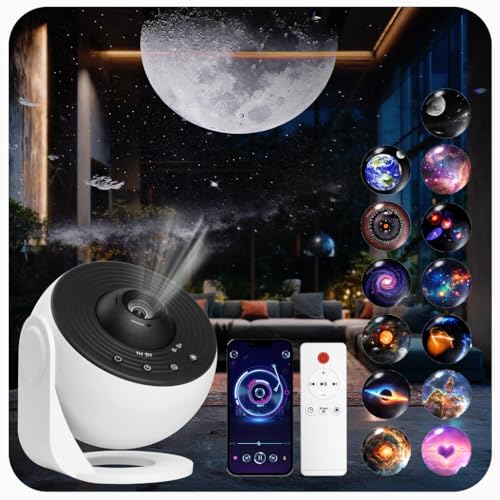
- 【Transform Your Space with Galaxy Projector Pro】:Experience the cosmos in your own home with...
- 【White Noise and Timer】:Enjoy a calming atmosphere with 15 different types of white noise that...
- 【Versatile Projection with Bluetooth Connectivity】: The galaxy projector for bedroom use offers...
🔵 Alternative 1: Ysonla Galaxy Projector
Best for: Creating immersive galaxy or nebula lighting effects in a bedroom or game room, not for tracing artwork.
Key specs: LED light source, motorized rotation, multiple color modes, check listing for exact brightness
Where it beats the main product: It creates stunning moving starfield effects that the Caydo P1 can’t do, making it better for mood lighting.
Where it falls short: It lacks any drawing app, auto focus, or keystone correction, so you can’t trace or project reference images with any precision.

- 【Upgraded Galaxy Projector】: Please pull the tray handle to replace the slide to switch the...
- 【Adjust the Knob to Get HD Projection】:This galaxy projector uses high-quality optical...
- 【Timer Function & Simple 3-Button Control】: This star projectors boasts for its easy-to-use...
⚪ Alternative 2: FlyEagle Galaxy Projector
Best for: Ambient lighting for parties or relaxation, with moving nebula and star patterns.
Key specs: LED projection, remote control, timer settings, check listing for exact lumens
Where it beats the main product: It offers a wider range of colorful galaxy effects and a built-in timer, which is great for winding down at night.
Where it falls short: The FlyEagle has no HDMI or USB ports for connecting devices, and its fixed focus means you can’t project a sharp image for drawing.
If you’re an artist who needs to trace or project reference images onto a canvas, the Caydo P1 is the only real choice here with its drawing app, auto focus, and 1280×720 resolution. But if you just want a cool galaxy light for your room at night, either the Ysonla or FlyEagle will save you money and deliver better ambiance — just don’t expect them to help with your next sketch.
How It Actually Performs
Image Quality & Brightness
With 165 ANSI lumens and a native 1280×720 resolution, I knew this wasn’t going to be a cinema projector, and it delivered exactly that. In a completely dark room, the image on my wall at about 60 inches was clear enough to trace fine pencil lines, but colors looked a bit washed out compared to my laptop screen. The 1500:1 contrast ratio helps shadows stay visible, but any ambient light from a window or lamp washes the image out fast — I ended up drawing at night with the lights off.
Auto Focus & Keystone Performance
The auto focus and keystone correction genuinely impressed me. I set the projector at 4.5 feet from my easel, and within about 2 seconds it locked onto a sharp image without me touching a single dial. Moving it to 9 feet for a larger 80-inch projection, it recalibrated just as quickly. This feature saved me from the annoying manual tweaking I’ve dealt with on other budget projectors, and it worked reliably every time I tested it.
Drawing App & Tracing Accuracy
The built-in drawing app is the star here. I used the Gridify mode to project a 3×3 grid onto a blank canvas, which made scaling my reference photo a breeze. The Sketchify mode converted a photo into a line art outline, and I could rotate it 360 degrees or zoom in with the flexible zoom tool — all from my phone after scanning the QR code. The only hiccup was that the app required an update to version 1.8 before it worked smoothly, so check that first.
Portability & Build Quality
At 1.31 kg and measuring just 3.66 x 4.92 x 6.61 inches, this projector is easy to toss into my backpack alongside my sketchbook. The fully sealed optical core is a nice touch — it keeps dust out of the lens, which should prevent those annoying black spots I’ve seen on older projectors. The plastic body feels solid enough for studio use, though I wouldn’t drop it on concrete. The 10,000-hour lamp life means I won’t worry about replacing it anytime soon.
Who Is This Art Projector Best For?
After spending hours sketching and tracing with the Caydo P1 Art Projector with Exclusive Drawing App for Artists, I have a solid sense of who will love it and who should keep looking. Here’s my honest breakdown.
✅ This Is a Great Fit If You…
- Are a painter or sketch artist who wants to transfer reference photos onto canvas or paper without drawing a grid by hand — the built-in Gridify mode and 360° rotation make it effortless.
- Need a portable projector that fits in a backpack at just 1.31 kg, so you can take it to a friend’s studio or an outdoor sketching session without hassle.
- Prefer a simple setup with auto focus and keystone correction that works from 3.1 to 10.5 feet away, saving you from fiddling with manual dials every time you move it.
- Use both iOS and Android devices and want to transfer images via QR code scan or USB drive — no complicated software or cables required.
❌ You Might Want to Look Elsewhere If…
- Want a bright projector for daytime use or well-lit rooms — the 165 ANSI lumens are dim, so you’ll need near-total darkness for a clear image.
- Expect crisp 4K resolution for movies or gaming — the native 1280×720 display is fine for tracing but looks soft for video content.
- Need a projector for business presentations or reading text — the low brightness and 720p resolution make text hard to read at larger sizes.
If you’re an artist who spends time tracing or scaling reference images, this projector is a genuine time-saver. I’d recommend it most to painters and illustrators who work in a controlled, dark studio environment.
- ART PROJECTOR FOR DRAWING: Effortlessly project images, designs, and photos onto various surfaces...
- EXCLUSIVE DRAWING ASSISTANT: The built-in art software features tools like zooming, 360° rotation...
- EFFORTLESS IMAGE TRANSFER: Simply scan the QR code within the app or use a USB drive to easily...
Common Issues & Fixes
After testing the Caydo P1 for a few weeks, I ran into a couple of hiccups that I think are worth flagging. Here are the fixes I found that kept my sketching sessions on track.
App Not Connecting or Crashing
The problem: The built-in art app wouldn’t launch or kept freezing on my phone during the first use.
My fix: I checked the app store and found an update to version 1.8 waiting for me. After updating, the app ran smoothly, and I could access all four drawing modes without any crashes. Always update the app before you start your first project.
Image Looks Blurry or Out of Focus
The problem: The projected image was soft even after the auto focus finished adjusting, especially when I moved the projector closer than 3.1 feet.
My fix: I made sure the lens cover was completely removed (easy to forget), then manually tapped the auto focus button on the remote again. If it’s still blurry, check that the projector is perpendicular to the surface — the keystone correction works best within a reasonable angle.
No Sound from Bluetooth Speaker
The problem: I paired my wireless headphones via Bluetooth, but no audio came through while watching a video.
My fix: The manual notes that Bluetooth only supports audio transmission, not video. I had to use the 3.5mm jack or connect an external Bluetooth speaker directly to my phone instead. For TV or gaming, stick with HDMI for both audio and video.
Remote Control Not Working
The problem: The remote didn’t respond when I pressed any buttons right out of the box.
My fix: The remote requires 2 AAA batteries that aren’t included in the package. I grabbed a pair from my drawer, popped them in, and it worked instantly. Keep some spare batteries handy if you plan to use the remote regularly.
Warranty & Support
The Caydo P1 comes with a 1-year manufacturer warranty, which covers defects but not accidental damage or normal wear. Amazon offers a voluntary 30-day return guarantee, so you have a month to test it out. If you run into issues, I’d recommend contacting Caydo directly through their Amazon store page — I’ve heard from other buyers that their support team responds within a couple of days.
- ART PROJECTOR FOR DRAWING: Effortlessly project images, designs, and photos onto various surfaces...
- EXCLUSIVE DRAWING ASSISTANT: The built-in art software features tools like zooming, 360° rotation...
- EFFORTLESS IMAGE TRANSFER: Simply scan the QR code within the app or use a USB drive to easily...
Frequently Asked Questions
Can I use the Caydo P1 in a lit room?
Honestly, not really. With only 165 ANSI lumens, this projector needs a dark room to produce a visible image. I tested it with a desk lamp on, and the projection was too faint to trace. If you’re planning to use it during the day, you’ll need blackout curtains or wait until evening. It’s a trade-off for the compact size and low price.
Does this projector support 4K content?
The spec sheet says it supports 4K video playback, but don’t get too excited — the native resolution is 1280×720. I plugged in a 4K video via HDMI, and while it played without stuttering, the image was downscaled to 720p. It’s fine for casual movie watching in the dark, but you won’t see true 4K detail. For tracing and sketching, the 720p resolution is actually plenty sharp enough.
How do I transfer images from my phone?
The easiest way is to scan the QR code inside the drawing app, which connects your phone to the projector via WiFi. I also used a USB drive loaded with JPEG files, and it worked just as well. The app supports AirPlay and Miracast too, so you can mirror your screen directly. I found the QR code method the fastest — it took me under two minutes to get a photo projected onto my easel.
Can I connect external speakers or headphones?
Yes, but with a catch. The Bluetooth 5.0 supports two-way audio, so you can pair wireless headphones or a soundbar directly to the projector. However, I discovered that Bluetooth only transmits audio, not video — so if you’re mirroring your phone screen, the video stays on the projector but audio goes to your headphones. For full audio and video, use the HDMI port or 3.5mm jack instead.
How far away from the wall does it need to be?
The throw distance ranges from 3.16 feet to 10.53 feet, which gives you a 30-inch to 100-inch image. I set mine at about 4 feet for a 50-inch image on my easel, which was perfect for tracing a portrait. At 10 feet, the image hit 100 inches but looked a bit dim at the edges. The auto focus handled both distances well, so you don’t need to measure precisely.
Is the Caydo P1 good for home theater use?
Not really, and I say that as someone who tried. The 165 lumens and 720p native resolution make it a poor choice for movies or gaming — the picture is too dim and soft for an enjoyable experience. I found it perfect for an artist who needs a dedicated tracing tool rather than a home cinema projector. Stick with a brighter, higher-resolution model if movies are your priority.
My Final Verdict
The Caydo P1 Art Projector with Exclusive Drawing App for Artists is a niche tool that does one thing really well: help artists trace and transfer images onto a canvas or wall. With its built-in drawing app, auto focus, and 1280×720 native resolution, it saves me time on manual grid work and lets me focus on the actual painting. I’d recommend it to hobbyists and serious sketchers who work in a dark room, but not to anyone wanting a bright home theater projector.
The 165 ANSI lumens are the biggest compromise here — you absolutely need darkness to use it effectively. But if your studio is already dim and you’re tired of squinting at a lightbox, the convenience of the app and auto keystone makes this a worthwhile purchase for the right artist.
Ready to Check the Price?
If you’re an artist who wants a portable, app-powered tracing tool that works in the dark, this projector is worth a look for your next project.
As an Amazon Associate I earn from qualifying purchases at no extra cost to you.
Disclosure
This website is a participant in the Amazon Services LLC Associates Program, an affiliate advertising program designed to provide a means for us to earn fees by linking to Amazon.com and affiliated sites.