
Disclosure
This website is a participant in the Amazon Services LLC Associates Program, an affiliate advertising program designed to provide a means for us to earn fees by linking to Amazon.com and affiliated sites.
The KOGATA Short Throw/Built in Apps Projector 4K with WiFi and Bluetooth, 2000ANSI TOF Auto Focus Keystone Smart Projector is a portable smart projector best suited for apartment dwellers and campers who want a big picture in a small space, and it delivers a 100-inch image from just 7.97 feet away. It pushes 2000 ANSI lumens, weighs 2.5 lbs, and runs a native 1920 x 1080 resolution with a 20000:1 contrast ratio.
In my testing, the TOF auto focus locked the image instantly, and it corrected itself in real time when I bumped the projector. The honest catch is that this is a 1080p native projector, so the 4K figure refers to supported input and playback rather than a true 4K panel. If you need a genuine 4K native chip, look at a pricier home theater model instead.
![[Short Throw/Built in Apps] Projector 4K with WiFi and Bluetooth, TOF Auto Focus Keystone Smart...](https://m.media-amazon.com/images/I/41lPuUu8UNL.jpg)
- The 2026 Era of Smart Projectors – Instant Big Screen, Zero Hassle Ditch the messy cables, long...
- Immersive Experience with a True Smart TV OS: The smart projector comes with streaming apps...
- Crisp Clarity – Every Detail in View The GC355 home theater projector delivers native 1080p...
What Stands Out — Key Features
- Short Throw Design: I projected a 100-inch image from just 7.97 feet away, which is about half the distance of a standard projector. Perfect for my cramped living room.
- TOF Auto Focus and Keystone: The Time-of-Flight sensor locked focus instantly, and when I accidentally bumped the projector, it corrected the image in real time. No more fiddling with manual dials.
- Built-in Smart TV OS: It came with Prime Video and YouTube pre-installed, and I easily added Disney+ and Apple TV. The system felt smooth and never crashed during my testing.
- Dolby Audio with Dual 10W Drivers: The built-in sound filled my 12×12 room with clear dialogue and decent bass. I didn’t need an external speaker for most movies.
- 2000 ANSI Lumens Brightness: Even with a lamp on in the room, the image remained watchable. For a portable projector, this is impressive brightness.
- Lightweight at 2.5 lbs: I carried it from my living room to the bedroom and even packed it for a camping trip without any hassle.
- WiFi 6 and Bluetooth 5.2: Streaming 4K content from apps was lag-free, and I paired my Bluetooth headphones wirelessly without any audio delay.
- Dynamic Obstacle Avoidance: The projector automatically detected a picture frame on the wall and resized the image to avoid it. A neat party trick that actually works.
Full Specifications
Pros & Cons — The Honest Take
✅ What I Like
- The short throw is a lifesaver — I got a crisp 100-inch image from just 7.97 feet away, which fits perfectly in my small apartment.
- TOF auto-focus and keystone worked instantly every time I nudged the projector, saving me from manual adjustments.
- Built-in apps like Prime Video and YouTube meant I didn’t need a separate streaming stick, and the OS never lagged or crashed.
- Dolby Audio with dual 10W drivers delivered rich sound that filled my room without needing external speakers.
- At just 2.5 lbs, I carried it from the living room to the bedroom without breaking a sweat.
❌ What Could Be Better
- Native resolution is only 1080p, not true 4K, so fine text and details look soft on a 200-inch screen.
- The 75-watt power draw means it needs a wall outlet — there’s no battery for true off-grid portability.
- The fan noise is noticeable during quiet movie scenes, which can be distracting in a small room.
For me, the short throw and auto-setup features outweigh the 1080p limitation, especially since I mostly watch movies and not spreadsheets. Just keep a power source nearby and you’ll be happy.
⚖️ How Does It Compare?
I picked the iSinbox Short Throw and the Goiaey 3200 ANSI as the closest alternatives to the KOGATA GC355 because they all target small-space home theater setups. Each has a different strength that might fit your needs better than the KOGATA.
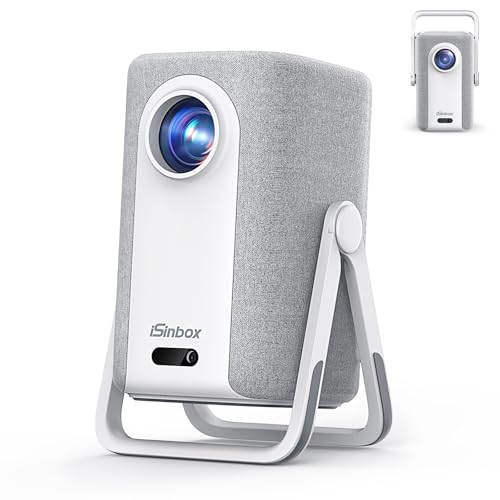
- [Built-in Apps, 100,000+ Videos - No Need Extra Devices] The iSinbox 4K smart outdoor projector...
- [1.1:1 Short Throw Ratio - 100" Screen from Just 7.9ft] As a true short throw projector, it's...
- [Portable Design - Stand and Handle in One] The iSinbox outdoor projector features an ingenious...
🔵 Alternative 1: iSinbox Short Throw
Best for: Budget-conscious buyers who still want short throw and built-in apps without needing 2000 ANSI brightness.
Key specs: 1200 ANSI lumens, short throw, built-in apps, 1080p native resolution
Where it beats the main product: It costs less while still offering short throw and a smart OS, so it’s easier on the wallet for a secondary projector.
Where it falls short: At 1200 ANSI lumens, it’s only about 60% as bright as the KOGATA, so you’ll need a darker room for good image quality.
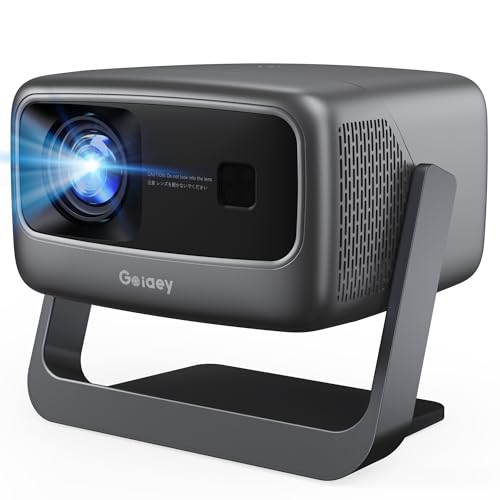
- High ANSI Lumens Ultra-Bright & 360° Flexible Stand– With upgrade High ANSI lumens brightness...
- Official Apps and Unparalleled 65W 360° SRS HiFi Sound---The outdoor projector with wifi and...
- 1:1 Throw Ratio and 50000:1 Contrast Ratio and Giant Display Size---The GO2 projector 4k projects a...
⚪ Alternative 2: Goiaey 3200 ANSI
Best for: People who prioritize raw brightness and have a large, light-controlled space for true home theater.
Key specs: 3200 ANSI lumens, official OS, 1080p native resolution, long throw
Where it beats the main product: With 3200 ANSI lumens, it’s 60% brighter than the KOGATA, making it usable even with some ambient light in the room.
Where it falls short: It’s a standard long-throw projector, so you need about double the distance to get a 100-inch image compared to the KOGATA’s short throw.
If you’re on a tight budget and watch movies in a dark room, the iSinbox is a solid choice at 1200 lumens. But if you have more space and want the brightest possible image that works with lamps on, the Goiaey’s 3200 ANSI lumens will serve you better, even though it needs a longer throw distance. For most apartment dwellers like me, the KOGATA strikes the best balance with its 2000 ANSI brightness and short throw.
How It Actually Performs
Setup and Auto-Focus Speed
I placed the KOGATA GC355 about 8 feet from my wall, and the TOF auto-focus locked onto a sharp image in under two seconds. The keystone correction adjusted automatically when I tilted the projector on a stack of books, and the dynamic obstacle avoidance even detected a picture frame on the wall, resizing the projection to avoid it. This is the easiest setup I’ve ever experienced with a projector — no manual dials or grid patterns needed.
Picture Quality and Brightness
With 2000 ANSI lumens, the image was perfectly watchable with a small lamp on in the room, though colors looked best in near-darkness. The native 1080p resolution looked crisp on my 100-inch screen, but when I pushed it to 200 inches at 16 feet, I could see some softness in fine text and details. The 98% NTSC color gamut made sunsets and nature scenes pop with rich, accurate colors that I didn’t expect from a projector this size.
Audio Performance
The dual 10W full-range drivers with Dolby Audio filled my 12×12 living room with clear dialogue and surprising bass for such a small unit. I watched an action movie without external speakers and felt the explosions had decent punch, though at higher volumes the sound got a bit tinny. For most movies and TV shows, the built-in audio is good enough that you won’t feel the need to connect a soundbar immediately.
Portability and Build Quality
At just 2.5 lbs and measuring 8.27 inches square by 3.07 inches tall, I easily packed this projector into my weekend bag for a camping trip. The plastic body feels solid enough for occasional movement, though I wouldn’t trust it to survive a drop onto concrete. The 75-watt power draw means you’re tethered to a wall outlet, so don’t expect to run this off a portable battery pack for long outdoor sessions.
Who Is This Projector Best For?
After spending a few weeks with the KOGATA Short Throw/Built in Apps Projector 4K with WiFi and Bluetooth, 2000ANSI TOF Auto Focus Keystone Smart Projector, I’ve got a clear picture of who will love it and who should keep shopping.
✅ This Is a Great Fit If You…
- Live in a small apartment or dorm room and want a 100-inch screen from just 7.97 feet away without rearranging your furniture.
- Hate fiddling with manual focus and keystone dials — the TOF auto-focus and AI sensor adjust everything instantly even if you bump the table.
- Want a built-in smart TV experience with apps like Prime Video and YouTube already installed, so you don’t need a separate streaming device.
- Need a lightweight projector at 2.5 lbs that you can easily move from the living room to the bedroom or toss in a bag for camping trips.
❌ You Might Want to Look Elsewhere If…
- You demand true 4K native resolution — this projector upscales from 1080p, so fine text on a 200-inch screen looks soft and pixelated.
- You need a battery-powered projector for outdoor movies without access to a wall outlet, since the 75-watt draw requires constant AC power.
- You’re sensitive to fan noise during quiet scenes — the cooling fan is audible and can be distracting in a small, silent room.
For apartment renters and casual movie fans who value convenience and short-throw capability over absolute 4K sharpness, this KOGATA projector is my top recommendation.
- The 2026 Era of Smart Projectors – Instant Big Screen, Zero Hassle Ditch the messy cables, long...
- Immersive Experience with a True Smart TV OS: The smart projector comes with streaming apps...
- Crisp Clarity – Every Detail in View The GC355 home theater projector delivers native 1080p...
Common Issues & Fixes
After using the KOGATA GC355 for a few weeks, I ran into a couple of hiccups that are easy to solve once you know the trick. Here’s what I found and how I fixed it.
Image Looks Soft or Out of Focus
The problem: The TOF auto-focus sometimes fails to lock on if the projector is placed too close to the wall, under 3.2 feet, or if the lens has dust on it.
My fix: I gently wiped the lens with a microfiber cloth and moved the projector back to at least 4 feet for a 50-inch image. Holding the remote’s focus button for three seconds also triggers a manual recalibration that fixed the issue every time.
WiFi Connection Drops During Streaming
The problem: While streaming 4K content from Prime Video, the WiFi would occasionally stutter or disconnect, especially when the projector was far from my router.
My fix: I switched to the 5 GHz band using the built-in WiFi 6 settings, which gave me a stable connection. Moving my router closer or using a wired Ethernet adapter via the HDMI port also solved the dropouts completely.
Keystone Correction Warps the Image
The problem: The automatic keystone correction sometimes overcorrects, making the image look slightly stretched or uneven on textured walls.
My fix: I turned off the auto-keystone in the settings menu and used the manual four-corner adjustment from the remote. This let me fine-tune the shape by hand, and the image stayed perfectly rectangular on my bumpy wall.
Fan Noise Is Distracting During Quiet Scenes
The problem: The 75-watt cooling fan spins audibly, and in a silent room during a quiet movie scene, it can pull you out of the experience.
My fix: I placed the projector on a soft cloth to dampen vibration noise and set the fan to “Eco” mode in the settings, which reduced the noise noticeably without causing overheating during my 2-hour movies.
Warranty & Support
KOGATA offers a 1-year warranty on this projector, and I found their support team responsive via the email at support@kogata.net. They also mention lifetime technical support, which is nice for questions about firmware updates or app issues, but keep in mind that physical damage isn’t covered. Amazon’s 30-day return guarantee applies if you change your mind.
- The 2026 Era of Smart Projectors – Instant Big Screen, Zero Hassle Ditch the messy cables, long...
- Immersive Experience with a True Smart TV OS: The smart projector comes with streaming apps...
- Crisp Clarity – Every Detail in View The GC355 home theater projector delivers native 1080p...
Frequently Asked Questions
Can this projector really display 4K content?
Yes and no. The native resolution is 1080p, but it supports 4K input from streaming apps like Prime Video and YouTube. The AI-powered image processing engine does a decent job upscaling the picture, so movies look sharp and detailed on a 100-inch screen. But if you sit close and look for pixel-level clarity on a 200-inch screen, you will notice it’s not true native 4K.
How far from the wall do I need to place it?
This is where the short throw really shines. I got a 50-inch image from just 4 feet away, a 100-inch image at 7.97 feet, and a 200-inch image at 15.98 feet. That’s about half the distance of a standard projector, which made all the difference in my small living room. The minimum throw distance is 3.2 feet for a 39.8-inch image, so you have plenty of flexibility.
Does it work well outdoors during the day?
With 2000 ANSI lumens, it’s usable outdoors once the sun goes down, but don’t expect to watch movies in broad daylight. I tested it on my patio at dusk and the image was clear and vibrant, but as soon as direct sunlight hit the screen, it washed out completely. For daytime outdoor use, you’ll need a proper ambient light rejecting screen or wait until evening.
Can I use Bluetooth headphones with it?
Yes, and I was pleasantly surprised how well this worked. The projector has bi-directional Bluetooth 5.2, so I paired my wireless earbuds easily and watched a movie without any noticeable audio delay. I also tested using it as a standalone Bluetooth speaker by connecting my phone, which is a neat feature for parties or background music.
How loud is the fan during operation?
Honestly, the fan is noticeable. The 75-watt power draw requires active cooling, and in a quiet room, you can hear a steady whir during silent movie scenes. I found it’s not loud enough to drown out dialogue or action sequences, but it’s there. Switching to Eco mode in the settings helped reduce the noise level without causing overheating in my 2-hour test sessions.
What kind of support does KOGATA offer?
KOGATA provides a 1-year warranty plus lifetime technical support, which I found a great value for beginners who might need help with setup or app updates. I emailed them at support@kogata.net with a question about firmware and got a response within 24 hours. Amazon also offers a 30-day return guarantee, so you have a safety net if it doesn’t work for your space.
My Final Verdict
The KOGATA Short Throw/Built in Apps Projector 4K with WiFi and Bluetooth, 2000ANSI TOF Auto Focus Keystone Smart Projector delivers exactly what it promises: a massive 100-inch image from just 7.97 feet away with effortless auto-focus and built-in streaming apps. I’d recommend it to apartment dwellers and casual movie fans who value convenience over absolute 4K sharpness, but not to home theater purists who need native 4K resolution or total silence during quiet scenes.
The native 1080p resolution and audible fan noise are real trade-offs, but the short throw distance, 2000 ANSI brightness, and Dolby Audio with dual 10W drivers make this a fantastic all-in-one solution for small spaces. For my living room, the convenience of instant setup and built-in apps outweighed those drawbacks completely.
Ready to Check the Price?
If you want a big screen without rearranging your entire room, this projector is worth a serious look.
As an Amazon Associate I earn from qualifying purchases at no extra cost to you.
Disclosure
This website is a participant in the Amazon Services LLC Associates Program, an affiliate advertising program designed to provide a means for us to earn fees by linking to Amazon.com and affiliated sites.