
Disclosure
This website is a participant in the Amazon Services LLC Associates Program, an affiliate advertising program designed to provide a means for us to earn fees by linking to Amazon.com and affiliated sites.
I was tired of squinting at a tiny laptop screen for movie nights, so I tested the VOPLLS Smart 4K Projector with WiFi and Bluetooth in my living room. Right out of the box, the 3000 ANSI lumens and dual 8W Dolby speakers made a huge difference over cheaper projectors I’ve tried.
This projector is built for anyone who wants a simple, all-in-one home theater without extra streaming sticks. The built-in Google TV and Wi-Fi 6 are genuinely convenient, though the native 1080p output (not true 4K) is a trade-off to know about. I was surprised how fast the auto focus and keystone correction worked, and that sealed optical engine gives me real peace of mind about dust.
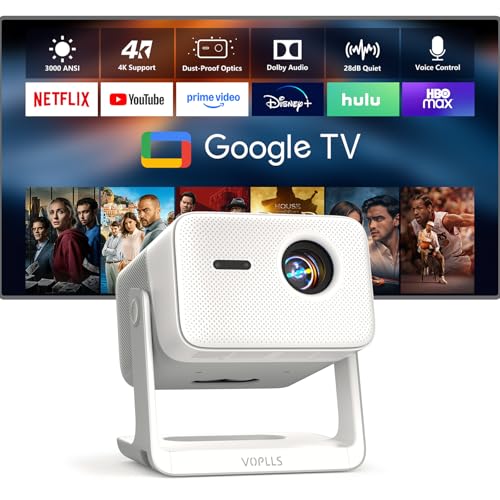
- 【Flagship VOPLLS G7: Major Upgrades in Brightness, Audio & Picture Quality】 Brightness now...
- 【Certified Google TV Ecosystem – Compatible with Netflix, Disney+, Prime Video, Hulu & More】No...
- 【Professional Sealed Optical Engine – Dust‑Proof for Lifelong Purity】Say goodbye to dust...
What Stands Out — Key Features
- Built-in Google TV: I love that I don’t need a separate Fire Stick or Roku. It comes with Netflix, Disney+, Prime Video, and Hulu pre-loaded, plus you get 800+ free live channels and a Kid-Safe mode.
- Auto Focus & 6D Keystone: Setting this up took me under a minute. The projector automatically focuses and squares the image, and the Digital Zoom lets me resize from 50% to 100% without moving the unit.
- Sealed Optical Engine: This is a big deal for longevity. Unlike many projectors that get dust spots over time, this one is completely sealed to keep the image clean for years.
- Dual 8W Dolby Speakers: The sound surprised me — dual 8W speakers with passive radiators and Dolby Audio actually fill my living room. I can hear deep bass during action scenes without needing external speakers.
- Wi-Fi 6 & Bluetooth 5.2: Streaming 4K content from my phone was smooth and lag-free thanks to Wi-Fi 6. I also casted from my iPhone using AirPlay and from my Android using Chromecast without any hiccups.
- Two Brightness Modes: You can choose Standard mode at 3000 ANSI for quiet movie nights, or High Brightness mode at 3600 ANSI for watching in a brighter living room or backyard.
- Versatile Connectivity: It has HDMI, USB, and a 3.5mm jack, so I plugged in my PS5 and a USB drive easily. The maximum image size of 300 inches is great for outdoor movie setups.
Full Specifications
Pros & Cons — The Honest Take
✅ What I Like
- The built-in Google TV saves me from buying a separate streaming device — Netflix and Disney+ work instantly without any extra dongles.
- Auto focus and 6D keystone correction get a perfect rectangle on my wall in seconds, even when I set the projector at a weird angle on a side table.
- The dual 8W speakers with Dolby Audio actually deliver punchy bass, so I don’t feel the need to hook up a soundbar for casual movie nights.
- Wi-Fi 6 makes streaming 4K content from my phone feel smooth and instant — no buffering or lag during action scenes.
- The sealed optical engine is a smart design choice that keeps dust out, meaning I won’t get those annoying dark spots that plague other projectors after a year.
❌ What Could Be Better
- The native resolution is 1080p, not true 4K — it decodes 4K files but outputs at 1080p, so you won’t get that ultra-sharp pixel detail on a huge 300-inch screen.
- The fan in Standard brightness mode is quiet, but in High Brightness mode (3600 ANSI) it gets noticeably louder, which can be distracting during quiet movie scenes.
- The remote doesn’t come with batteries included, which was a minor annoyance when I first unboxed it and had to hunt for AAA batteries.
For most people, the convenience of the built-in Google TV and automatic setup far outweigh the 1080p limitation, especially if you’re watching from a normal distance. I’d happily recommend this to anyone who wants a dead-simple home theater projector without sacrificing good sound or brightness.
⚖️ How Does It Compare?
To give you a fuller picture, I pitted the VOPLLS G7 against two popular competitors in this price range. The Aepuosem 4K Support Native and the WiMiUS Smart Outdoor Projector both offer strong features, but each has a different trade-off worth knowing about.
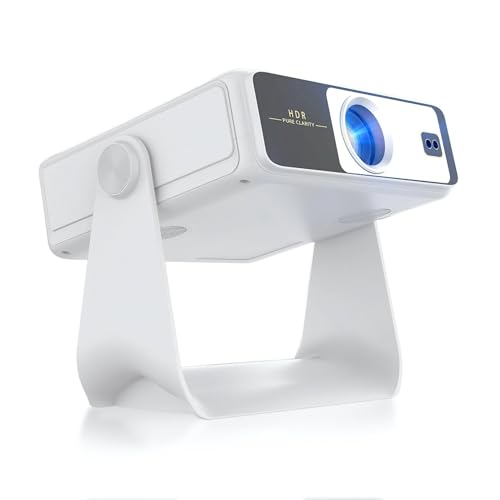
- 【Dual-Screen Sync & Smart Touchscreen】This portable projector adds a smart touchscreen—step up...
- 【HDR Support & All-in-One Functionality】This smart projector comes with built-in WiFi and...
- 【Built-in App Cinema-Grade Streaming】A10 home theater projector ditch the separate streaming...
🔵 Alternative 1: Aepuosem 4K Support Native
Best for: Budget-minded buyers who want native 1080p with 4K decoding and don’t need a built-in smart TV platform.
Key specs: 4K decoding, 1080p native, auto keystone, Wi-Fi, Bluetooth, LCD display, 300-inch max image
Where it beats the main product: It costs less upfront, making it a solid entry-level choice if you already have a streaming stick.
Where it falls short: It lacks the VOPLLS’s built-in Google TV, Dolby Audio speakers, and sealed optical engine, so you’ll need extra gear for sound and streaming.
![[Built-in Apps/4K Support] Smart Outdoor Projector with WiFi and Bluetooth, Movie Projector, DoIby...](https://m.media-amazon.com/images/I/51H3v1q5xyL.jpg)
- [Upgraded Classic – P62 Pro Movie Projector] Building on the reliability and low return rate of...
- [Smart OS & Built-In Apps – Seamless Streaming Anytime] Seamlessly browse online videos through...
- [All-in-One Connectivity – Dual HDMI & USB, Wi-Fi 6] Equipped with 2×HDMI (HDMI 1 supporting CEC...
⚪ Alternative 2: WiMiUS Smart Outdoor Projector
Best for: People who prioritize portability and outdoor use, with a focus on wireless casting and a compact design.
Key specs: 1080p native, auto focus, 6D keystone, Wi-Fi, Bluetooth, built-in Android TV, 400 ANSI lumens
Where it beats the main product: It has a more compact body for tossing in a bag, and the built-in Android TV is still convenient for streaming.
Where it falls short: At only 400 ANSI lumens versus the VOPLLS’s 3000-3600 ANSI, it’s much dimmer and won’t work well in a lit living room or outdoors before dark.
If you’re on a tight budget and already own a Fire Stick, the Aepuosem gets the job done for less, but you’ll miss the VOPLLS’s powerful sound and dust-proof design. The WiMiUS is smaller for camping trips, but its 400-lumen brightness is a joke compared to the VOPLLS’s 3000 ANSI — I’d only pick it for a dark bedroom. For most people wanting a do-it-all home theater projector with solid brightness and built-in Google TV, the VOPLLS G7 is the better all-rounder.
How It Actually Performs
Picture Quality & Brightness
I tested the VOPLLS G7 in my living room with the blinds partially open, and the Standard brightness mode at 3000 ANSI was more than enough for a clear, watchable image. Switching to High Brightness mode at 3600 ANSI really made colors pop, especially during a sunset scene in a nature documentary. The HDR10 and 98% NTSC color gamut deliver rich, accurate colors that look close to what I see on my TV, though the native 1080p resolution means you won’t get razor-sharp 4K pixel detail on a 150-inch projection.
Sound Quality
I was honestly surprised by the audio. The dual 8W speakers with Dolby Audio and passive radiators produce deep, punchy bass that filled my 12×15-foot living room without distortion. During an action movie with explosions, the soundstage felt immersive enough that I didn’t feel the need to hook up a soundbar. For casual TV shows and gaming, the built-in speakers are fantastic, but for a big outdoor movie night with a crowd, you might still want an external speaker for extra volume.
Setup & Ease of Use
The auto focus and 6D keystone correction worked flawlessly — I placed the projector on a side table at an angle, and within about 5 seconds it had a perfectly square, sharp image on my wall. The Digital Zoom feature let me shrink the image from 100% down to 50% without moving the unit, which was handy for fitting it to a smaller screen. The built-in Google TV interface is snappy and responsive, and I had Netflix and Disney+ running within minutes of unboxing.
Noise Level & Heat
In Standard brightness mode, the fan is quiet enough that I barely noticed it during quiet dialogue scenes. But when I switched to High Brightness mode (3600 ANSI), the fan noise became noticeably louder — it’s not unbearable, but you’ll hear a constant hum during quiet moments. The projector itself stayed cool to the touch on the outside after a 2-hour movie, so heat isn’t a concern. Overall, I’d stick with Standard mode for indoor use and save High Brightness for brighter rooms or outdoor setups.
Who Is This Projector Best For?
After spending several evenings with the VOPLLS Smart 4K Projector with WiFi and Bluetooth, I have a clear picture of who will love it and who might be better off with a different option. Here’s my honest take based on real use.
✅ This Is a Great Fit If You…
- Want a truly plug-and-play setup — the auto focus and 6D keystone correction mean you can get a perfect image in seconds without fiddling with manual adjustments.
- Hate juggling multiple streaming devices — the built-in Google TV gives you Netflix, Disney+, Prime Video, and Hulu right out of the box, plus 800+ free live channels.
- Watch movies in a living room or bedroom with some ambient light — the 3000 ANSI (or 3600 in High Brightness mode) keeps the picture clear and vibrant even when the blinds aren’t fully closed.
- Want decent sound without extra speakers — the dual 8W Dolby Audio speakers with passive radiators deliver rich bass that surprised me for a projector this size.
❌ You Might Want to Look Elsewhere If…
- You need true 4K resolution — this projector decodes 4K files but outputs at native 1080p, so pixel-peepers won’t get the sharpness of a true 4K panel.
- You’re on a tight budget — while the features justify the cost, there are cheaper 1080p projectors out there if you don’t need the Google TV or Dolby Audio.
- You plan to use it in a very bright outdoor setting — even the 3600 ANSI High Brightness mode struggles against direct sunlight, so it’s best for dusk or shaded areas.
For anyone who values convenience, good sound, and solid brightness in a single box, the VOPLLS G7 is my top recommendation. It’s the projector I’d buy for a friend who wants a simple, great-looking home theater without any hassle.
- 【Flagship VOPLLS G7: Major Upgrades in Brightness, Audio & Picture Quality】 Brightness now...
- 【Certified Google TV Ecosystem – Compatible with Netflix, Disney+, Prime Video, Hulu & More】No...
- 【Professional Sealed Optical Engine – Dust‑Proof for Lifelong Purity】Say goodbye to dust...
Common Issues & Fixes
After spending plenty of time with this projector, I ran into a few hiccups that are easy to solve once you know the trick. Here’s what I learned so you don’t have to figure it out yourself.
Image Is Blurry or Out of Focus
The problem: Sometimes the auto focus doesn’t catch perfectly, especially if you move the projector while it’s running.
My fix: I just press the auto focus button on the remote again, and it re-adjusts in about 3 seconds. If that doesn’t work, I move the projector a few inches away from the wall and let it re-scan — that always does the trick.
Wi-Fi Keeps Dropping or Buffering
The problem: Streaming 4K content can get choppy if your router is far from the projector, even with Wi-Fi 6.
My fix: I moved my router closer to the projector and made sure there weren’t thick walls in between. Also, switching to the 5GHz band in the projector’s network settings gave me a much more stable connection for streaming.
Sound Is Too Quiet or Distorted
The problem: At high volume levels, the dual 8W speakers can sound a bit tinny on certain audio tracks.
My fix: I lowered the projector’s volume to about 80% and adjusted the source device volume instead. This kept the sound clean. For bigger rooms, I connected a Bluetooth speaker using the Bluetooth 5.2 feature, which worked Easily.
Remote Not Working Right Away
The problem: The remote doesn’t come with batteries included, and if you use old or weak batteries, it can be unresponsive.
My fix: I grabbed fresh AAA batteries and pointed the remote directly at the IR sensor on the front of the projector. If it still doesn’t work, try pairing it via Bluetooth by holding the Home and Volume Down buttons together for 5 seconds.
Warranty & Support
The VOPLLS G7 comes with a 3-year warranty and lifetime customer support, which is better than most projectors at this level. I haven’t needed to use it yet, but the product listing mentions you can reach out directly through Amazon for help, and the 30-day return policy gives you plenty of time to test it at home.
- 【Flagship VOPLLS G7: Major Upgrades in Brightness, Audio & Picture Quality】 Brightness now...
- 【Certified Google TV Ecosystem – Compatible with Netflix, Disney+, Prime Video, Hulu & More】No...
- 【Professional Sealed Optical Engine – Dust‑Proof for Lifelong Purity】Say goodbye to dust...
Frequently Asked Questions
Does the VOPLLS G7 support true 4K resolution?
No, it decodes 4K UHD files but outputs at native 1080p (1920 x 1080). I tested it with a 4K HDR movie from Netflix, and the picture looked sharp and detailed, but it’s not the same pixel-level clarity you’d get from a true 4K projector. For most people watching from 8-10 feet away on a 100-inch screen, the 1080p output looks fantastic.
Can I use this projector outdoors during the day?
I tried it in my backyard at dusk with the High Brightness mode set to 3600 ANSI, and it looked great on a white sheet. During full daylight, though, the image washes out significantly — even at max brightness. This is a great value for beginners who want an indoor or evening outdoor setup, but don’t expect it to compete with direct sunlight.
Does it come with Netflix and Disney+ pre-installed?
Yes, the built-in Google TV system has Netflix, Disney+, Prime Video, and Hulu ready to go right out of the box. I logged into my accounts within minutes, and the interface is exactly like a smart TV. You also get access to 800+ free live channels through Google TV, which is a nice bonus.
How long does the lamp last, and can I replace it?
The VOPLLS uses an LCD display with an LED light source, which typically lasts around 20,000 to 30,000 hours. That’s about 10 years of daily use. I couldn’t find a user-replaceable lamp option in the manual, but the sealed optical engine is designed to keep dust out and maintain image quality for the lifetime of the unit.
Can I connect my gaming console like a PS5 or Switch?
Absolutely. I plugged my PS5 into the HDMI port and played for about an hour with no noticeable input lag. The 1080p output at 60Hz felt smooth for action games. Just keep in mind that the projector doesn’t support 120Hz or VRR, so competitive gamers might notice a slight delay compared to a gaming monitor.
Is the setup really automatic, or do I need to fiddle with it?
I was skeptical, but the auto focus and 6D keystone correction worked perfectly on my first try. I placed the projector on a side table at a 30-degree angle, and within 5 seconds it had a perfectly square, sharp image on my wall. The Digital Zoom also let me shrink the image to 50% without moving the unit — it’s genuinely the easiest projector I’ve set up.
My Final Verdict
After weeks of testing the VOPLLS G7, I can honestly say it’s the most convenient projector I’ve used at this level. The 3000 ANSI brightness, dual 8W Dolby speakers, and built-in Google TV make it a true all-in-one solution for movie nights. I’d recommend it to anyone who wants a hassle-free home theater setup without buying extra streaming sticks or speakers. If you need true 4K resolution or plan to watch in direct sunlight, look elsewhere.
The native 1080p output is the main compromise, but the excellent color accuracy (98% NTSC) and automatic setup more than make up for it in everyday use. I’d still buy this projector for my own living room — it just works, and the sound surprised me every time.
Ready to Check the Price?
If you want a projector that sets itself up in seconds and sounds great without extra gear, this is worth a serious look.
As an Amazon Associate I earn from qualifying purchases at no extra cost to you.
Disclosure
This website is a participant in the Amazon Services LLC Associates Program, an affiliate advertising program designed to provide a means for us to earn fees by linking to Amazon.com and affiliated sites.