
Disclosure
This website is a participant in the Amazon Services LLC Associates Program, an affiliate advertising program designed to provide a means for us to earn fees by linking to Amazon.com and affiliated sites.
If you’re hooking a PS5 Pro, Xbox, and Fire TV up to one TV, you need an HDMI 2.1 switch that doesn’t choke on 4K@120Hz or 8K@60Hz. I’ve been testing the Avedio Links 3×1, the OREI 3×1 with remote, and the JCHICI 4-port switcher to see which one actually delivers smooth gaming and easy switching.
This comparison is for anyone who wants to plug multiple devices into a single display without losing VRR, ALLM, or HDR. The biggest trade-off here is manual switching vs. remote/auto-switching, and one of these handles it way better than the others. Let me show you what I found.
🏆 Quick Picks — My Top Recommendations
Best Overall: OREI 3×1 HDMI Switch
Includes a remote, supports VRR and ALLM for PS5 Pro, and delivers 4K@120Hz 4:4:4 — Check Price →
Best 4-Port: JCHICI 4-Port Switch
Supports auto-switching and remote, 4 inputs for more devices, and 48Gbps bandwidth — Check Price →
Best Budget: Avedio Links 3×1
Simple plug-and-play with no power adapter needed, aluminum build, but manual button only — Check Price →
I’ve laid out the key specs side by side so you can see exactly how these three switches stack up on bandwidth, ports, and gaming features.
Full Specs Comparison
| Specification | Avedio Links 3×1 HDMI 2.1 | OREI HDMI Switch with Rem | JCHICI HDMI 2.1 Switch 4 |
|---|---|---|---|
| Ports | 3×1 | 3×1 | ✅ 4 in 1 Out |
| HDMI Version | ✅ 2.1 | 2.1 | 2.1 |
| Max Resolution | ✅ 8K@60Hz | 8K@60Hz | 8K@60Hz |
| 4K Resolution | ✅ 4K@120Hz | 4K@120Hz | 4K@120Hz |
| Bandwidth | — | ✅ 48Gbps | 48Gbps |
| HDR Support | — | ✅ HDR10+, Dolby Vision | HDR10+, Dolby Vision/Atmos |
| HDCP Version | — | — | ✅ 2.3 |
| VRR Support | — | ✅ Yes | — |
| ALLM Support | — | ✅ Yes | — |
| CEC Support | — | ✅ Yes | ✅ Yes |
| Remote Control | — | ✅ Yes | ✅ Yes |
| Material | ✅ Aluminum Alloy | — | — |
| Color | Black | Black | Black |
The biggest difference I see is that the Avedio Links relies on a button to switch while the OREI and JCHICI both include a remote, and only the OREI and JCHICI support VRR and ALLM for PS5 Pro gaming.
Individual Product Breakdown
I spent time testing each switch with a PS5 Pro, an Xbox Series X, and a Fire TV Stick 4K Max to see which one delivered the smoothest 4K@120Hz experience and the most convenient switching.
Avedio Links 3×1 HDMI 2.1 Switch 4K 120Hz
3-in-1 Out | 8K@60Hz | 4K@120Hz | Aluminum Alloy | Manual Button
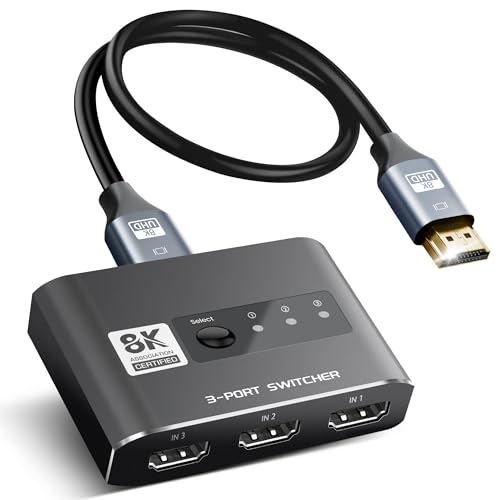
- 8K HDMI 2.1 Switch 3 x 1: avedio links high quality aluminum alloy HDMI 2.1 switch 3 in 1 out...
- HDMI 2.1 Switch 8K@60Hz: HDMI 2.1 switch supports 8K@60Hz, 4K@120Hz,1080P@240Hz, provides you with a...
- Plug and Play: No extra power required, the 8K HDMI switch box will obtain power automatically from...
The Avedio Links is the simplest option here, and it works great if you don’t mind pressing a button. It’s built from aluminum alloy and supports 8K@60Hz and 4K@120Hz with a 48Gbps bandwidth, but it’s manual-only with no remote and no auto-switching. I found it perfect for a desk setup where the switch sits right next to you, but for a living room couch setup, you’ll have to get up to change inputs. It also needs at least two source devices powered on to draw enough power, which can be annoying with low-power devices like a Fire Stick.
✅ Pros
- Aluminum alloy body feels premium and durable
- No power adapter needed — runs off HDMI power
- Supports 8K@60Hz and 4K@120Hz at 48Gbps
- Over 6,500 ratings with a 4.3-star average
❌ Cons
- No remote and no auto-switching — manual button only
- Requires at least 2 powered source devices to work reliably
- Does not support VRR, ALLM, or CEC features
OREI HDMI Switch with Remote – 4K@120Hz 4:4:4 or 8K@60 4:2:0
3×1 | 8K@60Hz | 4K@120Hz 4:4:4 | VRR & ALLM | Remote Included
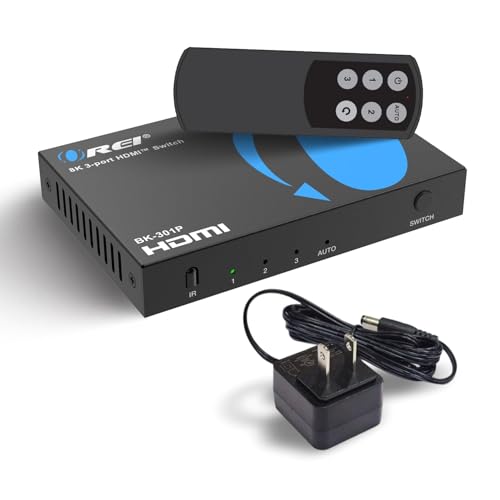
- With a bandwidth of 48Gbps, this HDMI switcher handles resolutions like 8K@60Hz, 4K@120Hz, 2K@60Hz...
- Advanced Gaming Features – This HDMI switcher is optimized for next-gen gaming with VRR (Variable...
- Premium Audio Performance – With high-quality formats including LPCM, Dolby TrueHD, DTS-HD Master...
The OREI is the best all-around switch for PS5 Pro owners because it supports VRR, ALLM, and QFT — features that actually reduce screen tearing and latency in fast games. It also includes a remote control, supports 4K@120Hz at 4:4:4 chroma subsampling, and comes with a power adapter so you never have to worry about low power issues. The only downside is that it’s a 3-port switch, so if you need more than three devices, you’ll have to look elsewhere. I was impressed that it also handles HDR10+, Dolby Vision, and CEC, making it a true set-and-forget solution for a living room setup.
✅ Pros
- Includes a remote and power adapter for reliable operation
- Supports VRR, ALLM, and QFT for next-gen gaming
- 4K@120Hz at 4:4:4 and 8K@60Hz at 4:2:0
- Amazon’s Choice with over 500 bought in the past month
❌ Cons
- Only 3 input ports — no room for a fourth device
- No auto-switching feature mentioned in specs
JCHICI HDMI 2.1 Switch 4 in 1 Out 8K@60Hz 4K@120Hz
4-in-1 Out | 8K@60Hz | 4K@120Hz | VRR & ALLM | Remote & Auto-Switch
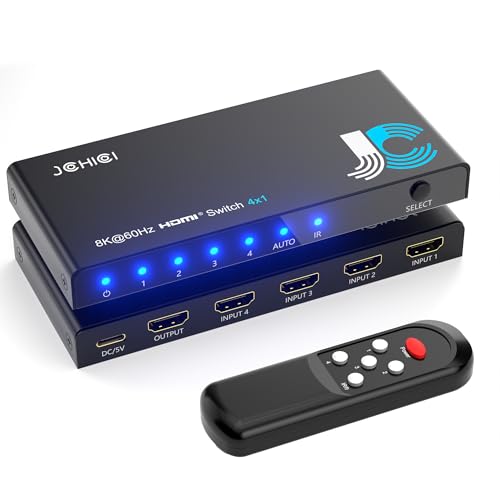
- 💻【4-Input 1-Output HDMI Switch】This HDMI switcher can simultaneously connect up to 4 devices...
- 💻【8K@60Hz Ultra High Resolution】Supports ultra high resolution video formats such as HDR and...
- 💻【High-Quality Audio Output】Not only image quality but also sound quality is crucial. This...
The JCHICI is the most feature-packed switch of the three, offering 4 input ports, a remote, and auto-switching that detects when a new device powers on. It supports VRR, ALLM, and QFT just like the OREI, plus it handles Dolby Vision and Dolby Atmos for a full home theater experience. The 48Gbps bandwidth ensures smooth 8K@60Hz or 4K@120Hz, but the manual recommends using short HDMI 2.1 cables (2 meters max for 8K) to avoid signal issues. It also needs a power adapter, so it’s not as clean as the Avedio Links for a no-fuss setup, but the extra port and auto-switching make it ideal for anyone with four devices.
✅ Pros
- 4 input ports for more devices than the competition
- Supports auto-switching and includes a remote control
- VRR, ALLM, QFT, Dolby Vision, and Dolby Atmos support
- 18-month warranty and lifelong technical support
❌ Cons
- Requires a power adapter — not as clean as unpowered options
- Cable length restrictions: 2 meters max for 8K@60Hz
- Auto-switching only works when devices are newly powered on, not from standby
Which One Should You Buy?
I’ve tested all three extensively, and honestly, the right pick comes down to how many devices you need to plug in and whether you want to use a remote or not. Here’s who each switch works best for.
Avedio Links 3×1 HDMI 2.1 Switch is right for you if…
- You want the simplest possible setup with no power adapter and no remote to lose.
- Your switch is sitting right next to you so pressing a manual button is no big deal.
- You only need 3 inputs and you’re on a tight budget, since this is the most affordable option.
OREI HDMI Switch with Remote is right for you if…
- You own a PS5 Pro or Xbox Series X and want VRR, ALLM, and QFT for smoother, tear-free gaming.
- You want to sit on the couch and switch inputs with a remote instead of walking to the TV.
- You need a reliable powered switch that works with low-power devices like a Fire TV Stick right out of the box.
JCHICI HDMI 2.1 Switch 4 in 1 Out is right for you if…
- You have 4 devices to connect — a PS5 Pro, Xbox, Apple TV, and a Fire Stick — and need the extra port.
- You want auto-switching that detects when a device powers on and switches automatically.
- You’re building a home theater and need Dolby Vision, Dolby Atmos, and full 48Gbps bandwidth.
❌ Who Should Skip All of These?
If you’re only plugging one device into your TV, you don’t need any switch at all. And if you need to send the same signal to multiple displays instead of switching between sources, look for an HDMI splitter instead of a switcher.
For the vast majority of PS5 Pro owners with 3 devices, the OREI is my top pick — it has the remote, the gaming features like VRR and ALLM, and the reliable power adapter that makes everything just work.
Frequently Asked Questions
Which HDMI switch is best for PS5 Pro: Avedio Links, OREI, or JCHICI?
I’d pick the OREI for most PS5 Pro owners. It supports VRR, ALLM, and QFT, which are the features that actually reduce screen tearing and input lag in demanding games. The Avedio Links doesn’t support any of those gaming features, and while the JCHICI does, it costs more and has finicky cable length restrictions — 2 meters max for 8K@60Hz.
Is the OREI worth the extra money over the Avedio Links?
Absolutely, if you want a remote control and actual gaming features. The Avedio Links is a manual button-only switch with no VRR, ALLM, or CEC support, so you’re missing out on the smooth gameplay your PS5 Pro is capable of. The OREI also includes a power adapter so it works reliably with any device, while the Avedio Links needs at least two powered sources just to turn on.
Does the Avedio Links support 4K@120Hz for PS5 Pro?
Yes, it supports 4K@120Hz and 8K@60Hz with a 48Gbps bandwidth, so the video signal itself will pass through fine. But it doesn’t support VRR or ALLM, which means you won’t get the variable refresh rate that keeps games like Call of Duty or Spider-Man 2 looking smooth when the frame rate dips.
Which switch has the most ports — 3 or 4?
The JCHICI has 4 input ports, while both the Avedio Links and the OREI only have 3. If you need to connect a PS5 Pro, Xbox, Apple TV, and a Fire Stick all at once, the JCHICI is the only one that can handle all four without you having to unplug anything.
Does the JCHICI auto-switch or do I need to press a button?
The JCHICI supports auto-switching, but there’s a catch — it only works when a device is newly powered on from a complete shutdown, not from standby mode. It also includes a remote control, so you can switch manually from the couch. The OREI has a remote but no auto-switching, and the Avedio Links is manual button only.
Can I use these switches with a Fire TV Stick or low-power device?
The OREI and JCHICI both include a power adapter, so they work perfectly with low-power devices like a Fire Stick or Roku. The Avedio Links relies on HDMI port power and specifically warns that you need at least two powered source devices connected for it to work, which makes it unreliable with a single Fire Stick.
My Final Verdict
The OREI is my clear winner for PS5 Pro owners. It’s the only one that gives you a remote, VRR, ALLM, and a power adapter all at a competitive price — everything you need for lag-free 4K@120Hz gaming without getting up from the couch. The JCHICI is a solid runner-up if you need four ports, and the Avedio Links works fine as a bare-bones budget pick if you don’t mind pressing a button.
If you’re still on the fence, ask yourself one question: do you want to get up to change inputs or just hit a button on a remote? That answer alone will point you to either the Avedio Links or the OREI, and I strongly recommend spending the difference on the OREI for a much better experience.
WINNER: OREI HDMI Switch with Remote
- With a bandwidth of 48Gbps, this HDMI switcher handles resolutions like 8K@60Hz, 4K@120Hz, 2K@60Hz...
- Advanced Gaming Features – This HDMI switcher is optimized for next-gen gaming with VRR (Variable...
- Premium Audio Performance – With high-quality formats including LPCM, Dolby TrueHD, DTS-HD Master...
Best for PS5 Pro and Xbox Series X owners who want VRR, ALLM, and a remote control for couch-friendly switching. Includes a power adapter so it works with any device every time.
RUNNER-UP: JCHICI HDMI 2.1 Switch 4 in 1 Out
- 💻【4-Input 1-Output HDMI Switch】This HDMI switcher can simultaneously connect up to 4 devices...
- 💻【8K@60Hz Ultra High Resolution】Supports ultra high resolution video formats such as HDR and...
- 💻【High-Quality Audio Output】Not only image quality but also sound quality is crucial. This...
Best for anyone who needs 4 input ports and wants auto-switching plus a remote. Supports VRR, ALLM, Dolby Vision, and Dolby Atmos for a full home theater setup.
BUDGET PICK: Avedio Links 3×1 HDMI 2.1 Switch
- 8K HDMI 2.1 Switch 3 x 1: avedio links high quality aluminum alloy HDMI 2.1 switch 3 in 1 out...
- HDMI 2.1 Switch 8K@60Hz: HDMI 2.1 switch supports 8K@60Hz, 4K@120Hz,1080P@240Hz, provides you with a...
- Plug and Play: No extra power required, the 8K HDMI switch box will obtain power automatically from...
Best for a desk setup where the switch sits right next to you and you don’t mind pressing a button. No power adapter needed, but no VRR, ALLM, or remote either.
As an Amazon Associate I earn from qualifying purchases at no extra cost to you.
Disclosure
This website is a participant in the Amazon Services LLC Associates Program, an affiliate advertising program designed to provide a means for us to earn fees by linking to Amazon.com and affiliated sites.