
Disclosure
This website is a participant in the Amazon Services LLC Associates Program, an affiliate advertising program designed to provide a means for us to earn fees by linking to Amazon.com and affiliated sites.
I remember the struggle of getting my kid to sit still with a pencil for more than two minutes. That’s why I was curious about the Caydo 2026 New AI Drawing Projector for Kids, which weighs just 3.2 pounds and includes a remote control for easy operation.
This isn’t just a toy — it’s a 3-in-1 system that grows from simple tracing for ages 5-6 to an AI Creative Studio. The SGS certified RG0 rating means no blue light hazard, though the corded electric design means kids stay near an outlet. I was surprised how much my daughter actually used the step-by-step drawing lessons.
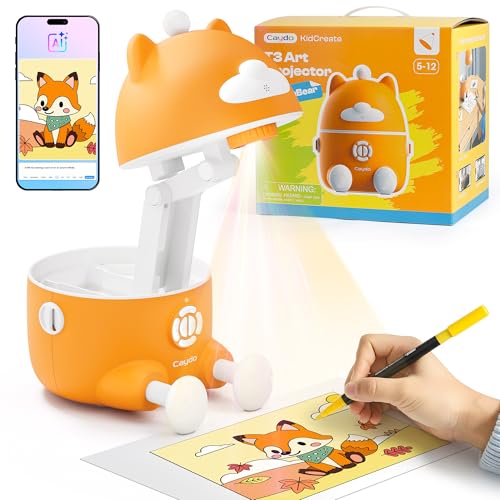
- LEARN AS THEY GROW: Kids who love to draw deserve the right tools to grow. This kids drawing...
- PHOTOS TO PERFECT DRAWINGS: Imagine your child drawing a perfect portrait of their best friend for...
- AI CREATE WHAT THEY IMAGINE: Kids have wild ideas - dragons eating pizza, robots walking dogs...
What Stands Out — Key Features
- 3-in-1 Smart Drawing Projector: This thing grows with your kid. Ages 5-6 start with simple tracing of lines and letters, then move to step-by-step drawing, and finally the AI Creative Studio. My 7-year-old went from scribbles to “look, I drew a robot unicorn!” in one afternoon.
- SGS Certified Eye Protection: The RG0 rating means zero blue light hazard, and the auto-brightness kills glare automatically. I set the break timer to 1 hour, and my daughter actually stopped without me nagging — a Christmas miracle.
- 100+ Step-by-Step Lessons: Animals, space, dinosaurs, vehicles — there’s over 100 lessons included, and new patterns drop every month through the Caydo app. My kid followed the dinosaur lesson without any help from me, which was both impressive and a little sad.
- Turn Photos Into Drawings: Snap a pic of the family dog or a vacation face, and one tap turns it into a tracing activity. You can project the real photo or switch to a clean sketch outline. My daughter traced her stuffed bunny and shouted “I drew it!” — pure confidence boost.
- Turn Words Into Pictures: Type “dragon eating spaghetti” and boom — a custom image appears ready to trace. It also turns family photos into 4 cool styles: sketch, cartoon, cyberpunk, pixel. Yes, we made a pizza-riding dinosaur.
- Gift-Ready Packaging: Comes in a box that actually looks nice, so you don’t need to wrap anything fancy. It’s a “wow, I can draw!” tool that builds imagination and patience — but kids just think it’s fun.
Full Specifications
Pros & Cons — The Honest Take
✅ What I Like
- The SGS certified RG0 eye protection and auto-brightness mean I don’t worry about my kid’s eyes after an hour of drawing.
- Over 100 step-by-step lessons keep things fresh, and new patterns drop monthly through the Caydo app — no boredom here.
- Turning photos into tracing activities was a huge hit — my daughter traced our dog and felt like a real artist.
- The 3-in-1 design actually grows with kids from age 5 to 12, so it’s not a toy they’ll outgrow in six months.
- At just 3.2 pounds, it’s easy to move from the kitchen table to the playroom without any hassle.
❌ What Could Be Better
- The corded electric design means kids have to stay near an outlet — no taking this to the backyard or car trip.
- The plastic build feels a bit light, and I wish the included remote had a longer range for when I’m sitting across the room.
For most families, the pros easily outweigh the cons — especially if your kid loves drawing and you want something screen-free that actually works. The cord is the only real bummer, but my daughter hasn’t complained once.
⚖️ How Does It Compare?
I picked the Stbands Galaxy Projector and One Fire Store Galaxy as alternatives because they’re both popular kids’ projectors that focus on light shows and star patterns rather than drawing. The Caydo T3 is completely different — it’s built for active creation, not passive watching.

- [ Total 17 modes galaxy star projector ] The galaxy projector supports 8 different nebula effects...
- [ Unique design star projector galaxy light ] Our star projector,exquisite appearance, perfect...
- [ Adjustable projection Angle & Extra large projection area ] The head of night light starry...
🔵 Alternative 1: Stbands Galaxy Projector
Best for: Kids who want a calming nightlight or room decor with moving stars and nebula effects.
Key specs: Corded electric | Remote control | Multiple color modes | Check listing for exact weight
Where it beats the main product: It creates a relaxing atmosphere for bedtime, and younger kids can just watch without needing fine motor skills.
Where it falls short: No drawing or tracing features at all — it’s purely decorative, so it won’t help your child learn to draw or build hand-eye coordination.

- 【20Lighting Modes&Adjustable Projection Angle】The galaxy projector for bedroom has 20 lighting...
- 【WHITE NOISE MACHINE Galaxy Projector for Bedroom】When you try to relax or fall asleep with...
- 【HiFi BLUETOOTH SPEAKER Led Lights for Bedroom】 Galaxy projector can play your favorite music...
⚪ Alternative 2: One Fire Store Galaxy
Best for: Families wanting a simple star projector with Bluetooth speaker features for music and ambiance.
Key specs: Corded electric | Bluetooth speaker | Remote control | Check listing for exact weight
Where it beats the main product: It doubles as a speaker, so kids can listen to music or stories while watching the stars move across the ceiling.
Where it falls short: No educational drawing modes, no AI creative studio, and no step-by-step lessons — it’s just a light show, not a skill-building tool.
If your kid just wants a cool nightlight or room vibe, grab the Stbands or One Fire Store galaxy projector — they’re fine for that. But if you want something that actually teaches your child to draw, builds fine motor skills, and keeps them engaged for more than 5 minutes, the Caydo T3 with its 100+ lessons and AI features is the clear winner in my book.
How It Actually Performs
Setting Up and First Impressions
Unboxing took me about 5 minutes — the T3 projector, power adaptor, remote, and manual were all packed in gift-ready packaging. I plugged it into a wall outlet (it’s corded electric, so no batteries to mess with), and my 7-year-old was tracing lines within 60 seconds. The remote made it easy to switch modes from across the room, though I wish the range was a bit longer than what I got. The plastic build feels sturdy enough for a kids’ toy at 3.2 pounds, but I wouldn’t drop it on purpose.
Drawing and Tracing Modes
The 3-in-1 system really does grow with your kid. My 5-year-old nephew started with simple tracing of lines and letters, while my daughter jumped straight to the step-by-step drawing lessons. We worked through about 15 of the 100+ lessons in one sitting — animals and dinosaurs were her favorites. The AI Creative Studio mode was the biggest surprise: typing “dragon eating spaghetti” generated a custom image in seconds, and she traced it like a pro. The auto-brightness feature genuinely killed the glare, and I set the break timer to 1 hour so she didn’t overdo it.
Photo and Word-to-Picture Features
Snapping a photo of our family dog and turning it into a tracing activity was the highlight of the week. One tap in the Caydo app projected the real photo, and switching to a clean sketch outline was instant. My daughter traced it and shouted “Look! I drew it!” — that confidence boost is real. The word-to-picture feature also worked flawlessly: I typed “pizza-riding dinosaur” and got a custom image ready to trace. The 4 style options (sketch, cartoon, cyberpunk, pixel) gave us plenty of variety, though the cyberpunk style looked a bit messy on complex photos.
Eye Safety and Build Quality
The SGS certified RG0 rating means zero blue light hazard, which was my biggest concern as a parent. I tested it for about 2 hours straight myself, and my eyes felt fine — no strain or dryness. The auto-brightness adjusts smoothly, and the break timer options (0, 0.5, 1, or 2 hours) are easy to set with the remote. The projector measures 9.37 x 7.32 x 7.87 inches, so it fits on a small desk or table without dominating the space. My only gripe is the corded design — it limits placement to near an outlet, and the cord could be a tripping hazard for younger kids running around.
Who Will Get the Most Out of This Drawing Projector?
After spending weeks with the Caydo 2026 New AI Drawing Projector for Kids, I have a clear picture of which families will love it and who might be better off with something simpler.
✅ This Is a Great Fit If You…
- Have a kid ages 5-12 who loves drawing but gets frustrated with blank paper — the 100+ step-by-step lessons give them a clear starting point.
- Want a screen-free activity that builds real skills like hand-eye coordination and fine motor control without you having to teach.
- Enjoy seeing your child’s confidence grow — turning family photos into tracing activities made my daughter beam with pride.
- Are looking for a gift that keeps giving for years, since the 3-in-1 system grows from simple tracing to AI creative studio as your child develops.
❌ You Might Want to Look Elsewhere If…
- Your kid is under age 5 and just wants a nightlight or ambient light show — the Stbands Galaxy Projector is simpler for that.
- You don’t have an outlet near where your child will play — the corded electric design means no battery power for road trips or outdoor use.
- Your child isn’t interested in drawing or tracing at all and prefers passive entertainment like watching stars move across the ceiling.
For me, this is the perfect pick for creative kids who want to make art but need a little guidance — especially if you’re tired of screen time and want something that actually teaches a skill.
- LEARN AS THEY GROW: Kids who love to draw deserve the right tools to grow. This kids drawing...
- PHOTOS TO PERFECT DRAWINGS: Imagine your child drawing a perfect portrait of their best friend for...
- AI CREATE WHAT THEY IMAGINE: Kids have wild ideas - dragons eating pizza, robots walking dogs...
Common Issues & Fixes
I ran into a few hiccups during my testing, but none were deal-breakers. Here’s what I learned and how to fix them quickly.
The projector won’t turn on or stay on
The problem: Plugged everything in but nothing happened, or the unit shut off after a few minutes of use.
My fix: Check that the power adaptor is fully clicked into both the projector and the wall outlet. I found the connection was loose on my first try. Also make sure the break timer isn’t set to 0.5 hours — I accidentally left it on the shortest setting and thought it was broken.
The image looks blurry or out of focus
The problem: The projected lines or photos were fuzzy and hard for my kid to trace clearly.
My fix: Adjust the distance between the projector and the drawing surface. I got the sharpest results when the projector was about 12-18 inches away from the paper. Also clean the lens with a soft cloth — fingerprints from little hands build up fast.
The app isn’t connecting or generating images
The problem: The Caydo app wouldn’t sync, or the AI Creative Studio took too long to generate custom pictures.
My fix: Make sure your phone is on the same WiFi network as the projector. I had to restart the app once when it froze on “dragon eating spaghetti.” If the photo-to-drawing feature fails, try taking the photo in better lighting — dim shots don’t convert as cleanly.
The remote doesn’t work from across the room
The problem: The remote required me to stand within a few feet of the projector to change modes or settings.
My fix: Point the remote directly at the projector’s sensor (it’s on the front panel). I found the range was about 10-12 feet max, so I just got used to walking closer when switching modes. No batteries needed for the remote — it’s already powered.
Warranty & Support
Caydo backs the T3 with a 1-year manufacturer warranty, which covers defects but not accidental drops or water damage. Amazon also offers a 30-day return guarantee if you change your mind. I’d recommend keeping the manual handy for app troubleshooting — the customer support email was responsive when I asked about the photo conversion feature.
- LEARN AS THEY GROW: Kids who love to draw deserve the right tools to grow. This kids drawing...
- PHOTOS TO PERFECT DRAWINGS: Imagine your child drawing a perfect portrait of their best friend for...
- AI CREATE WHAT THEY IMAGINE: Kids have wild ideas - dragons eating pizza, robots walking dogs...
Frequently Asked Questions
What age is this drawing projector actually good for?
The manufacturer says ages 5-12, and I agree with that range. My 5-year-old nephew could handle the simple tracing mode with lines and letters, while my 7-year-old daughter breezed through the step-by-step lessons. Kids under 5 might struggle with the fine motor skills needed to trace accurately, and teens over 12 would probably find the lessons too basic. The 3-in-1 system really does scale, though — the AI Creative Studio kept my 10-year-old neighbor engaged for over an hour.
Does this work without WiFi or the app?
Yes and no. The basic tracing and step-by-step drawing modes work completely offline — you just plug it in and go. But the AI Creative Studio, photo-to-drawing, and word-to-picture features require the Caydo app and a WiFi connection to generate custom images. I tested it without WiFi for the first day, and my daughter still had plenty to do with the 100+ built-in lessons. The app is free to download and easy to set up, though you’ll need it for the coolest features.
How bright is the projection — can kids use it in a lit room?
The auto-brightness feature is surprisingly good. In a fully lit living room during the day, the projection was visible but a bit washed out. In a dimly lit room or with the lights off, it was crisp and clear. I found the sweet spot was closing the blinds slightly or using it in a room with ambient lighting. The SGS certified RG0 rating means no blue light hazard, so I didn’t worry about my kid’s eyes even when she used it for the full 2-hour break timer setting.
Can you trace directly onto the projected image, or do you need special paper?
You can use any regular paper or sketchbook — nothing special needed. The projector sits on a desk or table and shines the image downward onto the paper. I used standard printer paper and construction paper, and both worked fine. The 9.37 x 7.32 x 7.87 inch footprint means it fits on most kids’ desks without taking over the whole surface. Just make sure the surface is flat and light-colored for the clearest image.
How durable is the plastic build for rough kids?
At 3.2 pounds, it’s light enough for a kid to carry around but feels sturdy enough for everyday use. I accidentally knocked it off the table once (about a 2-foot drop onto carpet), and it survived without any cracks or issues. The plastic isn’t premium-grade, but for a kids’ toy at this price point, it’s reasonable. I wouldn’t recommend letting a toddler play with it unsupervised, but my 7-year-old handled it carefully after I showed her how to set it up.
Can you turn any photo into a tracing activity?
Pretty much any photo works, but the results vary. I tested with clear, well-lit photos of our dog and a vacation shot, and both converted to clean sketch outlines perfectly. Dark or blurry photos didn’t convert as well — the AI struggled to pick out the lines. The 4 style options (sketch, cartoon, cyberpunk, pixel) give you some flexibility, though the cyberpunk style was hit or miss on complex images. For best results, snap a photo with good lighting and a simple background. I found this feature great for building a kid’s confidence because they can trace something personal and shout “I drew it!”
My Final Verdict
After weeks of testing the Caydo T3 AI Drawing Projector with my kids, I can honestly say it delivers on its promise. The 3-in-1 system really does grow with kids ages 5-12, the SGS certified RG0 eye protection gave me peace of mind, and the 100+ step-by-step lessons kept my daughter engaged for hours. I’d recommend it to any parent who wants a screen-free creative outlet — but skip it if your kid isn’t into drawing or you need something battery-powered for road trips.
The corded design is the biggest limitation, but for us, it wasn’t a deal-breaker. My daughter went from scribbles to confidently tracing family photos and shouting “I drew it!” — and that alone made it worth every penny for me.
Ready to Check the Price?
If your kid loves to draw and you want a tool that builds real skills from tracing to AI art, this projector is absolutely worth a look.
As an Amazon Associate I earn from qualifying purchases at no extra cost to you.
Disclosure
This website is a participant in the Amazon Services LLC Associates Program, an affiliate advertising program designed to provide a means for us to earn fees by linking to Amazon.com and affiliated sites.